2.1 Internet Protocols
The Internet exists today because of a suite of interrelated communications protocols. A protocol is a set of rules that partners use when they communicate. We have already described one of these essential Internet protocols back in Chapter 1, TCP/IP.
These protocols have been implemented in every operating system and make fast web development possible. If web developers had to keep track of packet routing, transmission details, domain resolution, checksums, and more, it would be hard to get around to the matter of actually building websites.
 Note
Note
The authors have always felt that knowledge of how the web works, from low-level protocol to high-level JavaScript library, creates better web developers, which is why we start with some fundamental concepts in these early chapters.
It's worth pointing out that there is a trend in web development to encourage web developers and designers to embrace this blending of roles as part of a holistic DevOps approach, which we describe in Chapter 17. This means even if you're hired primarily to style CSS, you may need to know about HTML, IP addresses, domain names, web servers, browsers and more. Thankfully, you can always come back and revisit this material later when it's referenced again!
2.1.1 A Layered Architecture
The TCP/IP Internet protocols were originally abstracted as a four-layer stack.1,2 Later abstractions subdivide it further into five or seven layers.3 Since we are focused on the top layer anyway, we will use the earliest and simplest four-layer network model shown in Figure 2.1.
Figure 2.1 Four-layer network model
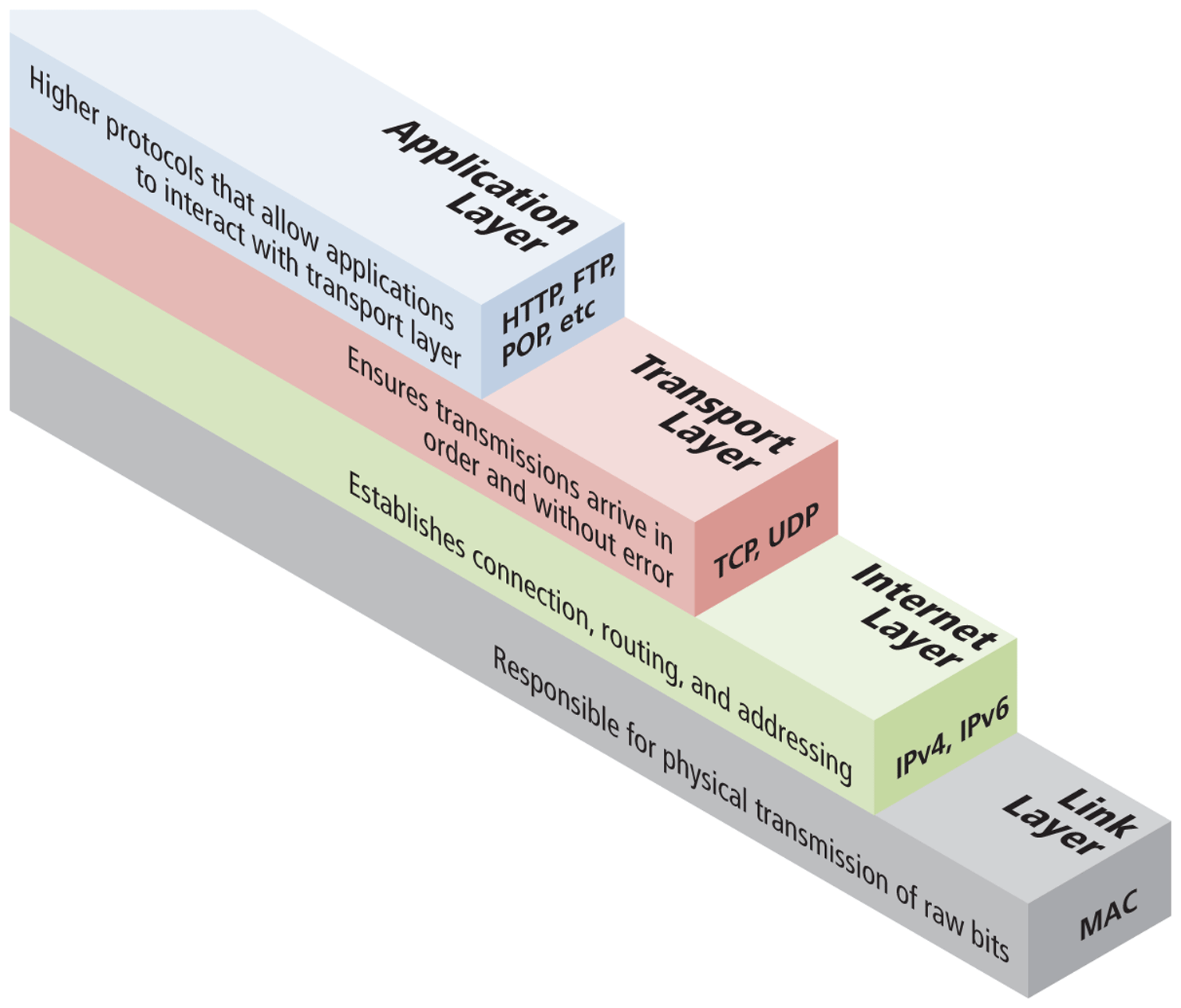
Layers communicate information up or down one level but needn’t worry about layers far above or below. Lower layers handle the more fundamental aspects of transmitting signals through networks, allowing the higher layers to implement bigger ideas like how a client and server interact.
2.1.2 Link Layer
The link layer is the lowest layer, responsible for both the physical transmission of data across media (both wired and wireless) and establishing logical links. It handles issues like packet creation, transmission, reception, error detection, collisions, line sharing, and more. The one term here that is sometimes used in the Internet context is that of MAC (media access control) addresses. These are unique 48- or 64-bit identifiers assigned to network hardware and which are used at the link layer. We will not focus on this layer any further, although you can learn more in a computer networking course or text.
2.1.3 Internet Layer
The Internet layer (sometimes also called the IP Layer) routes packets between communication partners across networks. The Internet layer provides “best effort” communication. It sends out a message to its destination but expects no reply and provides no guarantee the message will arrive intact, or at all.
The Internet uses the Internet Protocol (IP) addresses, which are numeric codes that uniquely identify destinations on the Internet. Every device connected to the Internet has such an IP address.
IP addresses will come up again and again for web developers. They are used when setting up a web server and can be used by developers in their applications. Online polls, for instance, need to consider IP addresses to ensure a given address does not vote more than once.
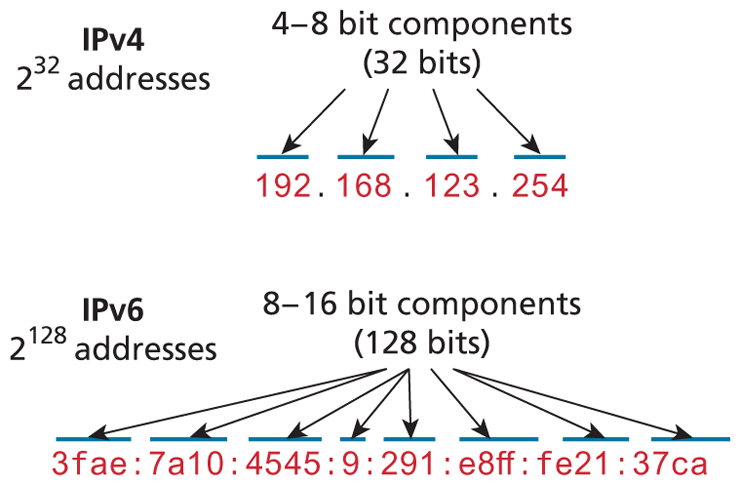
There are two types of IP addresses: IPv4 and IPv6. IPv4 addresses are the IP addresses from the original TCP/IP protocol. In IPv4, 12 numbers are used (implemented as four 8-bit integers), written with a dot between each integer (Figure 2.2). Since an unsigned 8-bit integer’s maximum value is 255, four integers together can theoretically encode approximately 4.2 billion unique IP addresses; however, several address ranges are reserved, thereby reducing the total amount of available addresses. Some of the most important of these reserved ranges are known as the Class A, Class B, and Class C networks address classes. For instance, addresses 10.x.x.x are for very large networks since the x.x.x allows for over 16 million devices within it. Most home networks are class C within the 192.168.x.x range which allows for 256 different devices.
Figure 2.2 IPv4 and IPv6 comparison
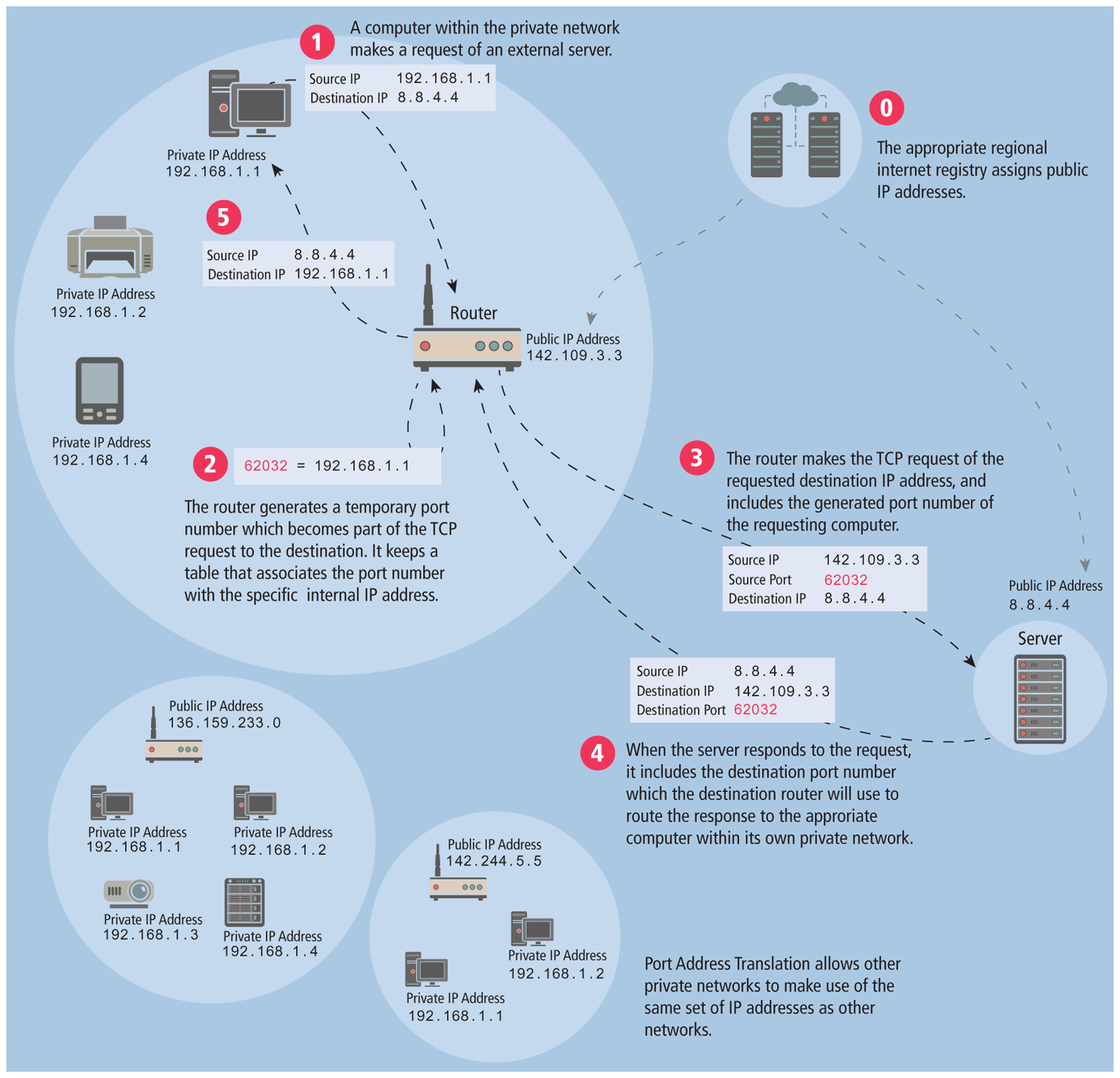
Even though the IPv4 address space was depleted in 2011, the number of computers connected to the Internet has continued to grow. One of the key reasons why this has happened is due to Port Address Translation (PAT), which allows multiple, unrelated networks to make use of the same IP address ranges. When you join a wireless network in a coffee shop, hook up a computer at your home, or access the Internet at your office or university, it is quite likely you are making use of PAT using a Class A, Class B, or Class C address range. Depending on the class, anywhere from 256 to 16 million devices can use the same local, private IP addresses (see Figure 2.3).
Figure 2.3 Port address translation
2.1.4 Transport Layer
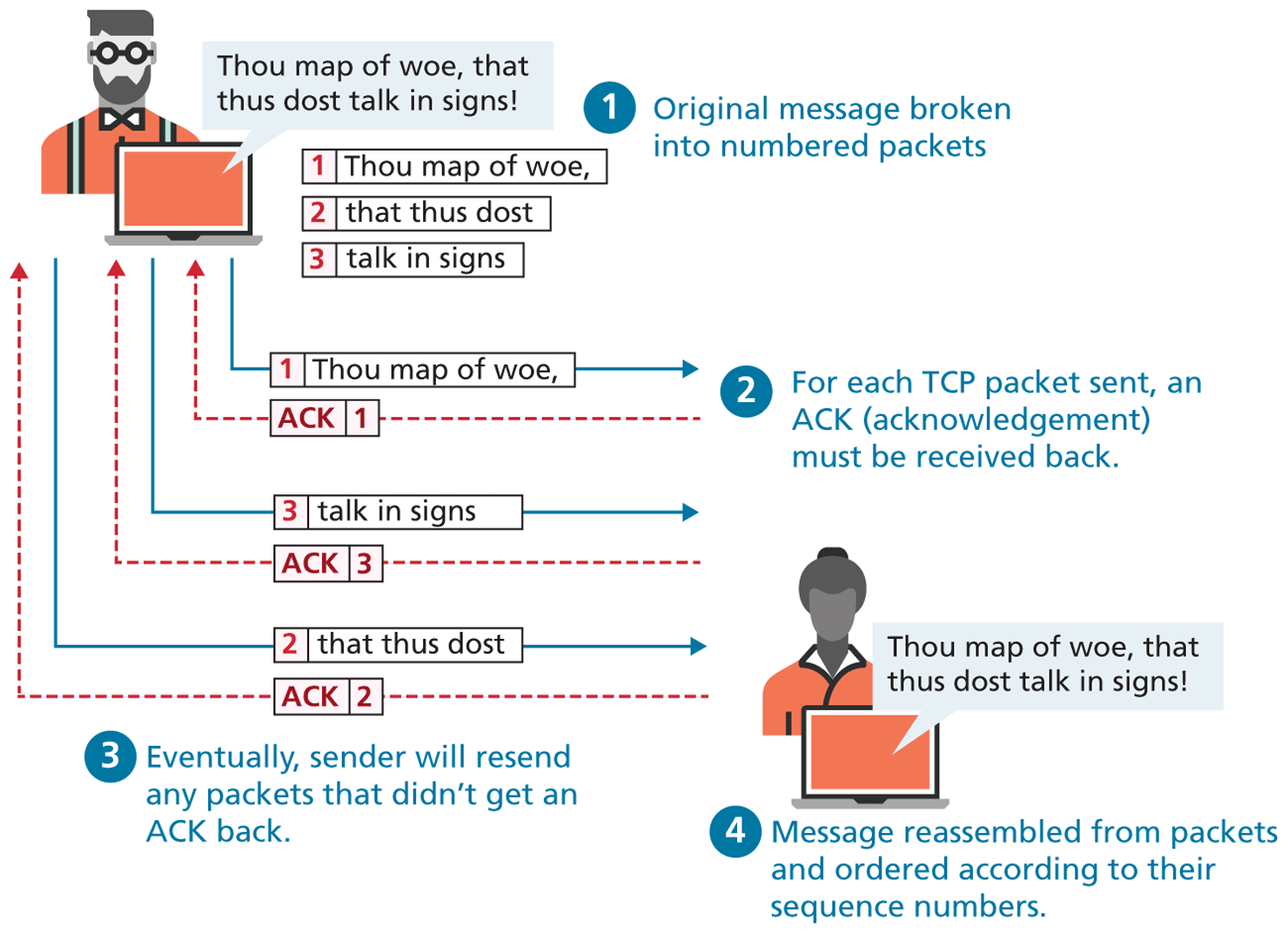
The transport layer ensures transmissions arrive in order and without error. This is accomplished through a few mechanisms. First, the data is broken into packets formatted according to the Transmission Control Protocol (TCP). The data in these packets can vary in size from 0 to 64 K, though in practice typical packet data size is around 0.5 to 1 K. Each data packet has a header that includes a sequence number, so the receiver can put the original message back in order, no matter when they arrive. Second, each packet acknowledges its successful arrival back to the sender so in the event of a lost packet, the transmitter will realize a packet has been lost since no ACK arrived for that packet. That packet is retransmitted, and although out of order, is reordered at the destination, as shown in Figure 2.4. This means you have a guarantee that messages sent will arrive and will be in order. As a consequence, web developers don’t have to worry about pages not getting to the users.
Figure 2.4 TCP packets
 Pro Tip
Sometimes we do not want guaranteed transmission of packets. Consider a live multicast of a soccer game, for example. Millions of subscribers may be streaming the game, and the broadcaster can’t afford to track and retransmit every lost packet. A small loss of data in the feed is acceptable, and the customers will still see the game. An Internet protocol called User Datagram Protocol (UDP) is used in these scenarios in lieu of TCP. Other examples of UDP services include Voice Over IP (VoIP), many online games, and Domain Name System (DNS).
2.1.5 Application Layer
With the application layer, we are at the level of protocols familiar to most web developers. Application layer protocols implement process-to-process communication and are at a higher level of abstraction in comparison to the low-level packet and IP address protocols in the layers below it.
There are many application layer protocols. A few that are useful to web developers include the following:
HTTP. The Hypertext Transfer Protocol is used for web communication.
SSH. The Secure Shell Protocol allows remote command-line connections to servers.
FTP. The File Transfer Protocol is used for transferring files between computers.
POP/IMAP/SMTP. Email-related protocols for transferring and storing email.
DNS. The Domain Name System protocol used for resolving domain names to IP addresses.
Note
We will discuss the HTTP and the DNS protocols later in this chapter. SSH will be briefly covered later in the book in Chapter 16 on security.