1.3 The Client-Server Model
The previous section made use of the terms “client” and “server.” It is now time to define these words. The web is sometimes referred to as a client-server model of communications. In the client-server model, there are two types of actors: clients and servers. The server is a computer agent that is normally active 24/7, listening for requests from clients. A client is a computer agent that makes requests and receives responses from the server, in the form of response codes (you will learn about these in Chapter 2), images, text files, and other data.
1.3.1 The Client
Client machines are the desktops, laptops, smart phones, and tablets you see everywhere in daily life. These machines have a broad range of specifications regarding operating system, processing speed, screen size, available memory, and storage. The essential characteristic of a client is that it can make requests to particular servers for particular resources using URLs and then wait for the response. These requests are processed in some way by the server.
In the most familiar scenario, client requests for web pages come through a web browser. But a client can be more than just a web browser. When your word processor’s help system accesses online resources, it is a client, as is an iOS game that communicates with a game server using HTTP. Sometimes a server web program can even act as a client.
1.3.2 The Server
The server in this model is the central repository, the command center, and the central hub of the client-server model. It hosts web applications, stores user and program data, and performs security authorization tasks. Since one server may serve many thousands, or millions of client requests, the demands on servers can be high. A site that stores image or video data, for example, will require many terabytes of storage to accommodate the demands of users. A site with many scripts calculating values on the fly, for instance, will require more CPU and RAM to process those requests in a reasonable amount of time.
The essential characteristic of a server is that it is listening for requests, and upon getting one, responds with a message. The exchange of information between the client and server is summarized by the request-response loop.
1.3.3 Server Types
In Figures 1.6, 1.7, and 1.9, the server was shown as a single machine, which is fine from a conceptual standpoint. Clients make requests for resources from a URL; to the client, the server is a single machine.
However, almost no real-world websites are served from a single server machine, but are instead served from a network of many server machines. It is also common to split the functionality of a website between several different types of server, as shown in Figure 1.13. These include the following:
Web servers. A web server is a computer servicing HTTP requests. This typically refers to a computer running web server software, such as Apache or Microsoft IIS (Internet Information Services).
Application servers. An application server is a computer that hosts and executes web applications, which may be created in PHP, ASP.NET, Ruby on Rails, or some other web development technology.
Database servers. A database server is a computer that is devoted to running a Database Management System (DBMS), such as MySQL, Oracle, or MongoDB, that is being used by web applications.
Mail servers. A mail server is a computer creating and satisfying mail requests, typically using the Simple Mail Transfer Protocol (SMTP).
Media servers. A media server (also called a streaming server) is a special type of server dedicated to servicing requests for images and videos. It may run special software that allows video content to be streamed to clients.
Authentication servers. An authentication server handles the most common security needs of web applications. This may involve interacting with local networking resources, such as LDAP (Lightweight Directory Access Protocol) or Active Directory.
Figure 1.13 Different types of server
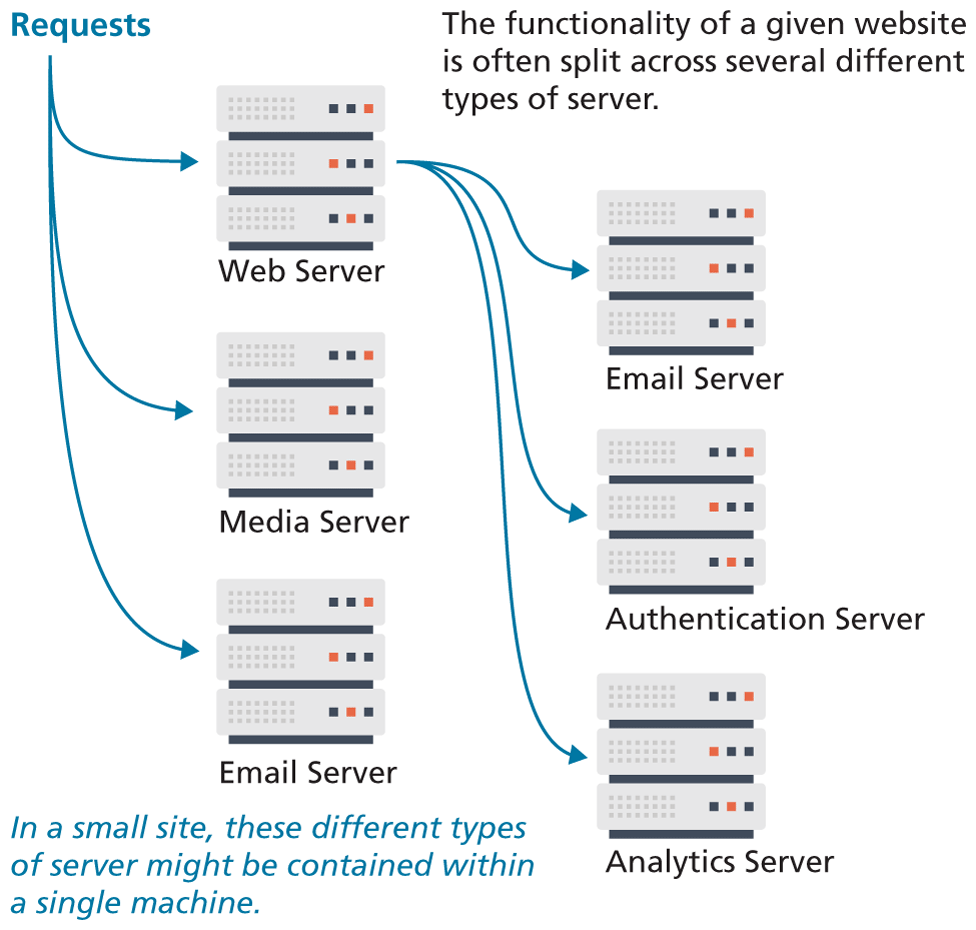
In smaller sites, these specialty servers are often the same machine as the web server.
1.3.4 Real-World Server Installations
The previous section briefly described the different types of server that one might find in a real-world website. In such a site, not only do these different types of servers run on separate machines, but there is often replication of each of the different server types. A busy site can receive thousands or even tens of thousands of requests a second; globally popular sites, such as Facebook, receive millions of requests a second.
A single web server that is also acting as an application or database server will be hard-pressed to handle more than a thousand requests a second, so the usual strategy for busier sites is to use a server farm. The goal behind server farms is to distribute incoming requests between clusters of machines so that any given web or data server is not excessively overloaded, as shown in Figure 1.14. Special routers called load balancers distribute incoming requests to available machines.
Figure 1.14 Server farm
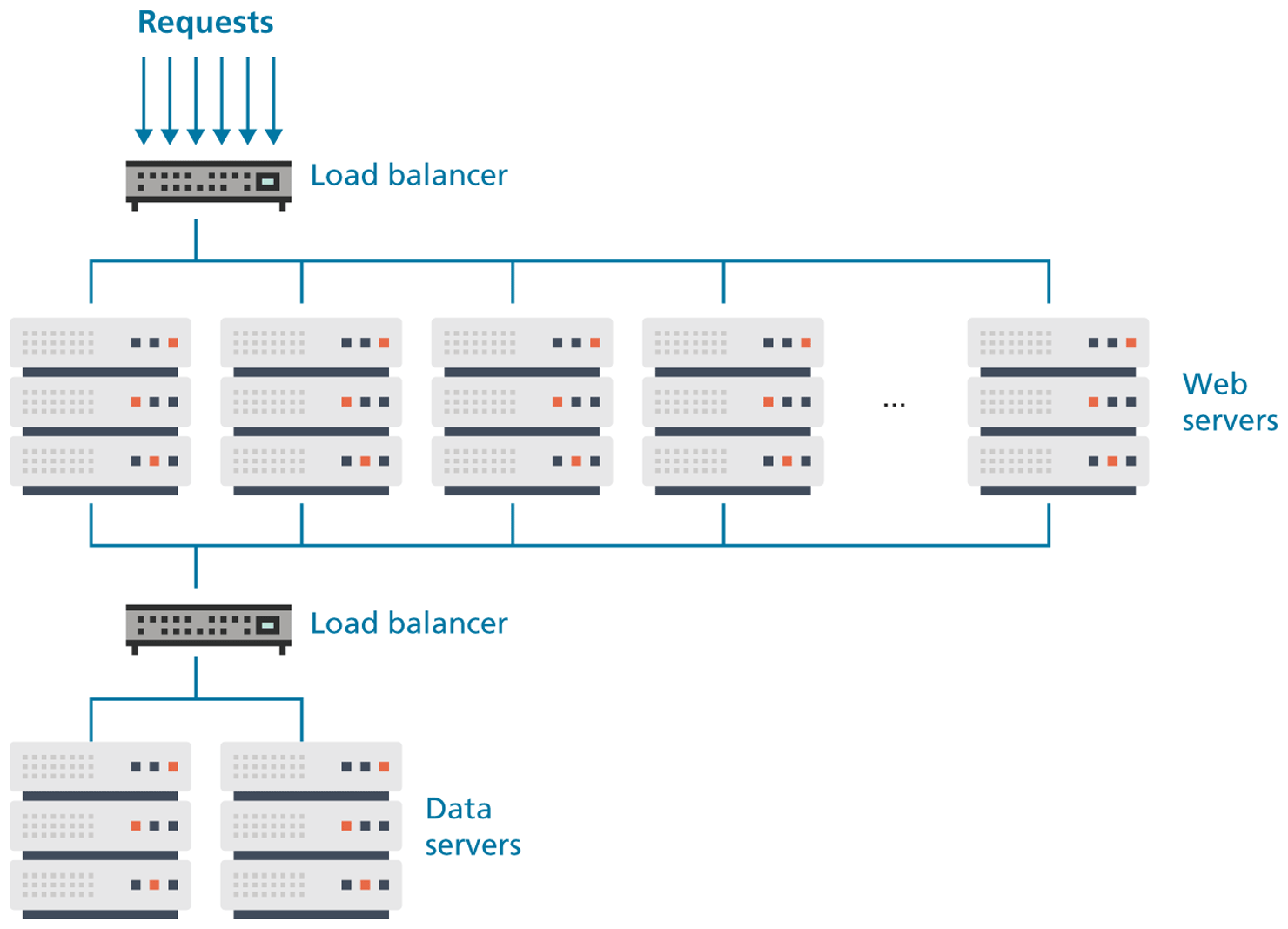
Even if a site can handle its load via a single server, it is not uncommon to still use a server farm because it provides failover redundancy; that is, if the hardware fails in a single server, one of the replicated servers in the farm will maintain the site’s availability.
In a server farm, the computers do not look like the ones in your house. Instead, these computers are more like the plates stacked in your kitchen cabinets. That is, a farm will have its servers and hard drives stacked on top of each other in server racks. A typical server farm will consist of many server racks, each containing many servers, as shown in Figure 1.15.
Figure 1.15 Sample server rack
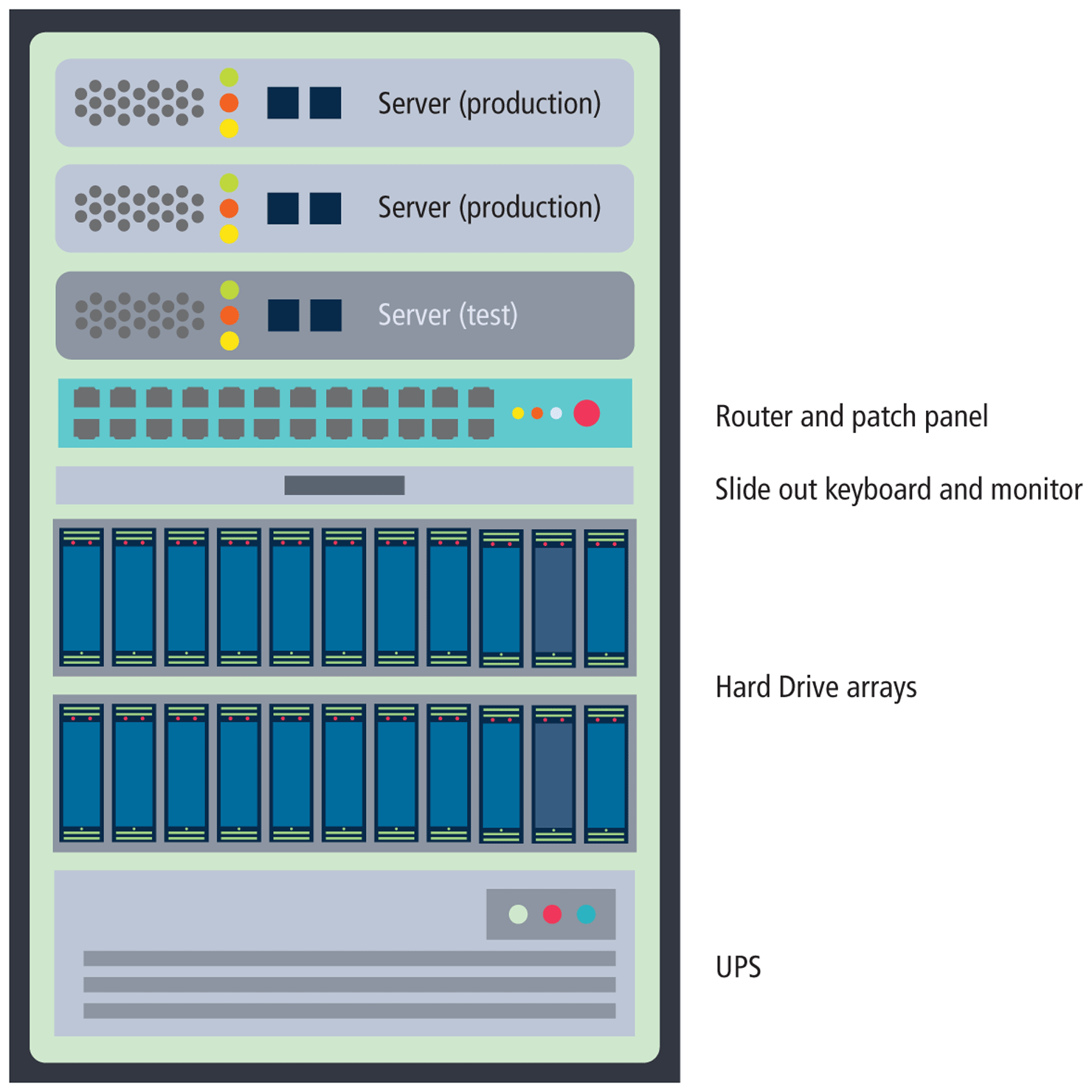
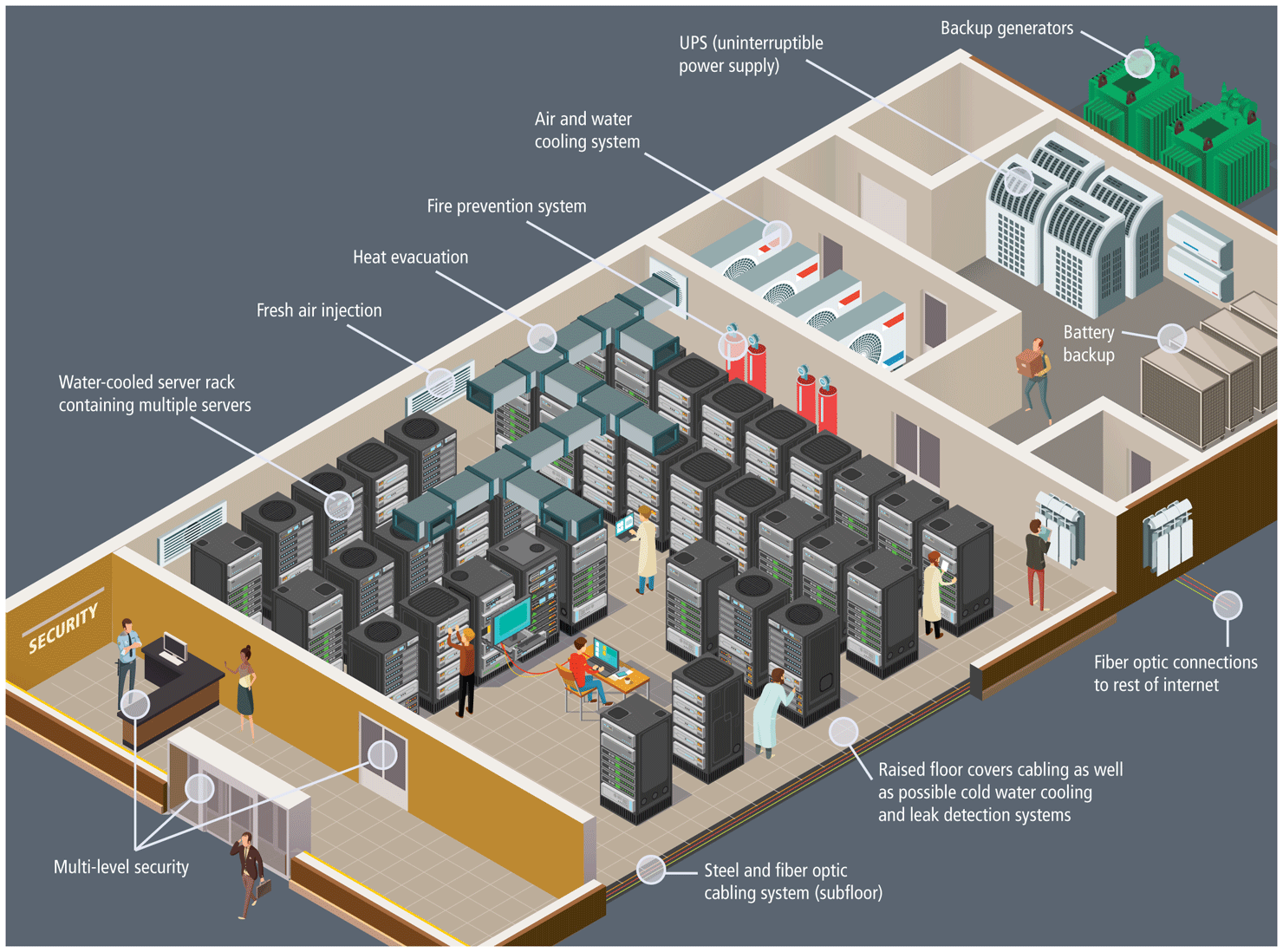
Server farms are typically housed in special facilities called data centers. A data center will contain more than just computers and hard drives; sophisticated air conditioning systems, redundancy power systems using batteries and generators, specialized fire suppression systems, and security personnel are all part of a typical data center, as shown in Figure 1.16.
Figure 1.16 Hypothetical data center
To prevent the potential for site downtimes, most large websites will exist in mirrored data centers in different parts of the country, or even the world. As a consequence, the costs for multiple redundant data centers are quite high (not only due to the cost of the infrastructure but also due to the very large electrical power consumption used by data centers), and only larger web companies can afford to create and manage their own. Most web companies will instead lease space from a third-party data center.
The scale of the web farms and data centers for large websites can be astonishingly large. While most companies do not publicize the size of their computing infrastructure, some educated guesses can be made based on the publicly known IP address ranges and published records of a company’s energy consumption and their power usage effectiveness. Back in 2013, Microsoft CEO Steve Ballmer provided some insight into the vast numbers of servers used by the largest web companies: “We have something over a million servers in our data center infrastructure. Google is bigger than we are. Amazon is a little bit smaller. You get Yahoo! and Facebook, and then everybody else is 100,000 units probably or less.”5
 Note
Note
It is also common for the reverse to be true—that is, a single server machine may host multiple sites. Large commercial web hosting companies, such as GoDaddy, BlueHost, Dreamhost, and others will typically host hundreds or even thousands of sites on a single machine (or mirrored on several servers).
This type of shared use of a server is sometimes referred to as shared hosting or a virtual server (or virtual private server). You will learn more about hosting and virtualization in Chapter 17.
1.3.5 Cloud Servers
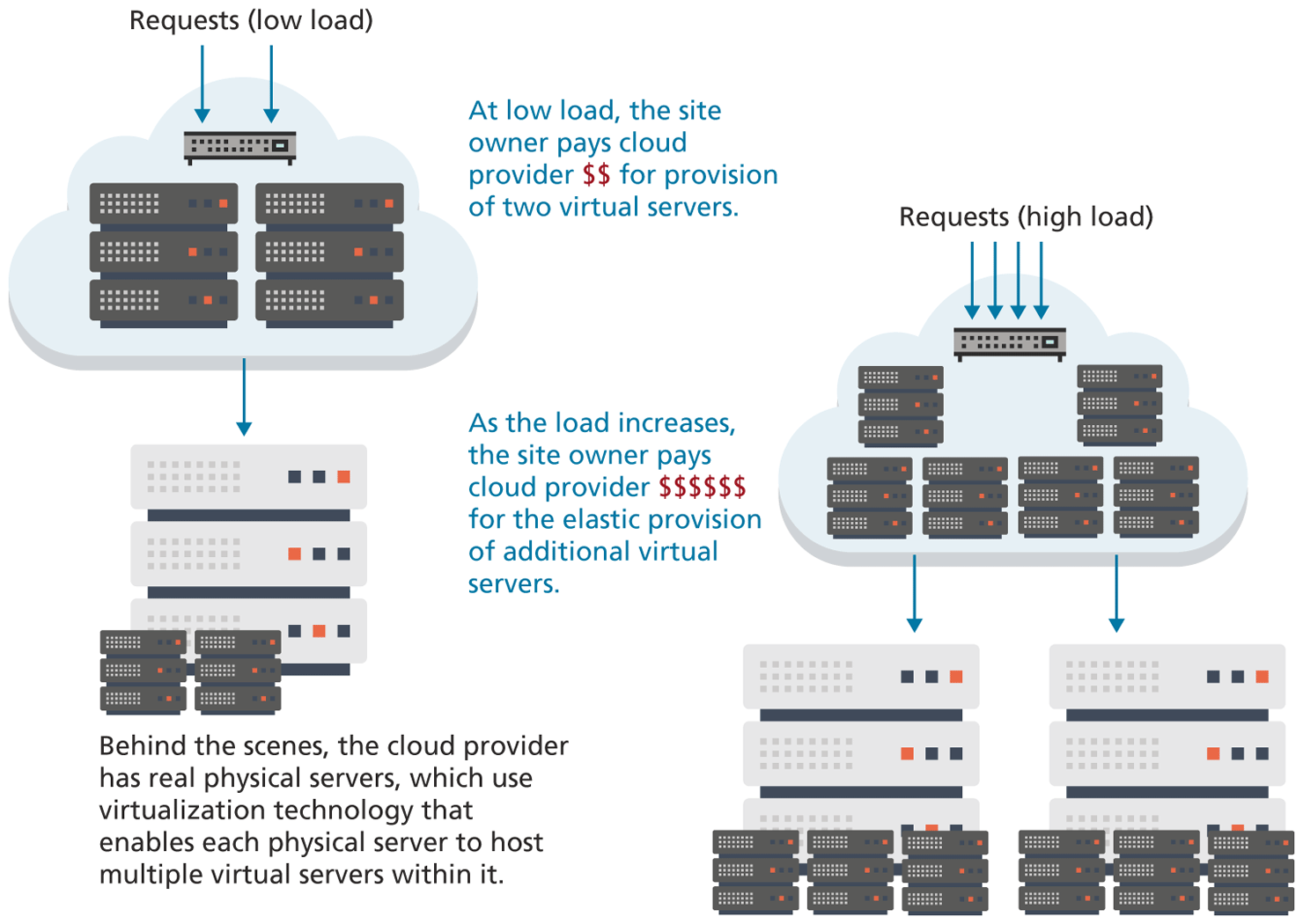
When this chapter was first written in 2013 for the first edition, most sites indeed made use of some type of physical server environment similar to Figure 1.14 within a data center. Since that time, one of the biggest transformations in the world of web development has been the migration of server infrastructure from site owners to cloud providers. Why? These cloud providers offer answers to three key questions for site owners who are considering the number of web servers needed to handle the average request volume:
What happens when request volume is much greater than average?
Who is going to set up and support these machines?
What happens when request volume is much lower than average?
Instead of spending too much on infrastructure to handle peak loads (and thus wasting money), or spending too little to handle peak loads (and thus having a site that that is excessively slow), cloud providers offer elastic provisioning of virtual servers, which scales costs and hardware to the demand, as shown in Figure 1.18.
Figure 1.18 Cloud servers