1.2 Definitions and History
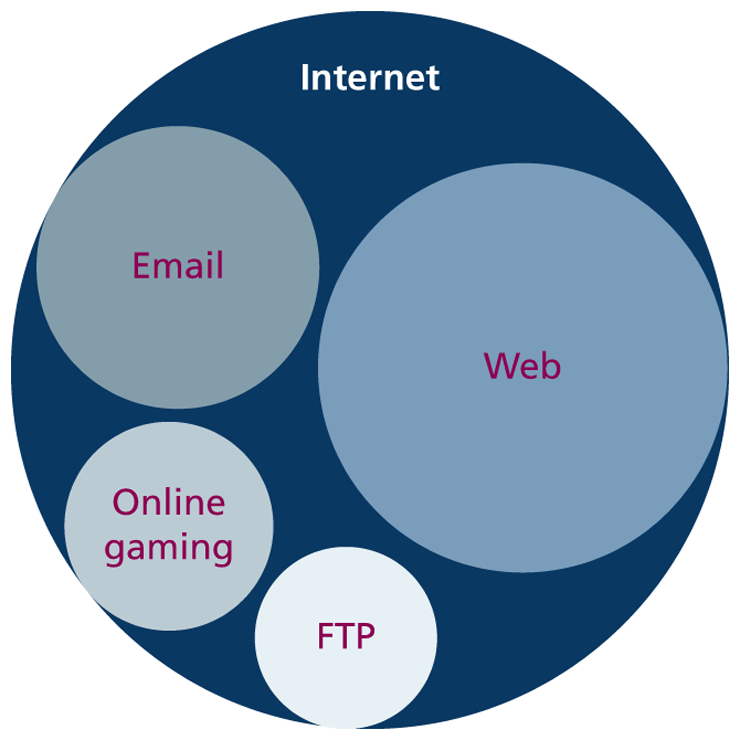
The World Wide Web (WWW or simply the web) is certainly what most people think of when they see the word “Internet.” But the web is only a subset of the Internet, as illustrated in Figure 1.2. While this book is focused on the web, part of this chapter is also devoted to a broad understanding of that larger circle labeled the “Internet.”
Figure 1.2 The web as a subset of the Internet
1.2.1 A Short History of the Internet
The history of telecommunication and data transport is a long one. There is a strategic advantage in being able to send a message as quickly as possible (or at least, more quickly than your competition). The Internet is not alone in providing instantaneous digital communication. Earlier technologies such as the radio, the telegraph, and the telephone provided the same speed of communication, albeit in an analog form.
Telephone networks in particular provide a good starting place to learn about modern digital communications. In the telephone networks of the past, calls were routed through operators who physically connected the caller and the receiver by connecting a wire to a switchboard to complete a circuit. These operators were around in some areas for almost a century before being replaced with automatic mechanical switches that did the same job: physically connect caller and receiver.
One of the weaknesses of having a physical connection is that you must establish a link and maintain a dedicated circuit for the duration of the call. This type of network connection is sometimes referred to as circuit switching and is shown in Figure 1.3.
Figure 1.3 Telephone network as example of circuit switching
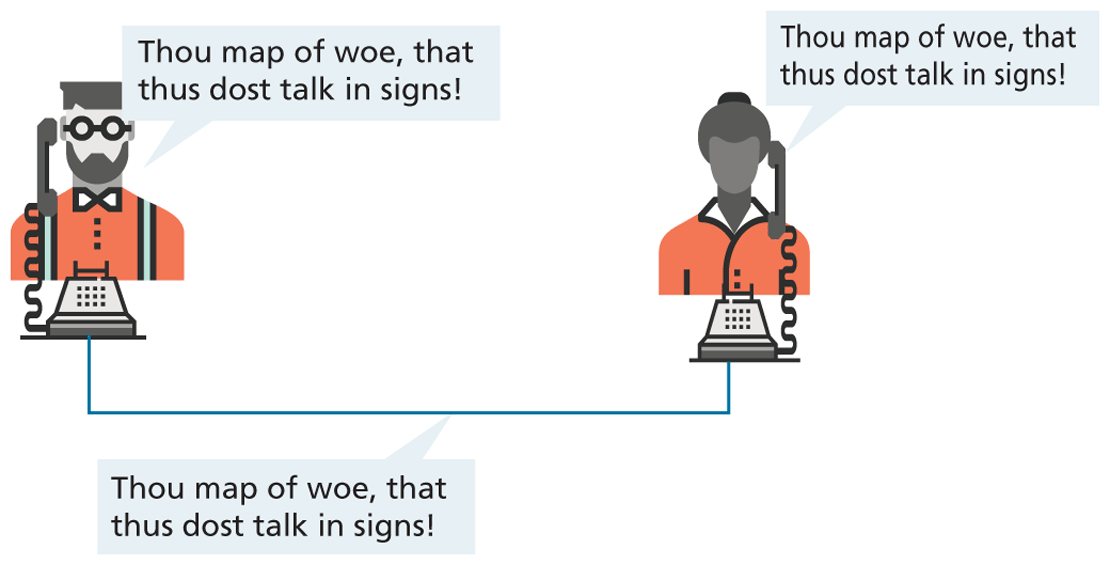
The problem with circuit switching is that it can be difficult to have multiple conversations simultaneously (which a computer might want to do). It also requires more bandwidth, since even the silences are transmitted (that is, unused capacity in the network is not being used efficiently).
Bandwidth is a measurement of how much data can (maximally) be transmitted along a communication channel. Normally measured in bits per second (bps), this measurement differs according to the type of Internet access technology you are using. A dial-up 56-Kbps modem has far less bandwidth than a 10-Gbps fiber optic connection.
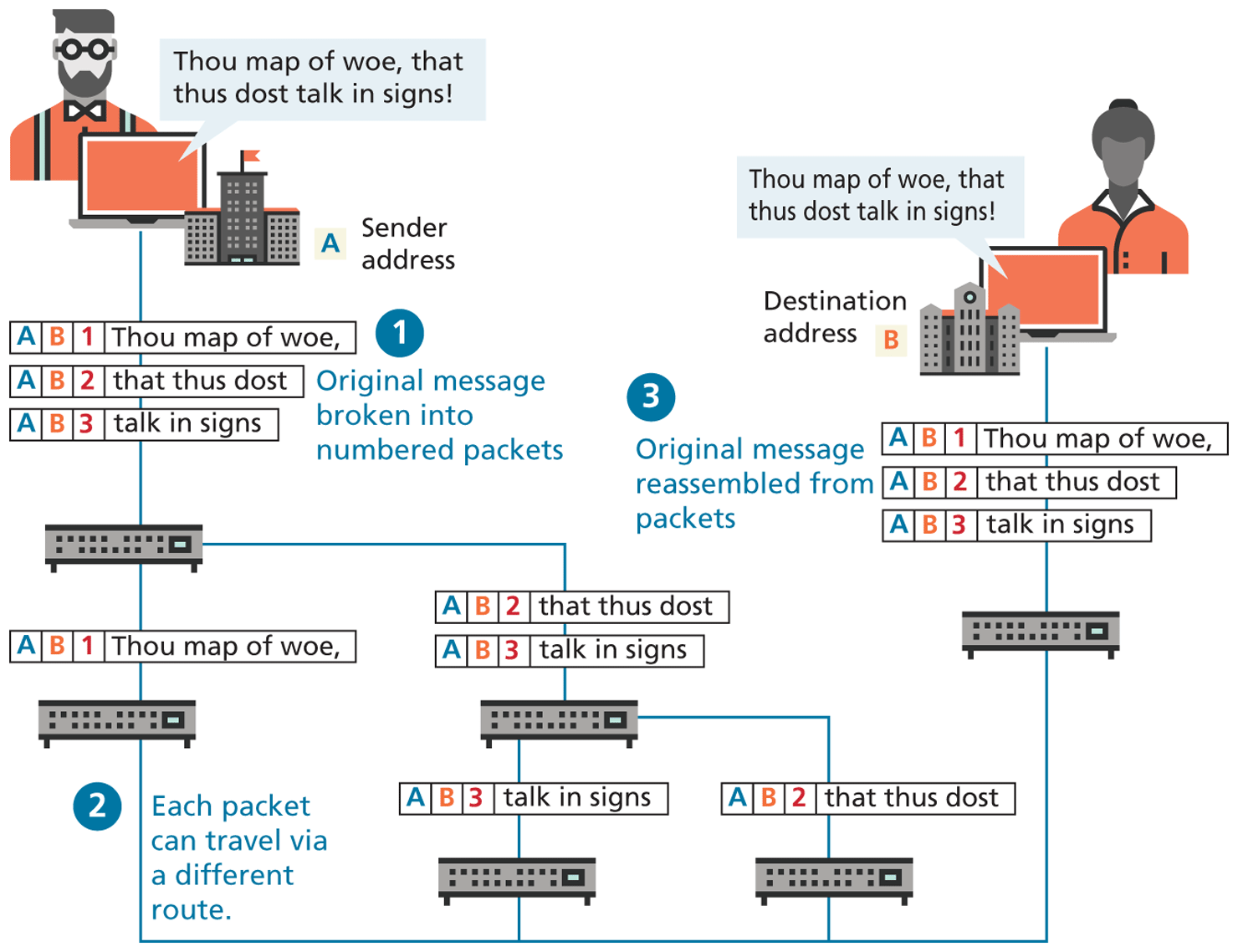
In the 1960s, as researchers explored digital communications and began to construct the first networks, the research network ARPANET was created. ARPANET did not use circuit switching but instead used an alternative communications method called packet switching. A packet-switched network does not require a continuous connection. Instead, it splits the messages into smaller chunks called packets and routes them to the appropriate place based on the destination address. The packets can take different routes to the destination, as shown in Figure 1.4. This may seem a more complicated and inefficient approach than circuit switching but is in fact more robust (it is not reliant on a single pathway that may fail) and a more efficient use of network resources (since a circuit can communicate data from multiple connections).
Figure 1.4 Internet network as example of packet switching
This early ARPANET network was funded and controlled by the United States government and was used exclusively for academic and scientific purposes. The early network started small, with just a handful of connected university campuses and research institutions and companies in 1969, and grew to a few hundred by the early 1980s.
At the same time, alternative networks were created like X.25 in 1974, which allowed (and encouraged) business use. USENET, built in 1979, had fewer restrictions still, and as a result grew quickly to 550 connected machines by 1981. Although there was growth in these various networks, the inability for them to communicate with each other was a real limitation. To promote the growth and unification of the disparate networks, a suite of protocols was invented to unify the networks. A protocol is the name given to a formal set of publicly available rules that manage data exchange between two points. Communications protocols allow any two computers to talk to one another, so long as they implement the protocol.
By 1981, protocols for the Internet were published and ready for use.1,2 New networks built in the United States began to adopt the TCP/IP (Transmission Control Protocol/Internet Protocol) communication model (discussed in the next section), while older networks were transitioned over to it.
Any organization, private or public, could potentially connect to this new network so long as they adopted the TCP/IP protocol. On January 1, 1983, TCP/IP was adopted across all of ARPANET, marking the end of the research network that spawned the Internet.3 Over the next two decades, TCP/IP networking was adopted across the globe.
1.2.2 The Birth of the Web
The next decade saw an explosion in the number of users, but the Internet of the late 1980s and the very early 1990s did not resemble the Internet we know today. During these early years, email and text-based systems were the extent of the Internet experience.
This transition from the old terminal and text-only Internet of the 1980s to the Internet of today is due to the invention and massive growth of the web. This invention is usually attributed to the British Tim Berners-Lee (now Sir Tim Berners-Lee), who, along with the Belgian Robert Cailliau, published a proposal in 1990 for a hypertext system while both were working at CERN (European Organization for Nuclear Research) in Switzerland. Shortly thereafter Berners-Lee developed the main features of the web.4
This early web incorporated the following essential elements that are still the core features of the web today:
A Uniform Resource Locator (URL) to uniquely identify a resource on the WWW.
The Hypertext Transfer Protocol (HTTP) to describe how requests and responses operate.
A software program (later called web server software) that can respond to HTTP requests.
Hypertext Markup Language (HTML) to publish documents.
A program (later called a browser) that can make HTTP requests to URLs and that can display the HTML it receives.
URLs and the HTTP are covered in this chapter. This chapter will also provide a little bit of insight into the nature of web server software; HTML will require several chapters to cover in this book. Chapter 17 will examine the inner workings of server software in more detail.
So while the essential outline of today’s web was in place in the early 1990s, the web as we know it did not really begin until Mosaic, the first popular graphical browser application, was developed at the National Center for Supercomputing Applications at the University of Illinois Urbana-Champaign and released in early 1993 by Eric Bina and Marc Andreessen (who was a computer science undergraduate student at the time). Andreessen later moved to California and cofounded Netscape Communications, which released Netscape Navigator in late 1994. Navigator quickly became the principal web browser, a position it held until the end of the 1990s, when Microsoft’s Internet Explorer (first released in 1995) became the market leader, a position it would hold for over a decade.
Also in late 1994, Berners-Lee helped found the World Wide Web Consortium (W3C), which would soon become the international standards organization that would oversee the growth of the web. This growth was very much facilitated by the decision of CERN to not patent the work and ideas done by its employee and instead leave the web protocols and code-base royalty free.
 Note
Note
The Request for Comments (RFC) archive lists all of the Internet and WWW protocols, concepts, and standards. It started out as an unofficial repository for ARPANET information and eventually became the de facto official record. Even today new standards are published there.
1.2.3 Web Applications in Comparison to Desktop Applications
The user experience for a website is unlike the user experience for traditional desktop software. The location of data storage, limitations with the user interface, and limited access to operating system features are just some of the distinctions. However, as web applications have become more and more sophisticated, the differences in the user experience between desktop applications and web applications are becoming more and more blurred.
There are a variety of advantages and disadvantages to web-based applications in comparison to desktop applications. Some of the advantages of web applications include the following:
They can be accessed from any Internet-enabled computer.
They can be used with different operating systems and browser applications.
They are easier to roll out program updates since only software on the server needs to be updated as opposed to every computer in the organization using the software.
They have a centralized storage on the server, which means fewer security concerns about local storage (which is important for sensitive information such as health care data).
Unfortunately, in the world of IT, for every advantage, there is often a corresponding disadvantage; this is also true of web applications. Some of these disadvantages include the following:
Requirement to have an active Internet connection (the Internet is not always available everywhere at all times).
Security concerns about sensitive private data being transmitted over the Internet.
Concerns over the storage, licensing, and use of uploaded data.
Problems with certain websites not having an identical appearance across all browsers.
Restrictions on access to operating system resources can prevent additional software from being installed and hardware from being accessed (like Adobe Flash on iOS).
In addition, clients or their IT staff may have additional plugins added to their browsers, which provide added control over their browsing experience, but which might interfere with JavaScript, cookies, or advertisements.
We will continually try to address these challenges throughout the book.
1.2.4 From Static to Dynamic (and Back to Static)
In the earliest days of the web, a webmaster (the term popular in the 1990s for the person who was responsible for creating and supporting a website) would publish web pages and periodically update them. Users could read the pages but could not provide feedback. The early days of the web included many encyclopedic, collection-style sites with lots of content to read (and animated icons to watch).
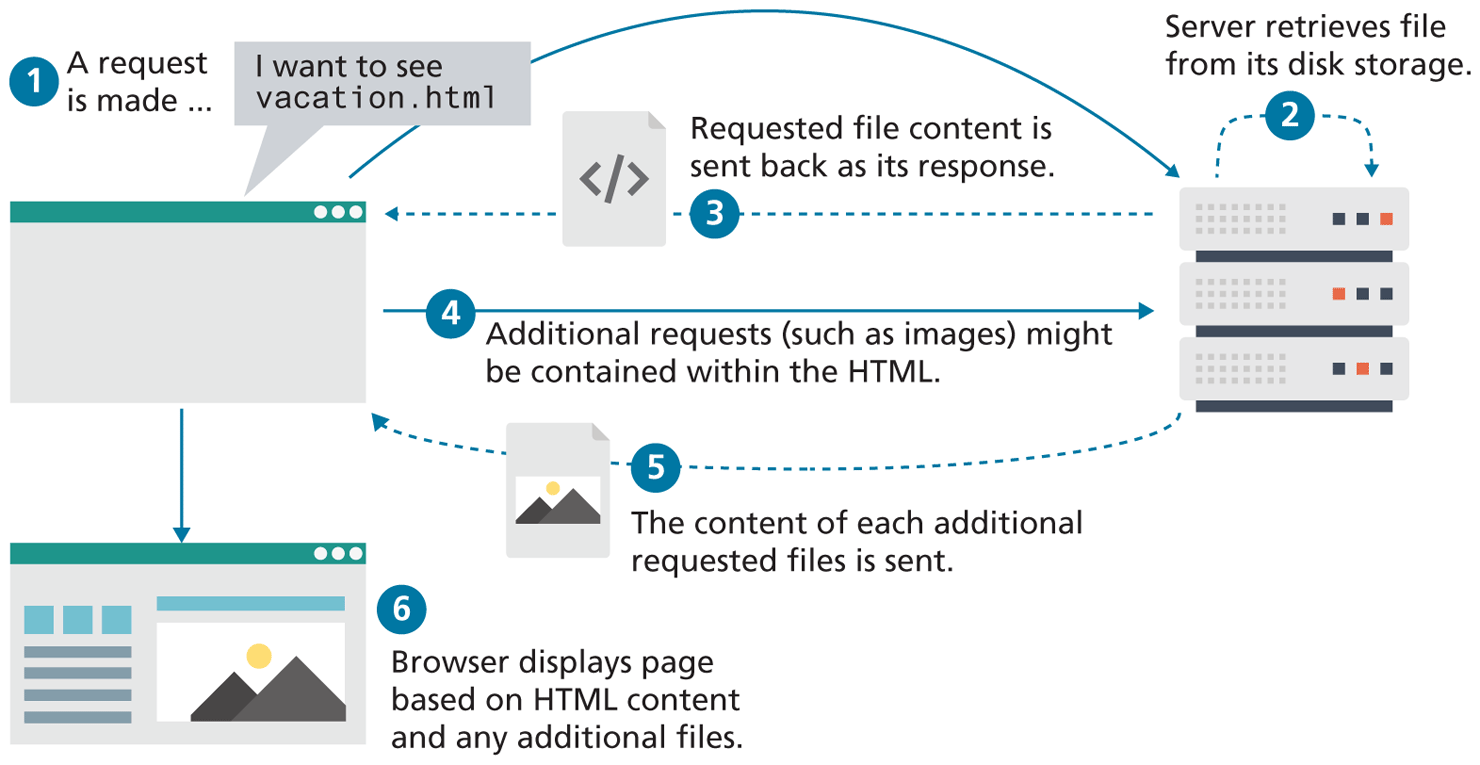
In those early days, the skills needed to create a website were pretty basic: one needed knowledge of HTML and perhaps familiarity with editing and creating images. This type of website was commonly referred to as a static website, in that it consists only of HTML pages that look identical for all users at all times. Figure 1.6 illustrates a simplified representation of the interaction between a user and a static website (it is referred to in the caption as “first generation” to differentiate it from the contemporary version of static sites).
Figure 1.6 Static website (first generation)
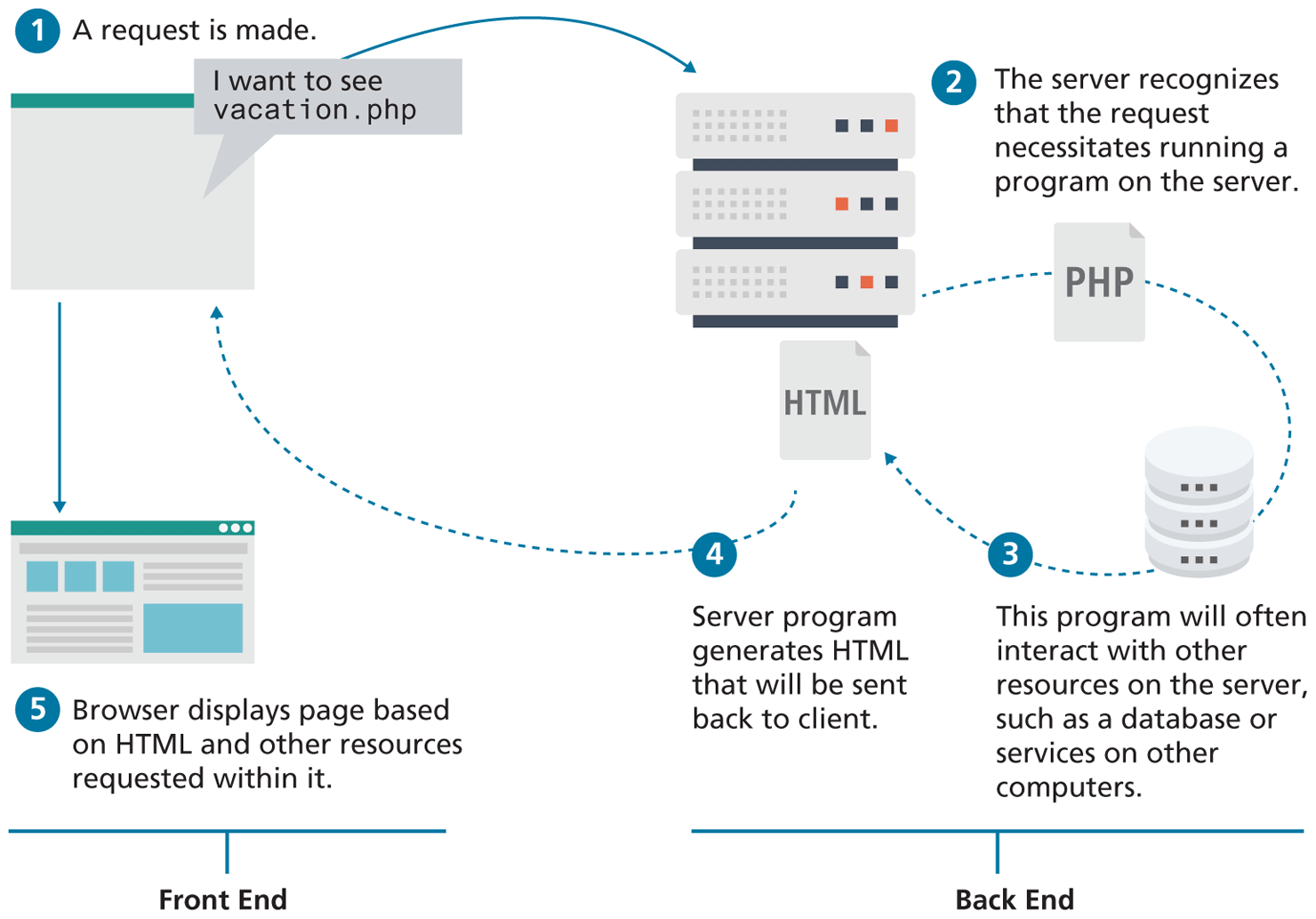
Within a few years of the invention of the web, sites began to get more complicated as more and more sites began to use programs running on web servers to generate content dynamically. These server-based programs would read content from databases, interface with existing enterprise computer systems, communicate with financial institutions, and then output HTML that would be sent back to the users’ browsers. This type of website is called a dynamic server-side website because the page content is being created dynamically by a program running on the server; this page content can vary from user to user. Figure 1.7 illustrates a very simplified representation of the interaction between a user and a dynamic website. The diagram also illustrates a conceptual division within web development that emerged as a consequence: the distinction between the front end and the back end. In the first decade of the 2000s, almost all of the focus in web development circles was on the back-end.
Figure 1.7 Dynamic Server-Side website
So while knowledge of HTML was still necessary for the creation of these dynamic websites, it became necessary to have programming knowledge as well. Moreover, by the late 1990s, additional knowledge and skills were becoming necessary, such as CSS, usability, and security.
By the end of the 2000s, a new buzzword entered the computer lexicon: Web 2.0. This term had two meanings, one for users and one for developers. For the users, Web 2.0 referred to an interactive experience where users could contribute and consume web content, thus creating a more user-driven web experience. Some of the most popular websites today fall into this category: Facebook, YouTube, and Wikipedia. This shift to allow feedback from the user, such as comments on a story, threads in a message board, or a profile on a social networking site has revolutionized what it means to use a web application.
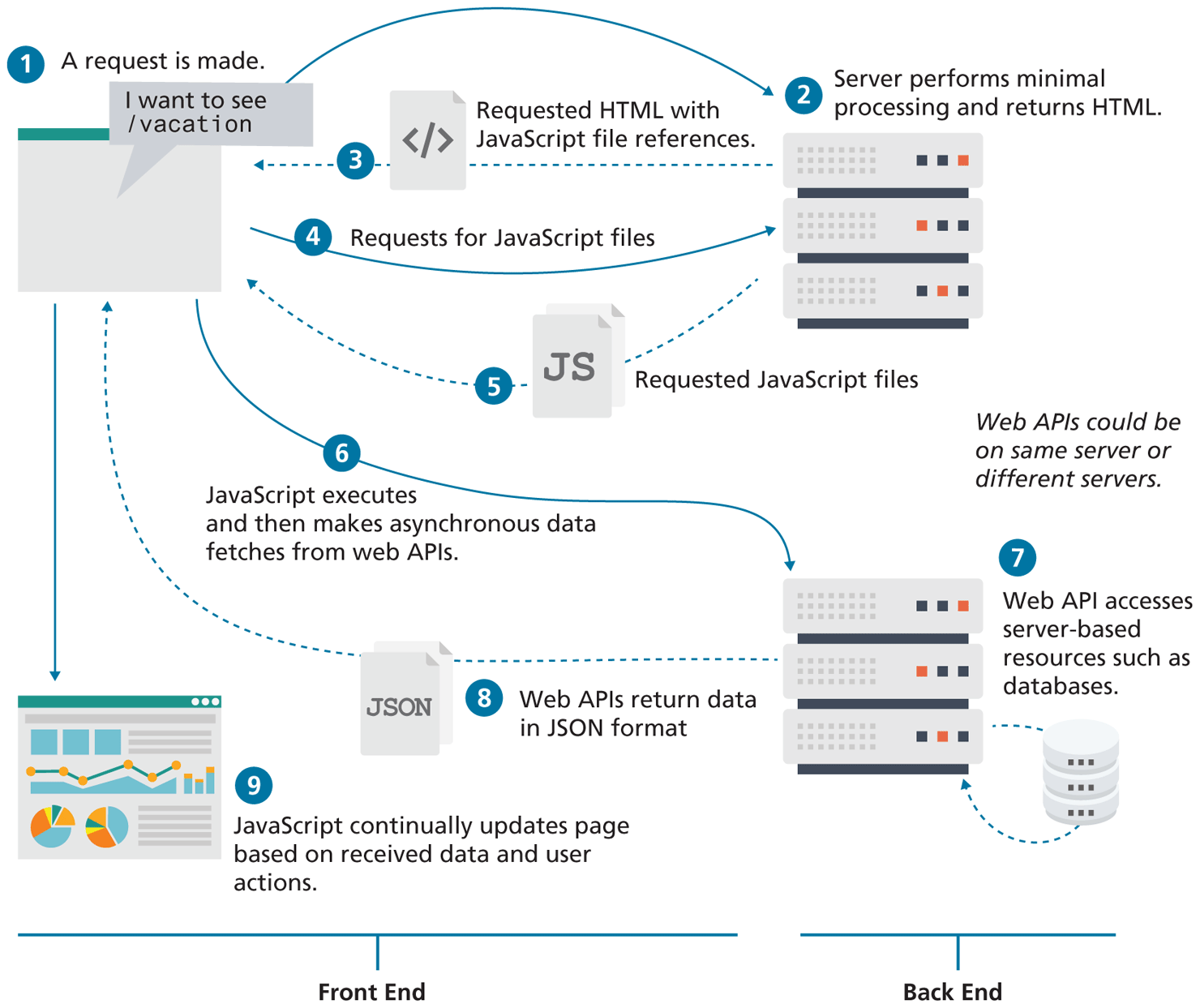
For software developers, Web 2.0 also referred to a change in the paradigm of how dynamic websites are created. Programming logic, which previously existed only on the server, began to migrate more and more to the browser, which required learning JavaScript, a sometimes tricky programming language that runs in the browser. While programs running on servers were still necessary, the back end became “thinner” in comparison to the front end. By the late 2010s, servers often performed minimal processing outside of authentication and data provision. As shown in Figure 1.9, dynamic websites today are dynamic both on the client and the server-side.
Figure 1.9 Dynamic websites today
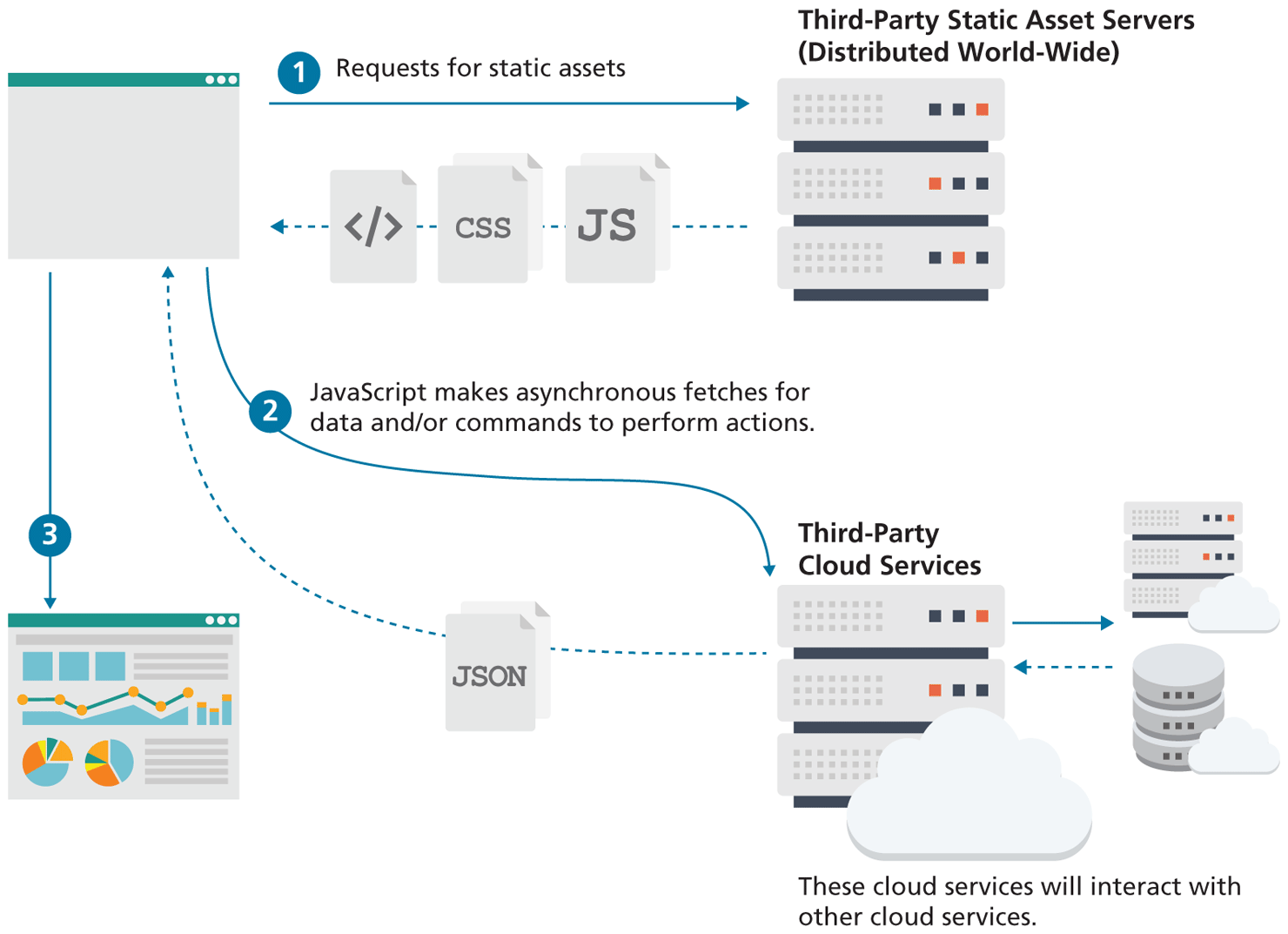
This trend towards thinner and thinner back ends is still continuing. Thanks to innovations in cloud-based services, static websites are back, albeit in a new form. As can be see in Figure 1.10, contemporary static sites make use of two types of servers: static asset servers which do no processing, and third-party cloud services which are consumed by JavaScript. The important point here is that this type of static site doesn't require running or setting up any type of server; instead it makes use of servers configured and operated by third-parties that are providing a wide-range of services, from databases, to authentication, to caching.
Figure 1.10 Static websites today
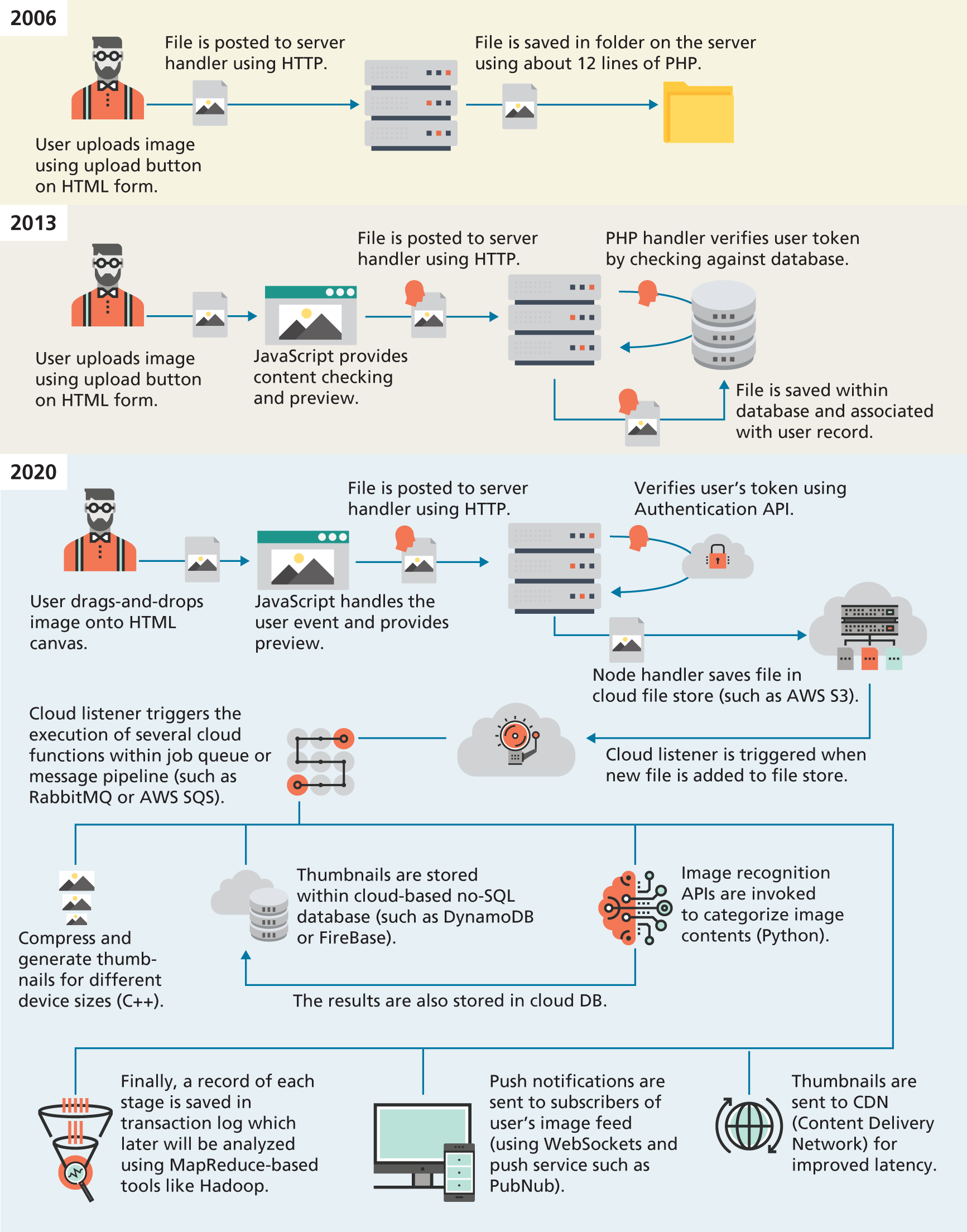
Web development today is thus significantly more complicated than it was when the first edition of this textbook was written in 2012–2013. Take for instance, the task of uploading a file to a website, which today is a relatively common feature of many websites. Figure 1.11 illustrates the expanding range of processes and technologies that have become part of just this single task. Now expand this single task to dozens of tasks, and you can begin to see that a textbook of this size cannot hope to cover everything you might need to know in web development.
Figure 1.11 Evolving complexity in web applications
Instead, this book focuses on the fundamentals. Early chapters on HTML and CSS teach layout and structural foundations. The core of the book are its JavaScript chapters, which focus on the fundamentals of the language and its usage within the browser. While back-ends are thinner than they once were, they are still essential to many sites, and cover two key server-side technologies as well as working with databases, state management, and authentication. The final chapters in the book switch over to the management and configuration of these servers.
This broad coverage of the entirety of web development is what makes this book different than many online tutorials which tend to focus deeply on narrow topics. The one constant in the history of web development has been change: by learning a broad spectrum of skills and topics, you will be better placed to adapt to the inevitable changes within web development.