Long description
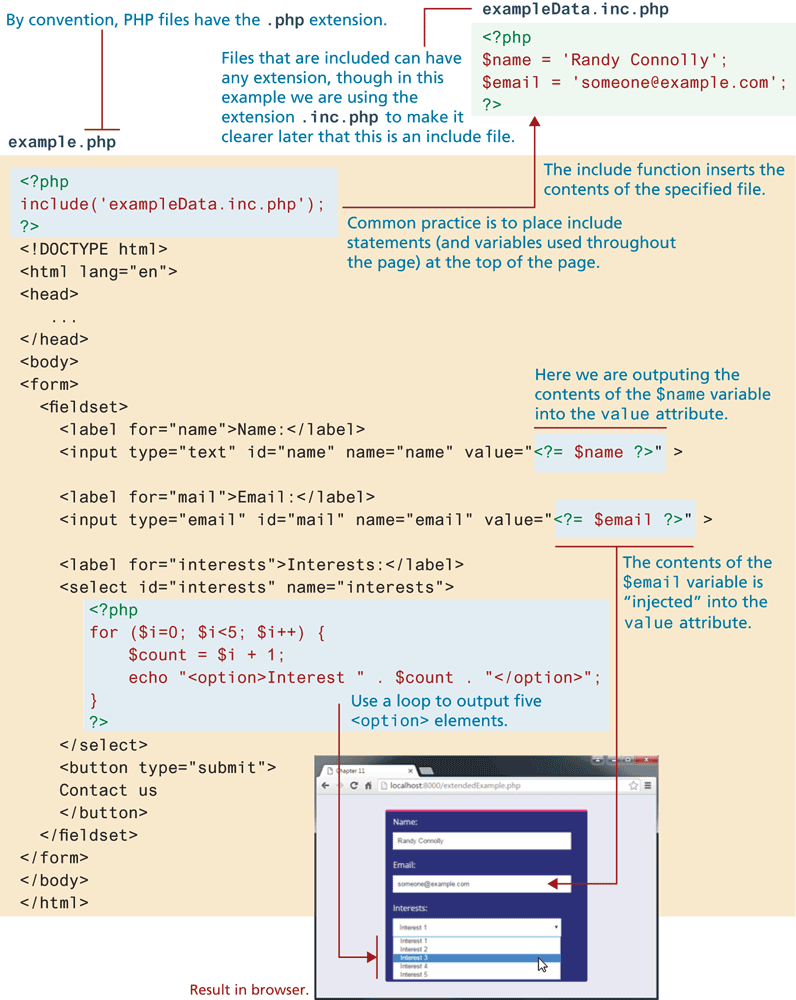
The block of code is titled example dot p h p. Note: By convention, P H P files have the dot p h p extension. The code reads as follows. Line 1: open angle bracket question mark p h p at indentation level 0. Line 2: include open parenthesis open single quote exampleData dot inc dot p h p close single quote close parenthesis semicolon indentation level 0. Line 3: question mark close angle bracket indentation level 0. Lines 1 to 3 correspond to the block of code titled exampleData dot inc dot p h p. The block of code reads as follows. Line 1: open angle bracket question mark p h p at indentation level 0. Line 2: dollar name equals open single quote Randy Connolly close single quote semicolon at indentation level 0. Line 3: dollar email equals open single quote someone at the rate example dot com close single quote semicolon at indentation level 0. Line 4: question mark close angle bracket at indentation level 0. Note: Files that are included can have any extension, though in this example we are using the extension dot inc dot php to make it example dot php clearer later that this is an include file. Common practice is to place include statements (and variables used throughout the page) at the top of the page. The include function inserts the contents of the specified file.
Line 4: open angle bracket exclamation mark DOCTYPE h t m l close angle bracket indentation level 0. Line 5: open angle bracket h t m l lang equals open double quotes en close double quotes close angle bracket indentation level 0. Line 6: open angle bracket head close angle bracket indentation level 0. Line 7: open angle bracket forward slash head close angle bracket at indentation level 0. Line 8: open angle bracket body close angle bracket at indentation level 0. Line 9: open angle bracket form close angle bracket at indentation level 0. Line 10: open angle bracket fieldset close angle bracket at indentation level 1. Line 11: open angle bracket label for equals open double quotes name close double quotes close angle bracket Name colon open angle bracket forward slash label close angle bracket at indentation level 2. Line 12: open angle bracket input type equals open double quotes text close double quotes i d equals open double quotes name close double quotes name equals open double quotes name close double quotes value equals open double quotes open angle bracket question mark p h p echo dollar name semicolon question mark close angle bracket close double quotes close angle bracket at indentation level 2. Note: In line 12, we are outputting the contents of the dollar name variable into the value attribute question mark p h p echo dollar name semicolon question mark. Line 13: open angle bracket label for equals open double quotes mail close double quotes close angle bracket Email colon open angle bracket forward slash label close angle bracket at indentation level 2. Line 14: open angle bracket input type equals open double quotes email close double quotes i d equals open double quotes mail close double quotes name equals open double quotes email close double quotes value equals open double quotes open angle bracket question mark p h p echo dollar email semicolon question mark close angle bracket close double quotes close angle bracket at indentation level 2. In line 14, we are outputting the contents of the dollar email variable into the value attribute question mark p h p echo dollar email semicolon question mark. Line 15: open angle bracket label for equals open double quotes interests close double quotes close angle bracket Interests colon open angle bracket forward slash label close angle bracket at indentation level 2. Line 16: open angle bracket select i d equals open double quotes interests close double quotes name equals open double quotes interests close double quotes close angle bracket at indentation level 3.
Line 17: open angle bracket question mark p h p at indentation level 3. Line 18: for open parenthesis dollar i equals 0 semicolon dollar i less than 5 semicolon dollar i increment close parenthesis open curly brace at indentation level 3. Line 19: dollar count equals dollar i plus 1 semicolon at indentation level 4. Line 20: echo open double quotes open angle bracket option close angle bracket Interest open double quotes dot dollar count dot close double quotes open angle bracket forward slash option close angle bracket close double quotes semicolon at indentation level 4. Line 21: close curly brace at indentation level 3. Line 22: question mark close angle bracket at indentation level 3. Lines 17 to 22 use a loop to output five open angle bracket option close angle bracket elements.
Line 23: open angle bracket forward slash select close angle bracket at indentation level 2. Line 24: open angle bracket button type equals open double quotes submit close double quotes close angle bracket at indentation level 2. Line 25: Contact us at indentation level 2. Line 26: open angle bracket forward slash button close angle bracket at indentation level 2. Line 27: open angle bracket forward slash fieldset close angle bracket at indentation level 1. Line 28: open angle bracket forward slash form close angle bracket at indentation level 0. Line 29: open angle bracket forward slash body close angle bracket at indentation level 0. Line 30: open angle bracket forward slash h t m l close angle bracket at indentation level 0.
The browser window that has a tab titled Chapter 12 is placed below the code. The browser contains a form content. The browser window shows a form content. The contents in the form are placed one below the other and are as follows: label colon, textbox. Name colon, textbox 1 with the value "Randy Connolly." Next Email colon, textbox 2 with the value "someone at the rate example dot com," Interests colon, dropdown list with the items “Interest 1, Interest 2, Interest 3, Interest 4, and Interest 5.” An arrow from line 14 corresponds to textbox 2 in the output form. An arrow from lines 17 to 22 correspond to the dropdown list in the output form.
Back