Long description
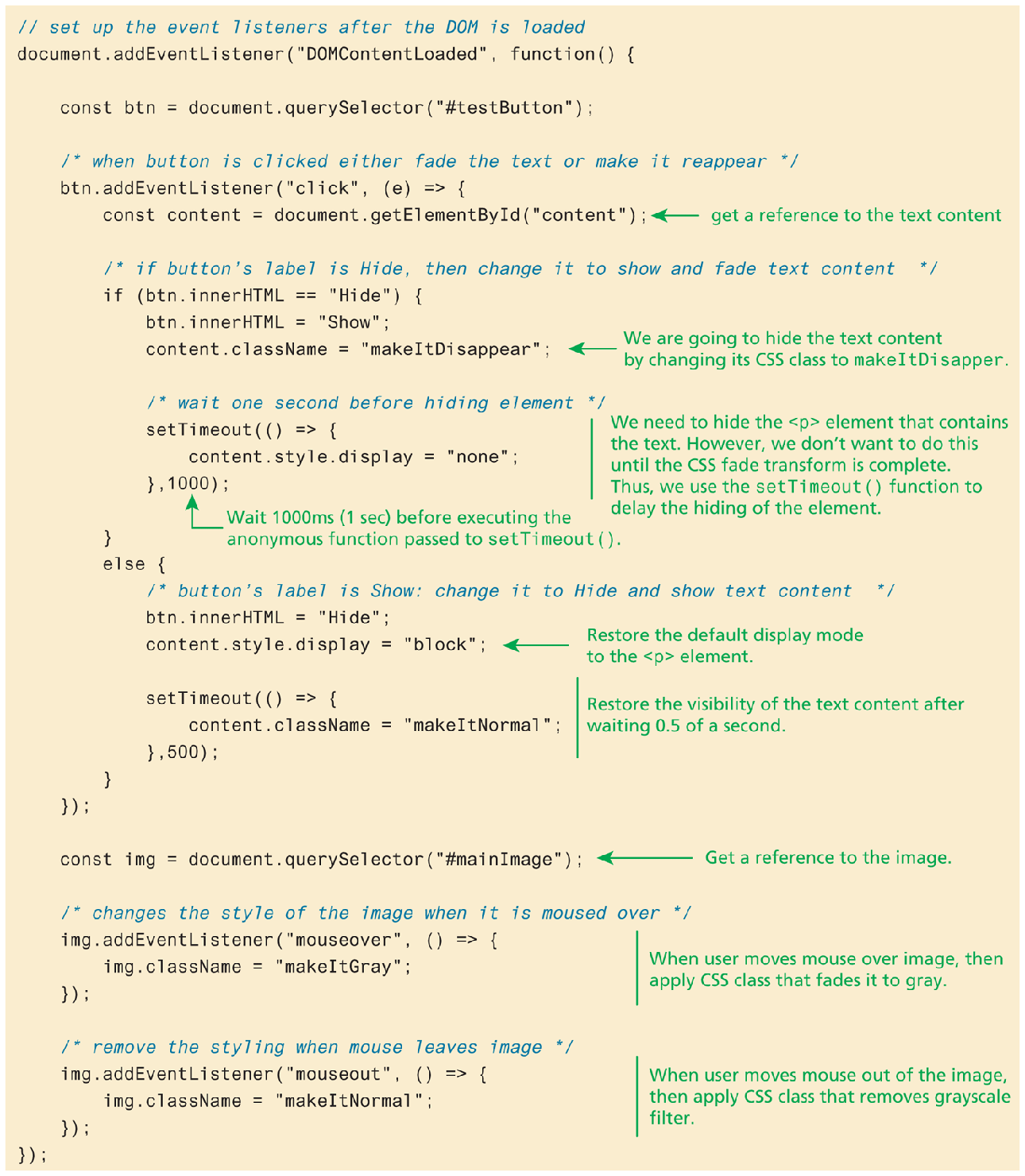
The JavaScript consists of 34 lines of code. Line 1. forward slash forward slash set up the event listeners after the DOM is loaded, at indentation level 0. Line 2: document dot addEvent Listener open parenthesis open double quotes DOMContent Loaded close double quotes comma function open parenthesis close parenthesis open curly braces, at indentation level 0. Line 3: const b t n equals document dot getElementById open parenthesis open double quotes testButton close double quotes close parenthesis semicolon, at indentation level 1. Line 4: forward slash asterisk when button is clicked either fade the text or make it reappear asterisk forward slash, at indentation level 1. Line 5: b t n dot addEventListener open parenthesis open double quotes click close double quotes comma function open parenthesis e close parenthesis open curly brace, at indentation level 1. Line 6: const content equals document dot getElementById open parenthesis open double quotes content close double quotes close parenthesis semicolon, at indentation level 2. An arrow labeled get a reference to the text content points to line 6. Line 7: forward slash asterisk if button's label is Hide, then change it to show and fade text content asterisk forward slash, at indentation level 2. Line 8: StartCommand if EndCommand open parenthesis b t n dot innerH T M L equals equals open double quotes Hide close double quotes close parenthesis open curly brace, at indentation level 2. Line 9: b t n dot innerH T M L equals open double quotes Show close double quotes semicolon, at indentation level 3. Line 10: content dot className equals open double quotes makeItDisappear close double quotes semicolon, at indentation level 3. An arrow labeled We are going to hide the text content by changing its CSS to makeItDisappear points to line 10. Line 11: forward slash asterisk wait one second before hiding element asterisk forward slash, at indentation level 3. Line 12: setTimeout open parenthesis function open parenthesis close parenthesis open curly brace, at indentation level 3. Line 13: content dot style dot display equals open double quotes none close double quotes semicolon, at indentation level 4. Line 14: close curly brace comma 1000 close parenthesis semicolon, at indentation level 3. An arrow labeled Wait 1000 m s (1 sec) before executing the anonymous function passed to setTimeout open parenthesis close parenthesis points to line 14.
Note2: Line 12 to 14 is marked: We need to hide the open angle bracket p close angle bracket element that contains the text. However, we don't want to do this until the CSS fade transform is complete. Thus, we use the setTimeout open parenthesis close parenthesis function to delay the hiding of the element.
Line 15: close curly brace, at indentation level 2. Line 16: else open curly brace, at indentation level 2. Line 17: forward slash asterisk button's label is Show: change it to Hide and show text content asterisk forward slash, at indentation level 3. Line 18: b t n dot innerH T M L equals open double quotes Hide close double quotes semicolon, at indentation level 3. Line 19: content dot style dot display equals open double quotes block close double quotes semicolon, at indentation level 3. An arrow labeled Restore the default display mode to the open angle bracket p close angle bracket element points to line 19. Line 20: setTimeout open parenthesis function open parenthesis close parenthesis open curly brace, at indentation level 3. Line 21: content dot className equals open double quotes makeItNormal close double quotes semicolon, at indentation level 4. Line 22: close curly brace comma 500 close parenthesis semicolon, at indentation level 3. Line 20 to 22 is marked Restore the visibility of the text content after waiting 0.5 of a second. Line 23: close curly brace, at indentation level 2. Line 24: close curly brace close parenthesis semicolon, at indentation level 1. Line 25: const i m g equals document dot getElementById open parenthesis open double quotes mainImage close double quotes close parenthesis semicolon, at indentation level 1. An arrow labeled Get a reference to the image points to line 25. Line 26: forward slash asterisk changes the style of the image when it is moused over asterisk forward slash, at indentation level 1. Line 27: i m g dot addEventListener open parenthesis open double quotes mouseover close double quotes comma function open parenthesis event close parenthesis open curly braces, at indentation level 1. Line 28: i m g dot className equals open double quotes makeItGray close double quotes semicolon, at indentation level 2. Line 29: close curly brace close parenthesis semicolon, at indentation level 1. Line 27 to 29 is marked when user moves mouse over image, then apply C S S class that fades it to grey. Line 30: forward slash asterisk remove the styling when mouse leaves image asterisk forward slash, at indentation level 1. Line 31: i m g dot addEventListener open parenthesis open double quotes mouseout close double quotes comma function open parenthesis event close parenthesis open curly brace, at indentation level 1. Line 32: i m g dot className equals open double quotes makeItNormal close double quotes semicolon, at indentation level 2. Line 33: close curly braces close parenthesis semicolon, at indentation level 1. Line 31 to 33 is marked When user moves mouse out of the image, then apply C S S class that removes grayscale filter. Line 34: close curly brace close parenthesis semicolon, at indentation level 0.
Back