Long description
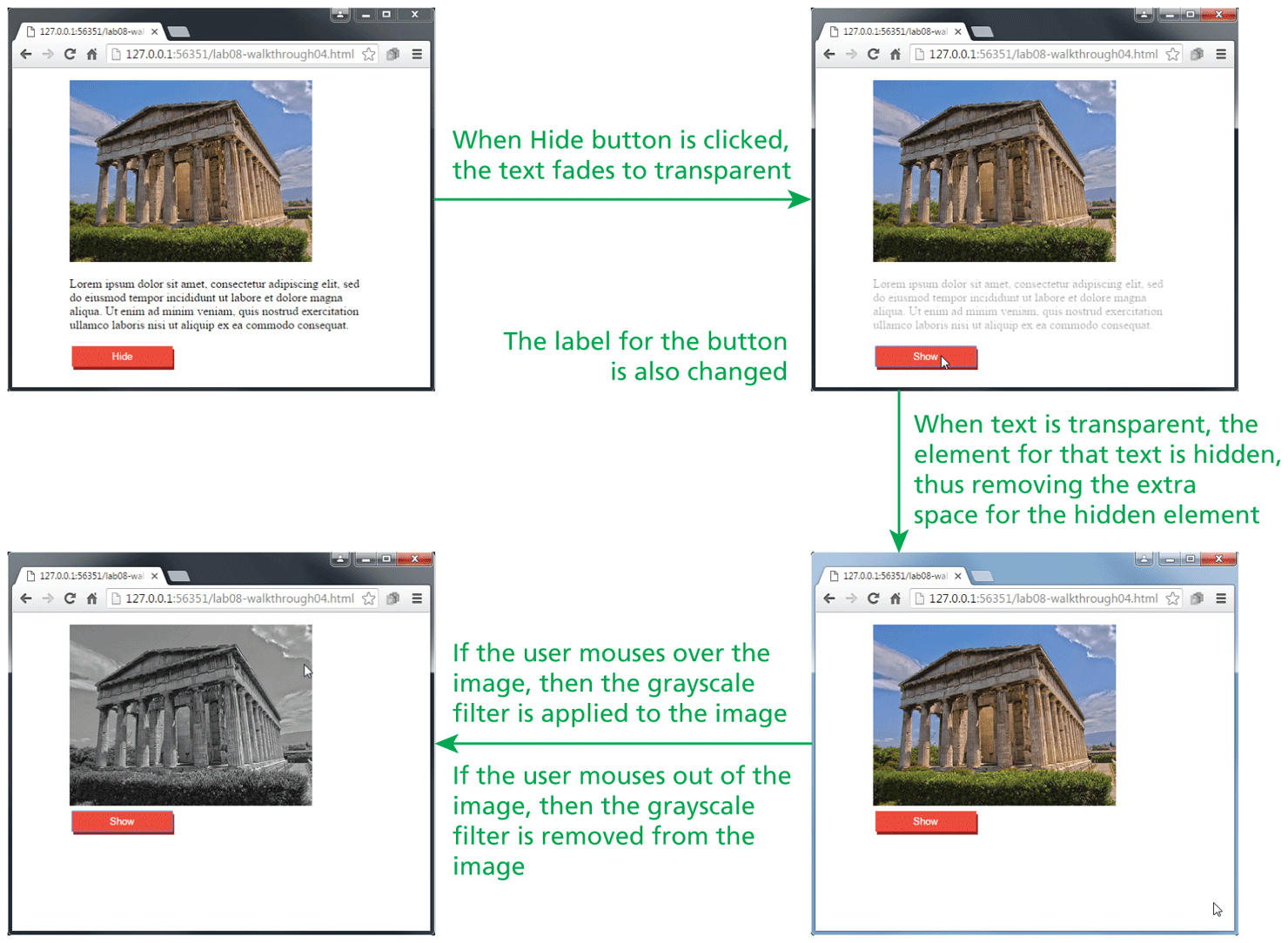
The first browser window that has a tab titled 127 dot 0 dot 0 dot 1 colon 56351 forward slash lab08 hyphen walk is placed on the top left side of the figure. The address bar reads, 127 dot 0 dot 0 dot 1 colon 56351 forward slash lab 08 hyphen walkthrough 04 dot h t m l. The browser window consists of an image, a paragraph, and a button. The image is placed at the top left of the browser window. A paragraph with four lines of text is placed below the image. A button labeled Hide is placed below the paragraph. The image, paragraph, and button are aligned to the left of the page at indentation level 5.
An arrow from the first browser window points to the right at the second browser window. A line of text that reads, When Hide button is clicked, the text fades to transparent is written at the top of the arrow.
The second browser window has a tab titled 127 dot 0 dot 0 dot 1 colon 56351 forward slash lab 08 hyphen walk. The address bar reads, 127 dot 0 dot 0 dot 1 colon 56351 forward slash lab 08 hyphen walkthrough 04 dot h t m l. The browser window consists of an image, a paragraph, and a button. The image is placed at the top left of the browser window. A paragraph with four lines of text is placed below the image. A button labeled Show is placed below the paragraph. A mouse cursor is placed on the button. The image, paragraph, and button are aligned to the left of the page at indentation level 5.
An arrow from the second browser window points downward at the third browser window. A line of text that reads, The label for the button is also changed is written at the left of the second browser window. A line of text that reads, When text is transparent, the element for that text is hidden, thus removing the extra space for the hidden element is written below the second browser window.
The third browser window has a tab titled 127 dot 0 dot 0 dot 1 colon 56351 forward slash lab 08 hyphen walk. The address bar reads, 127 dot 0 dot 0 dot 1 colon 56351 forward slash lab08 hyphen walkthrough 04 dot h t m l. The browser window consists of an image and a button. The image is placed at the top left of the browser window. A button labeled Show is placed below the image. The image and the button are aligned to the left of the page at indentation level 5.
An arrow points to the left from the third browser window to the fourth browser window. A line of text that reads, If the user mouses over the image, then the grayscale filter is applied to the image. If the user mouses out of the image, then the grayscale filter is removed from the image is written at the left of the third browser window.
The fourth browser window has a tab titled 127 dot 0 dot 0 dot 1 colon 56351 forward slash lab 08 hyphen walk. The address bar reads, 127 dot 0 dot 0 dot 1 colon 56351 forward slash lab08 hyphen walkthrough 04 dot h t m l. The browser window consists of an image and a button. The image in the third browser window is changed to black and white and is placed at the top left of the fourth browser window. A button labeled Show is placed below the image. The image and the button are aligned to the left of the page at indentation level 5.
Back