Long description
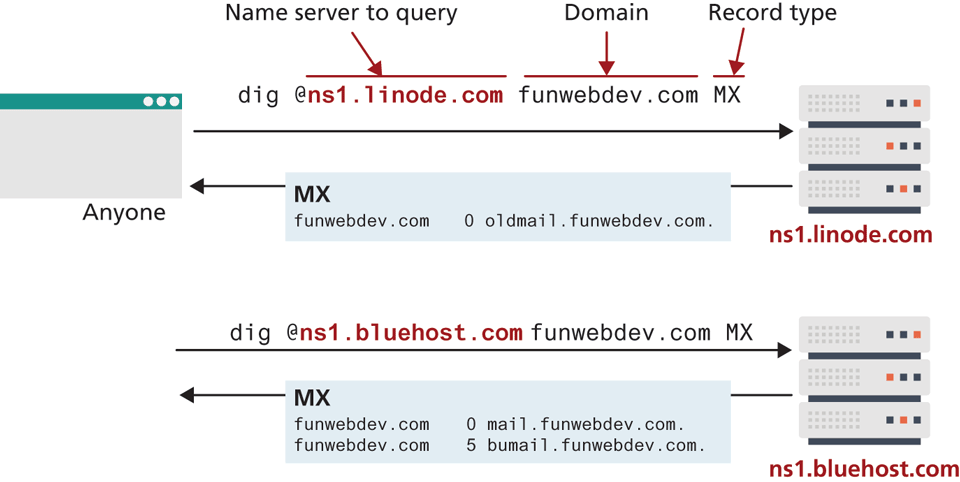
The figure shows a couple of usages of the dig command where different name servers have different values. Two annotated usages for dig command are shown here. Usage 1: For the command: dig @ns1 dot linode dot com funwebdev dot com, @ns1 dot linode dot com is labeled “Name server to query”. funwebdev dot com is labeled “Domain” and M X is labeled “Record type”. The name server labeled n s 1 linode dot com, is represented as a set of three blocks. An arrow from a window labeled Anyone, is connected to the n s 1 dot linode dot com block. An arrow from this block is connected back to the Anyone block, with a block labeled M X in between. The following is labeled on the m X block: funweddev.com 0 oldmail dot funwebdev dot com. Usage 2: The command, dig at the rate n s1 dot bluehost dot com funwebdev dot com M X, is labeled on an arrow, which points to the name server block labeled n s 1 dot bluehost dot com. An arrow from this block, points towards the left, with a block labeled M X in between. The following is labeled on the M X block: funwebdev dot com 0 mail dot funwebdev dot com. funwebdev dot com 5 bumail dot funwebdev dot com.
Back