Long description
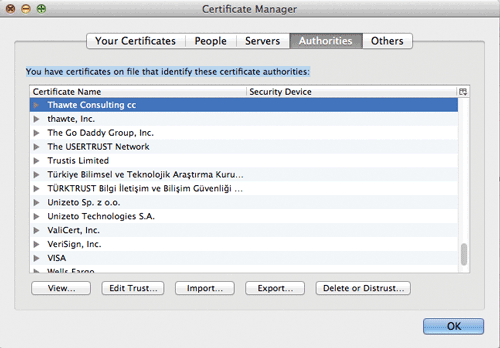
The browser window is titled "Certificate Manager". A navigation bar at the top has five tabs that are placed side-by-side and are aligned to the center. The tabs are labeled “Your Certificates”, “People", “Servers”, "Authorities", and "Others". The Authorities tab is highlighted indicating its selection.
A list of certificate names appear in a window below the navigation bar with a line of text at the top that reads, "You have certificates on file that identify these certificate authorities:". The list of certificate names reads as follows: “Thawte Consulting c c”, “thawte, Inc”, “The Go Daddy Group, Inc”, “The USERTRUST Network”, Trustis Limited”, “Turkiye Bilimsel v e Teknolojik Arastirma Kuru”, “TURKTRUST Bilgi iletisim ve Bilisim Guvenligi”, “Unizeto S p. z 0 point 0”, “Unizeto Technologies S. A”, “ValiCert, Inc “, “VeriSign, Inc”, "VISA”, “Walls Fargo". A vertical scrollbar is at the right of the window that allows the user to scroll for more certificate names. The first certificate is highlighted indicating its selection. Five buttons are shown below the window that are placed side-by-side. The buttons read as follows: View, Edit Trust, Import, Export, and Delete or Distrust. A button labeled O K is placed at the bottom right of the browser window.
Back