Long description
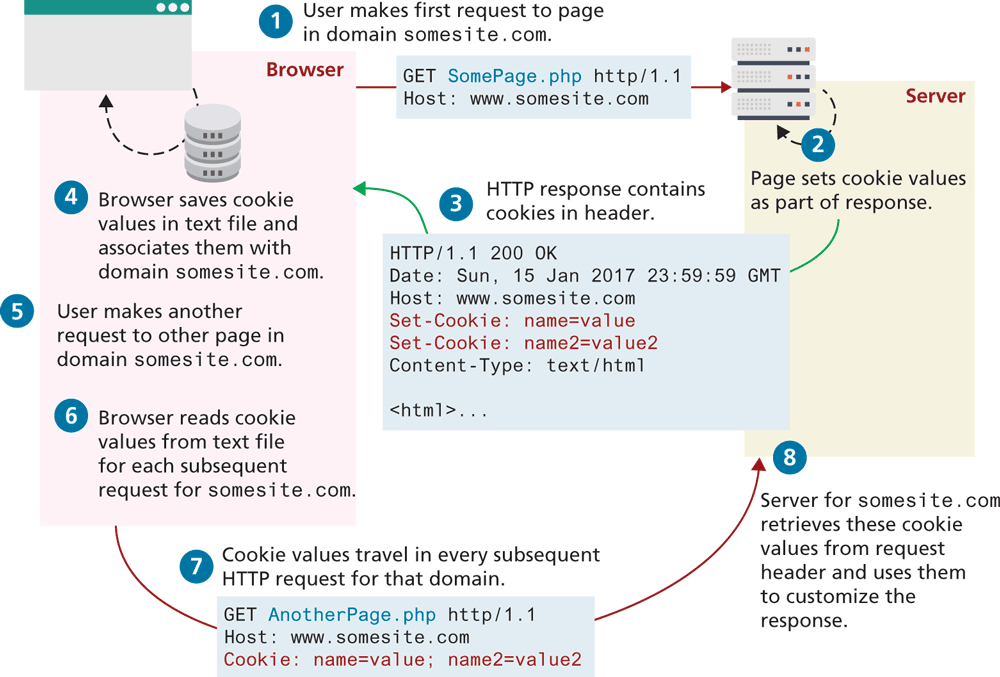
Step 1: User makes another request to other page in domain somesite dot com.
GET somePage dot p h p h t t p forward slash 1.1 Host colon w w w dot somesite dot com.
Step 2: Page sets cookie values as part of response.
Step 3: H T T P response contains cookies in header.
H T T P forward slash 1.1 200 OK Date colon Sun, 15 Jan 2017 23 colon 59 colon 59 G M T Host colon w w w dot somesite dot com. Set - Cookie colon name equals value. Set -Cookie: name2 equals value2 Content - Type colon text forward slash h t m l. open angular bracket h t m l close angular bracket.
Step 4: Browser saves cookie values in text file and associate them with domain somesite dot com.
Step 5: User makes another request to other page in domain somesite dot com.
Step 6: Browser reads cookie values from text file for each subsequent request for somesite dot com.
Step 7: Cookie values travel in every subsequent H T T P request for that domain.
GET AnotherPage. p h p h t t p forward slash 1.1 Host: w w w dot somesite dot com. Cookie: name=value; name2=value2
Step 8: Server for somesite. com retrieves these cookie values from request header and uses them to customize the response.
Back