Long description
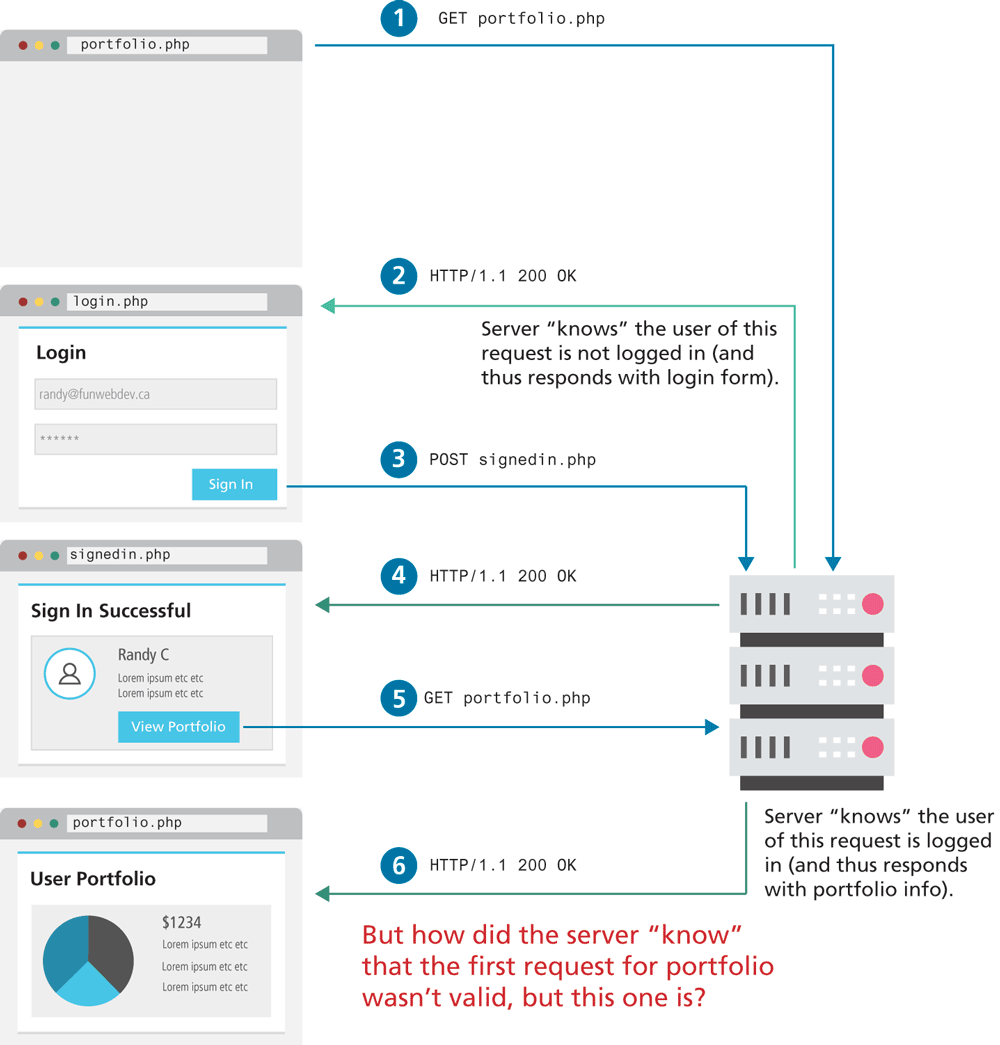
The figure consists of four browser windows that show the instances of the web application.
The first browser window with the address bar that reads, portfolio dot p h p is placed at the left side of the figure. A request is sent from the browser to the server that is shown at the right side of the figure.
Step 1: GET portfolio dot p h p.
Step 2: H T T P forward slash 1 point 1 200 O K.
Note: Server “knows” the user of this request is not logged in open parenthesis and thus responds with login form close parenthesis.
The second browser window with the address bar that reads, login dot p h p is placed below the first browser window. The browser window consists of a level-1 heading that reads, "Login". A form content is shown below the heading that reads from top to bottom as follows. Textbox 1 contains the value "randy at the rate funwebdev dot c “a”. Textbox 2 contains 6 asterisks that indicate hidden characters. A button labeled Sign In is placed below textbox 2. A request is sent to the server as below.
Step 3: POST signed in dot p h p.
The server sends the below response, which is displayed in the third browser window.
Step 4: H T T P forward slash 1 point 1 200 O K.
The third browser window with the address bar that reads, signed in dot p h p is placed below the second browser window. The browser window consists of a level-1 heading that reads, "Sign In Successful". Three lines of text and a button is placed below the heading. Line 1: Randy C. Line 2: Lorem ipsum etc etc. Line 3: Lorem ipsum etc etc. The button is labeled View Portfolio. A request is sent to the server as below.
Step 5: GET portfolio. php GET portfolio dot p h p.
Note: Server “knows close” the user of this request is not logged in open parenthesis and thus responds with portfolio info close parenthesis.
Step 6: H T T P forward slash 1 point 1 200 O K.
The fourth browser window with the address bar that reads, portfolio dot p h p is placed below the third browser window. The browser window consists of a level-1 heading that reads, "User Portfolio". A pie chart is shown below the heading. Four lines of text are shown at the right side of the pie chart. Line 1: dollar 1 2 3 4. Line 2: Lorem ipsum etc etc. Line 3: Lorem ipsum etc etc. Line 4: Lorem ipsum etc etc.
Note: But how did the server “know” that the first request for portfolio wasn't valid, but this one is ?
Back