Long description
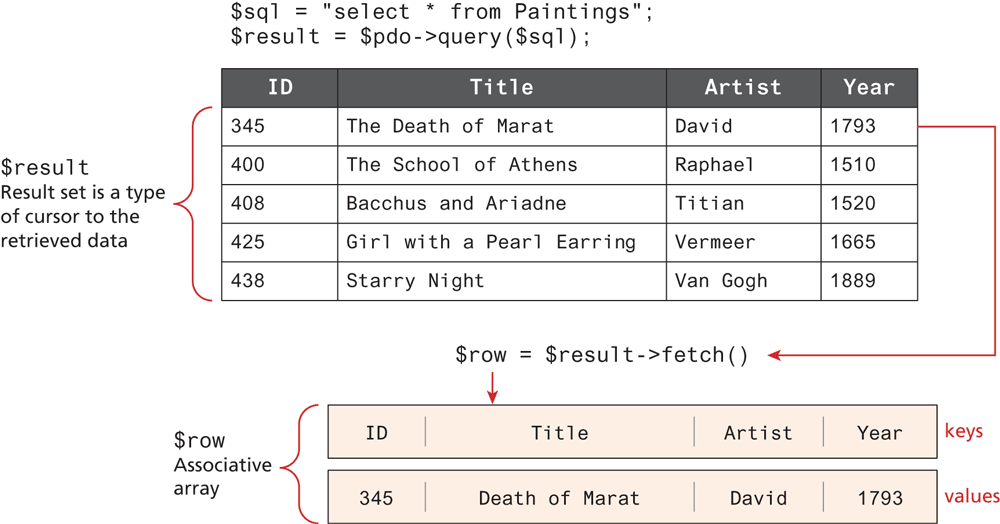
First S Q L code read: Line 1: dollar sql equals double quotes select star from Paintings double quotes semi colon. Line 2: dollar result equals dollar p d o hyphen close angle bracket query open bracket dollar s q l close bracket semi colon.
Table 1 labeled “ArtWork table” consists of 4 columns and 5 rows. The column heading, center aligned, are as follows: ArtWorkID, Title, Artist, and Year. The row entries, left aligned, are as follows. First row: ArtWorkID column, 345. Title column, The Death of Marat. ArtistID column, David. YearOfWork column, 1793. Next row: ArtWorkID column, 400. Title column, The School of Athens. ArtistID column, Raphael. YearOfWork column, 1510. Next row: ArtWorkID column, 408. Title column, Bacchus and Ariadne. ArtistID column, Titian. YearOfWork column, 1520. Next row: ArtWorkID column, 425. Title column, Girl with a Pearl Earring. ArtistID column, Vermeer. YearOfWork column, 1665. Last row: ArtWorkID column, 438. Title column, Starry Night. ArtistID column, Van Gogh. YearOfWork column, 1889. Row 1 to Row 5 is labeled “dollar result Result set is a type of cursor to the retrieved data”.
There is an arrow pointing from right side of Row 1 in Table 1, to second S Q L code that reads, dollar row equals dollar result dash close angle bracket fetch bracket open bracket close. S Q L query fetch retrieves the values of Row 1 in Table that is shown in 2 blocks below.
Block 1: row 0: ID, Title, Artist, Years. It is labeled “Key”. Block 2: row 0: 345, Death of Marat, David, 1793. It is labeled values. Block 1 and Block 2 represent “Dollar row Associative array”.
Back