Long description
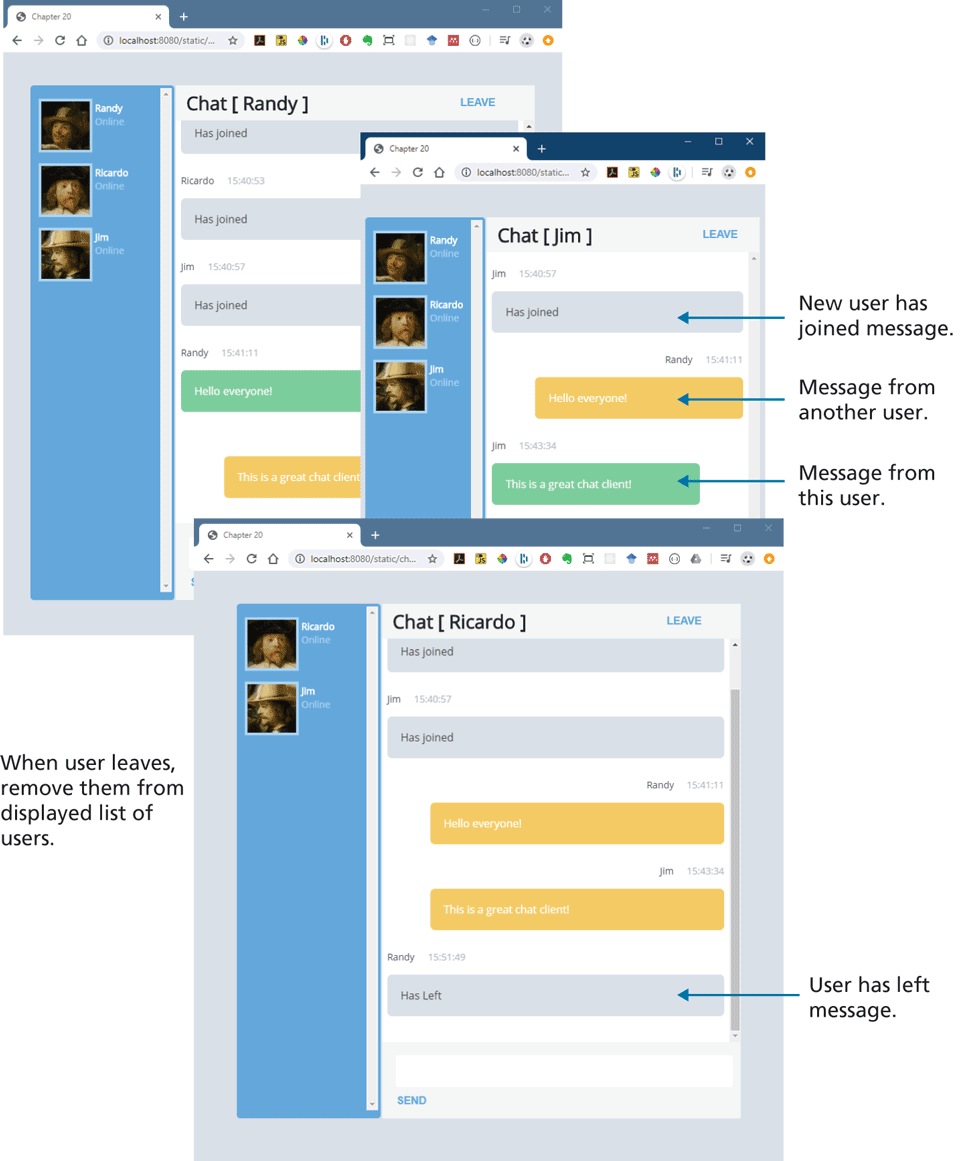
The browsers titled Chapter 20 overlap each other. The chat window is divided into two parts. The first part shows a list of users at the left and the second part shows chat messages at the right. The chat window in the first browser consists of three users labeled Randy, Ricardo, and Jim that are placed one below the other along with their images. Chat open square bracket Randy close square bracket is written at the top left corner of the chat messages. LEAVE is written at the top right corner. Eight lines of text are shown aligned to the left. Line 1: Has joined. Line 2: Ricardo 15:40:53. Line 3: Has joined. Line 4: Jim 15:40:57. Line 5: Has joined. Line 6: Randy 15:41:11. Line 7: Hello everyone! Line 8: This is a great chat client. The second browser is placed above the first browser overlapping it at the right. The chat window in the second browser consists of three users labeled Randy, Ricardo, and Jim that are placed one below the other along with their images. Chat open square bracket Jim close square bracket is written at the top left corner of the second part of the chat window. LEAVE is written at the top right corner. Six lines of text are shown below. Line 1: Jim 15:40:57, aligned to the left. Line 2: Has joined, aligned to the left. Line 3: Randy 15:41:11, aligned to the right. Line 4: Hello everyone!, aligned to the right. Line 5: Jim 15:43:34, aligned to the left. Line 6: This is a great chat client!, aligned to the left. Line 2 is labeled New user has joined message. Line 4 is labeled Message from another user. Line 6 is labeled Message from this user. The third browser is the first and second browser at the bottom. The chat window in the third browser consists of two users labeled Ricardo and Jim that are placed one below the other along with their images. A text that reads When user leaves, remove them from displayed list of users is written at the left side of the third browser. Chat open square bracket Ricardo close square bracket is written at the top left corner of second part of the chat window. LEAVE is written at the top right corner. There are nine lines of text are shown below. Line 1: Has joined, aligned to the left. Line 2: Jim 15:40:57, aligned to the left. Line 3: Has joined, aligned to the left. Line 4: Randy 15:41:11, aligned to the right. Line 5: Hello everyone!, aligned to the right. Line 6: Jim 15:43:34 aligned to the right. line 7: This is a great chat client!, aligned to the right. Line 8: Randy 15:51:49, aligned to the left. Line 9: Has left, aligned to the left. Line 9 is labeled User has left message. A button labeled SEND is placed at the bottom of the second part of the chat window.
Back