Long description
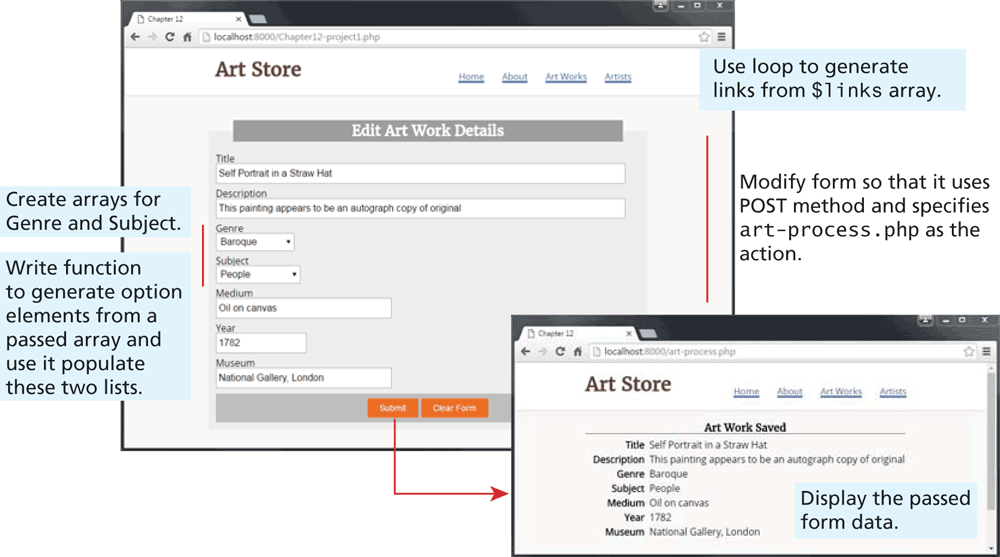
The First browser window has a tab titled Chapter 12. The address bar reads, localhost colon 8000 forward slash Chapter 12 hyphen project 1 dot p h p. The browser consists of a level-1 heading that reads, Art Store at the top left of the browser window. A navigation bar is at the right of the heading. The navigation bar consists of following tabs that read, Home, About, ArtWorks, and Artists. Note: Use loop to generate links from dollar links array. The form template titled Edit Art Work Details is shown below the heading. The form consists of seven textboxes placed one below the other and two buttons. Textbox 1 labeled Title contains the value, Self Portrait in Straw Hat. Textbox 2 labeled Description contains the value This painting appears to be an autograph copy of original. Textbox 3 labeled Genre has a dropdown list labeled Baroque. Textbox 4 labeled Subject has a dropdown list labeled People. A description that reads, Create arrays for Genre and Subject. Write function to generate option elements from a passed array and use it populate these two lists. is written at the left of textbox 3 and 4. Textbox 5 labeled Medium contains the value Oil on canvas. A description that reads, Modify form so that it uses POST method and specifies art-process dot p h p as the action is written at the right of textboxes 1 to 5. Textbox 6 labeled Year contains the value 1782. Textbox 7 labeled Museum contains the value National Gallery, London. The first button labeled Submit and the second button labeled Clear form are placed side-by-side at the bottom center of the form.
An arrow from the submit button points to the second browser window that has a tab titled Chapter 12. The address bar reads, localhost 6000 forward slash art hyphen process dot p h p. The browser contains a level-1 heading that reads, Art Store placed at the top left of the browser window. A navigation bar is at the right of the heading that consists of the tabs that read, Home, About, ArtWorks, and Artists. The output of the form in the first browser is shown below the heading as follows. A level-2 heading that reads, Art Work Saved is at the top center of the browser window. Seven rows of text with two columns are placed below the level-2 heading. Row 1, Column 1: Title. Row 1, Column 2: Self Portrait in Straw Hat. Row 2, Column 1: Description. Row 2, Column 2: This painting appears to be an autograph copy of original. Row 3, Column 1: Genre. Row 3, Column 2: Baroque. Row 4, Column 1: Subject. Row 4, Column 2: People. Row 5, Column 1: Medium. Row 5, Column 2: Oil on canvas. Row 6, Column 1: Year. Row 6, Column 2: 1782. Row 7, Column 1: Museum. Row 7, Column 2: National Gallery, London. A text that reads, Display the passed form data is written at the bottom right of the second browser window.
Back