Long description
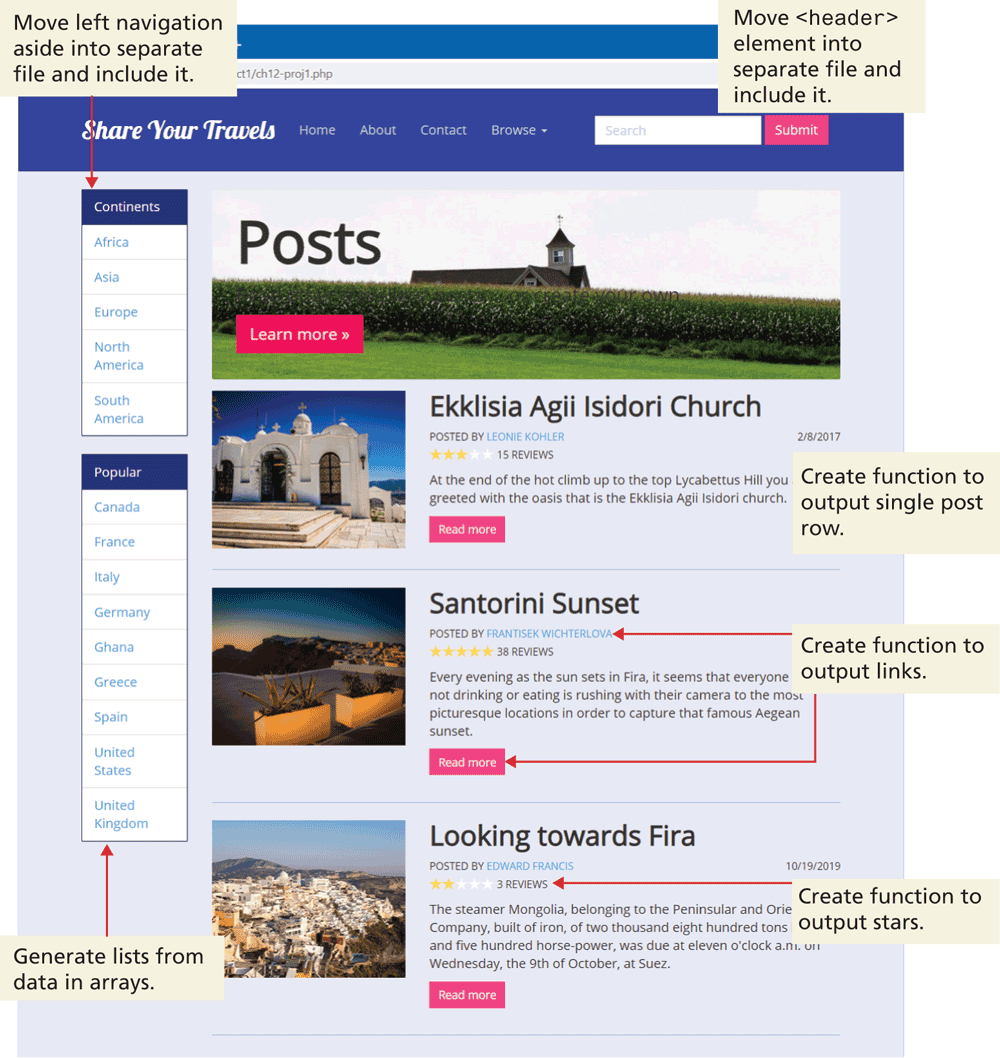
The browser window shows a horizontal navigation bar below the address bar. A level-2 heading that reads, Share Your Travels is placed at the left of the navigation bar followed by four tabs and a textbox with a Submit button at its right. The tabs read as follows: Home, About, Contact, and Browse. Move open angle bracket header close angle bracket element into separate file and include it is written above the horizontal navigation bar.
Two vertical navigation bars labeled Continents and Popular are placed one below the other at the bottom left of the horizontal navigation bar. An arrow labeled Move left navigation aside into separate file and include it points at the first vertical navigation bar labeled Continents. An arrow labeled Generate lists from data in arrays points at the list of tabs placed in the second vertical navigation bar labeled Popular. An image with a level-1 heading that reads, Posts is placed at the right side of the first vertical navigation bar. Three blocks that each contains an image at the left, a level-3 heading at the right, a link to the person’s profile who has posted the article that is mentioned in the block, the rating and reviews line for the article, a preview of the article, and a button labeled Read more are placed one below the other below the image with the heading Posts. The first block is marked Create function to output single post row. The second block has a double-headed arrow labeled Create function to output links that points at Read more and the link to the person’s profile who has posted the article. The third block has an arrow labeled Create function to output stars that points to the reviews line.
Back