Long description
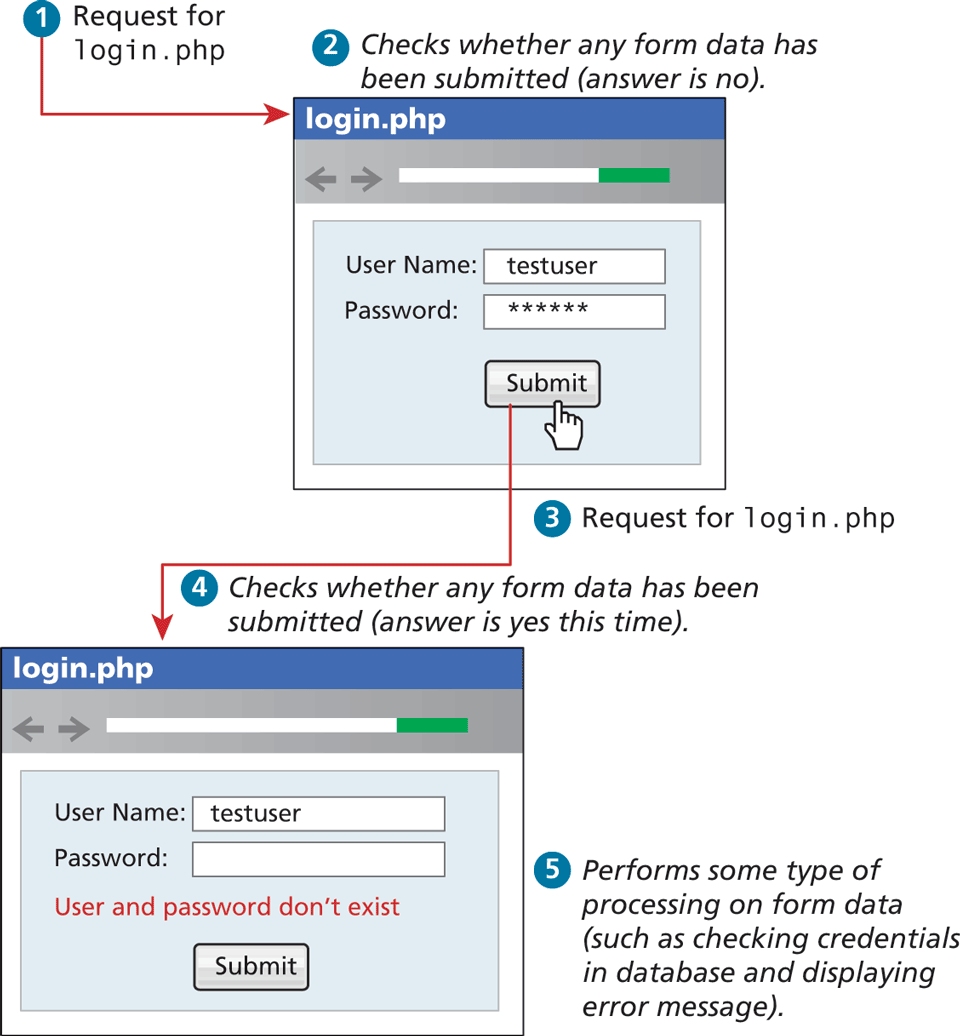
Step 1: Request for login dot p h p. Step 2: Checks whether any form data has been submitted (answer is no). The first browser window shows login dot p h p page that shows a form content. The form shows two textboxes and a button placed one below the other. A textbox labeled User Name colon contains the value "test user." A textbox labeled Password contains the value "asterisk asterisk asterisk asterisk asterisk asterisk." A "Submit" button is shown at the bottom of the form. Step 3: Request for login dot p h p. Step 4: Checks whether any form data has been submitted (answer is yes this time). The second browser window shows login dot p h p page that shows a form content. The form shows two textboxes and a button placed one below the other. A textbox labeled User Name colon contains the value "test user." A textbox labeled Password shows an empty textbox. An error message that reads, "User and password don't exist" is shown below the empty textbox. A "Submit" button is shown at the bottom of the form. Step 5: Performs some type of processing on form data (such as checking credentials in database and displaying error message).
Back