Long description
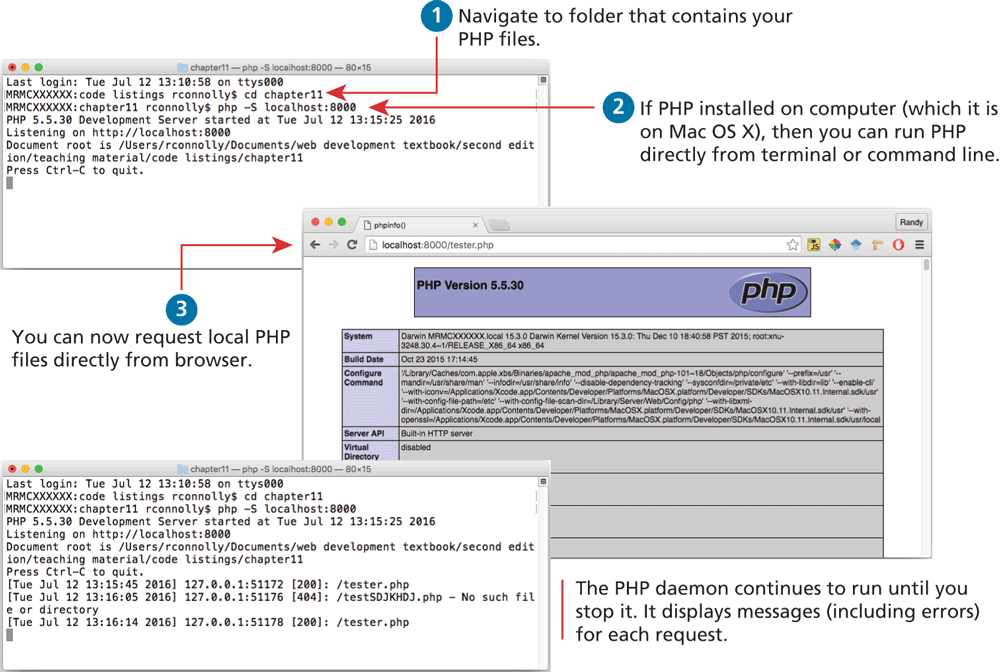
The first browser window titled chapter 11 — p h p – dollar localhost: 8000 — 80 by 15 is placed at the top left of the figure. The browser consists of 7 lines of text, which includes commands as well and reads as follows. Line 1: Last login colon Tue Jul 12 13 colon 10 colon 58 on t t y s 0 0 0. Line 2: M R M C X X X X X X colon code listings r Connolly dollar c d chapter11 open angle bracket. Line 3: M R M C X X X X X X colon chapter11 r Connolly dollar p h p hyphen S localhost colon 8000. Line 4: P H P 5 point 5 point 30 Development Server started at Tue Jul 12 13 colon 15 colon 25 2016. Line 5: Listening on H T T P colon forward slash forward slash localhost colon 8000. Line 6: Document root is forward slash Users forward slash r Connolly forward slash Documents forward slash web development textbook forward slash second edition forward slash teaching material forward slash code listings forward slash chapter11. Line 7: Press C t r l hyphen C to quit.
Step 1: Line 2 helps Navigate to folder that contains your P H P files.
Step 2: If P H P installed on computer open parenthesis which it is on Mac O S X close parenthesis, then you can run P H P directly from terminal or command line using line 3.
The second browser window titled p h p info open parenthesis close parenthesis is placed at the bottom right of the first browser window. The address bar reads, localhost colon 8000 forward slash tester dot p h p. The browser window consists of the information about the P H P version available in the local host and a table that shows details about the system, build date, configure command, server “A” P I, Virtual Directory, and so on.
Step 3: You can now request local P H P files directly from browser.
The third browser window is placed at the bottom left of the second browser. The browser window is titled chapter 11 — p h p – dollar localhost: 8000 — 80 by 15. The window consists of 10 lines of text, where the first seven lines are the same as the first browser window. The remaining lines read as follows. Line 8: open square bracket Tue Jul 12 13 colon 15 colon 45 2016 close square bracket 127 point 0 point 0 point 1 colon 51172 open square bracket 200 close square bracket colon forward slash tester dot p h p. Line 9: open square bracket Tue Jul 12 13 colon16 colon 05 2016 close square bracket 127 dot 0 dot 0 dot 1 colon 51176 open square bracket 404 close square bracket colon forward slash test S D J K H D J dot p h p hyphen No such file or directory. Line 10: open square bracket Tue Jul 12 13 colon 16 colon 14 2016 close square bracket 127 dot 0 dot 0 dot 1 colon 51178 open square bracket 200 close square bracket colon forward slash tester dot p h p.
Note: The P H P daemon continues to run until you stop it. It displays messages open parenthesis including errors close parenthesis for each request.
Back