Long description
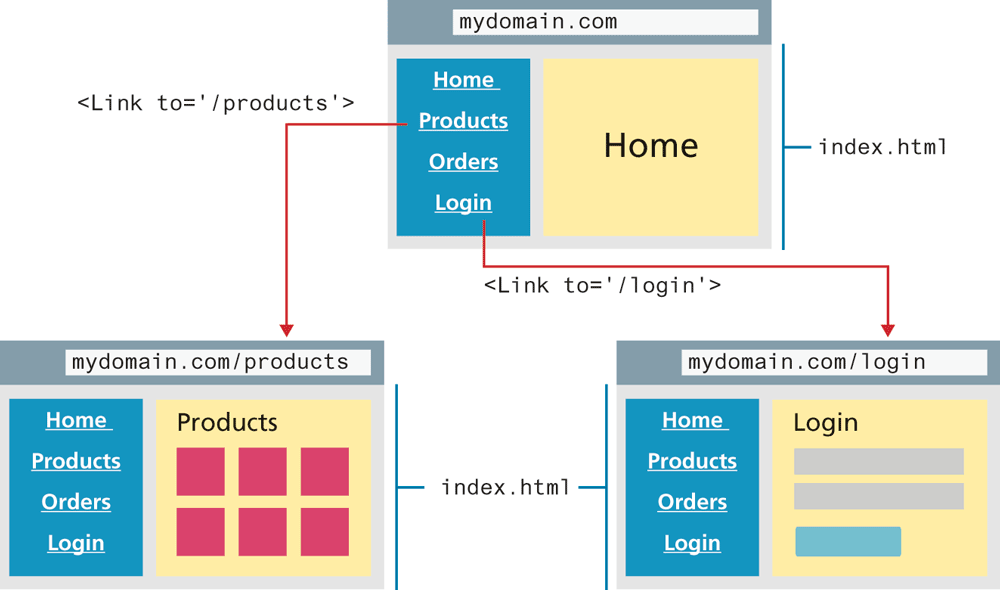
The first browser is placed at the top of the figure. The address textbox reads, mydomain dot com. The browser starts with 2 divisions that are placed side-by-side. Division 1 is a vertical navigation bar with the following tabs: Home, Products, Orders, and Login. Division 2 is a "Home" block. The two divisions are marked index dot h t m l.
An arrow labeled open angle bracket Link to equals open single quote forward slash products close single quote close angle bracket points from the Products tab to the second browser placed at the bottom left of the first browser.
The second browser has an address textbox that reads, mydomain dot com forward slash products. The browser starts with 2 divisions that are placed side-by-side. Division 1 is a vertical navigation bar that has the following tabs: Home, Products, Orders, and Login. Division 2 is titled "Products" and has with 6 square blocks placed in two rows.
An arrow labeled open angle bracket Link to equals open single quote forward slash login close single quote close angle bracket points from the Login tab to the third browser placed at the bottom right of the first browser.
The third browser has an address textbox that reads, mydomain dot com forward slash login. The browser starts with 2 divisions that are placed side-by-side. Division 1 is a vertical navigation bar that has the following tabs: Home, Products, Orders, and Login. Division 2 is a form content titled Login. Three rectangular boxes that represent two textboxes and a button are placed one below the other below the title.
The divisions in the second and third browser are marked index dot h t m l.
Back