Long description
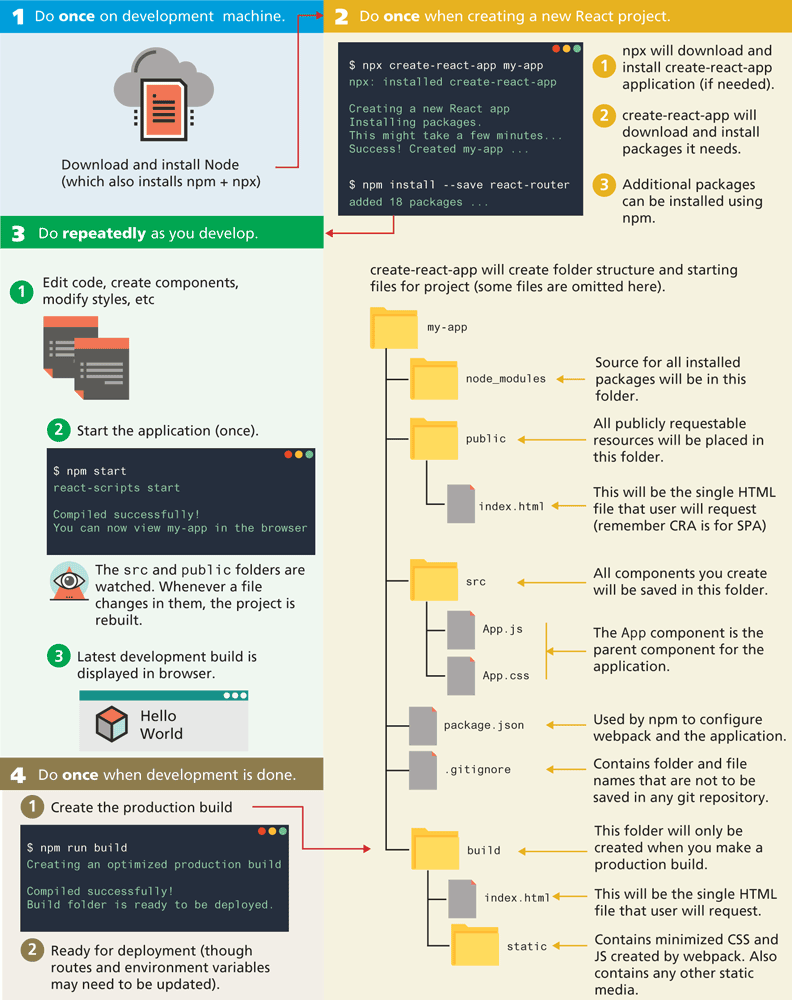
Step 1: Do once on development machine.
Download and install Node open parenthesis which also installs n p m plus n p x close parenthesis.
Step 2: Do once when creating a new React project.
A browser with the n p m package is shown. The package reads as follows. dollar n p x create-react hyphen app my hyphen app. n p x colon installed create hyphen react hyphen app. Creating a new React app. Installing packages. This might take a few minutes ellipsis. Success! Created my hyphen app. dollar n p m install hyphen hyphen save react hyphen router. added 18 packages.
Note: 1 n p x will download and install create-react-app application open parenthesis if needed close parenthesis.
2 create hyphen react hyphen app will download and install packages it needs.
3 Additional packages can be installed using n p m.
Step 3: Do repeatedly as you develop.
The following steps are to be repeated as the react app is developed.
Edit code, create components, modify styles, etc.
Start the application open parenthesis once close parenthesis.
A browser with the start package is shown. The package reads as follows. dollar n p m start. react hyphen scripts start. Compiled successfully! You can now view my hyphen app in the browser.
Note: The s r c and public folders are watched. Whenever a file changes in them, the project is rebuilt.
Latest development build is Latest development build is displayed in a browser that shows a cube and a text that reads, "Hello World."
Step 4: Do once when development is done.
The following steps are performed once the development is completed.
Create the production build.
A browser with a command to run scripts is shown. The command reads as follows. dollar n p m run build. Creating an optimized production build. Compiled successfully! Build folder is ready to be deployed.
Ready for deployment open parenthesis though routes and environment variables may need to be updated close parenthesis.
The create hyphen react hyphen app will create a folder structure and starting files for project open parenthesis some files are omitted here close parenthesis. The folder structure is shown as follows.
Main folder: my hyphen app.
Subfolder 1: node underscore modules. Source for all installed packages will be in this folder.
Subfolder 2: public. All publicly requestable resources will be placed in this folder.
The public subfolder has the index dot h t m l file. This will be a single H T M L file that the user will request open parenthesis remember C R “A” is for S P “A” close parenthesis.
Subfolder 3: s r c. All components you create will be saved in this folder.
The s r c subfolder has the App dot j s file and App dot c s s file. The App component is the parent component for the application.
The main folder named my hyphen app has a package dot j son file that is used by n p m to configure webpack and the application.
The main folder also has a dot git ignore file that contains a folder and file names that are not to be saved in any git repository.
Subfolder 4: build. This folder will only be created when you make a production build as shown in step 4.
The build subfolder has an index dot h t m l file. This will be a single H T M L file that the user will request.
The build subfolder has a folder named static. The static folder contains minimized C S S and J S created by webpack. The folder also contains any other static media.
Back