Long description
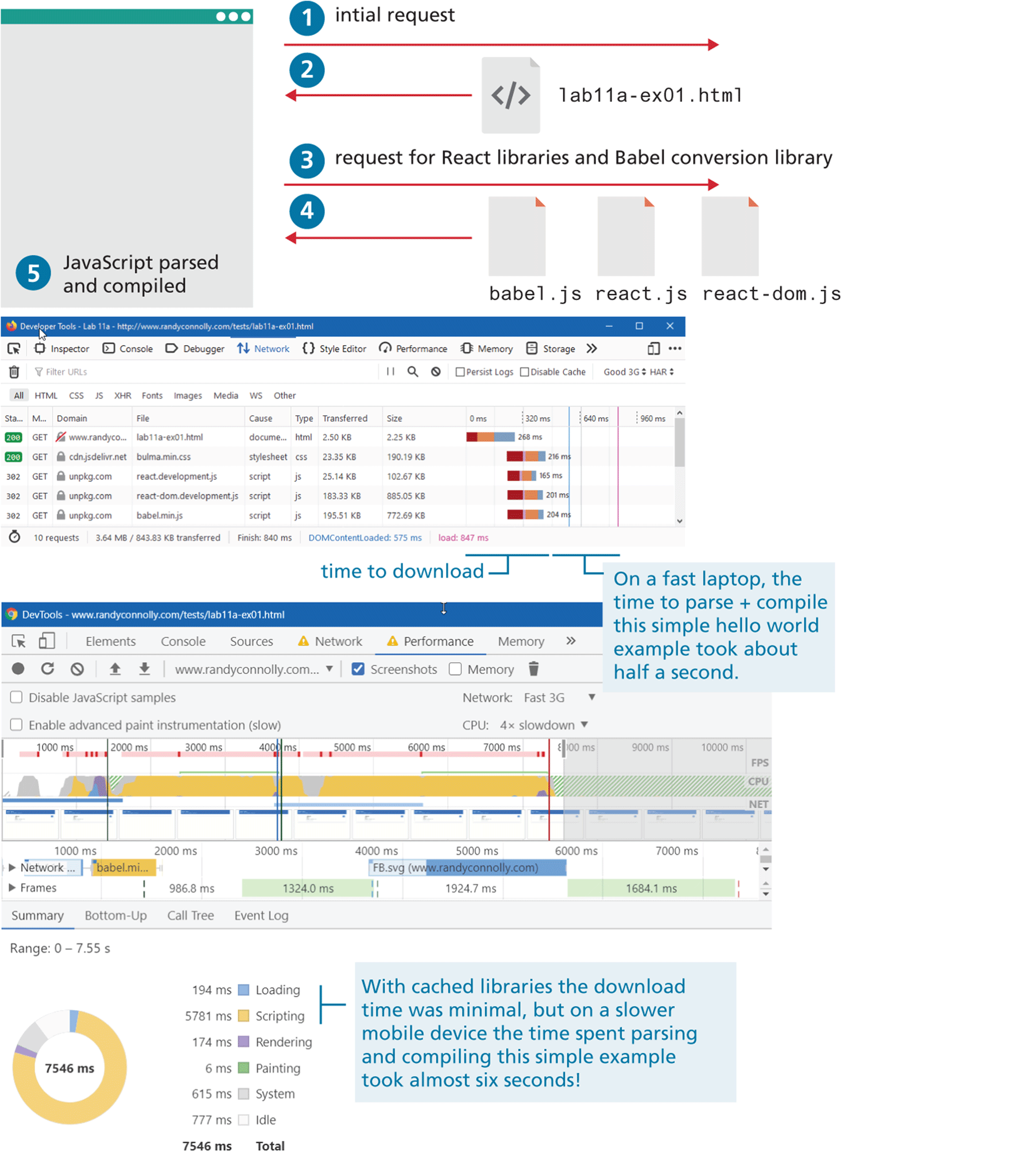
The five steps are shown at the top of the figure. Step 1: initial request. An arrow that points from left to right is placed below step 1. Step 2: A page labeled Open angular bracket forward slash close angular bracket lab 11 “a” hyphen ex 01 dot html is placed below step 1. An arrow points from the page to the left. Step 3: An arrow labeled request for React libraries and Babel conversion library points from left to right. Step 4: Three pages labeled babel dot j s, react dot j s , and react hyphen dom dot j s are placed side-by-side, below step 3. An arrow that points from the three pages to the left. Step 5: JavaScript parsed and compiled is placed inside a browser that is at the left of the figure. A browser labeled Developer Tools showing a list of script files, stylesheets, h t m l documents, their size, and download speed progress bars are placed below the five steps. Time to download is mentioned as Load colon 847 m s at the bottom of the browser. Note: On a fast laptop, the time to parse plus compile this simple hello world example took about half a second. The second browser labeled DevTools is placed below the browser labeled Developer Tools. The summary of the duration of the time taken by the network to download the files labeled babel dot m i ellipsis and F B dot s v g are mentioned in the browser along with the progress bars. Note: Range: o to 7.55 s is written below second browser. The progress chart is placed below the second browser. Two concentric circles represent the progress chart. Nearly 75 percent of the progress chart is colored in yellow. Nearly 15 percent of the progress chart is colored in white. Nearly 10 percent of the progress chart is colored in grey. Nearly 3 percent of the progress chart is colored in blue. Nearly 2 percent of the progress chart is colored purple. 7546 m s is written at the center of the concentric circles. Six small squares are placed one below the other at the right side of the chart. The first square colored blue is labeled Loading and has a value 194 m s. The second square colored yellow is labeled Scripting and has a value 5781 m s. The third square colored purple is labeled Rendering and has a value 174 m s. The fourth square colored green is labeled Painting and has a value 6 m s. The fifth square colored grey is labeled System and has a value 194 m s. The sixth square colored white is labeled Idle and has a value 777 m s. The total of the values sums up to 7546 m s. Note: With cached libraries the download time was minimal, but on a lower mobile device the time spend parsing and compiling this simple example took almost six seconds! is written at the right side of the squares.
Back