Long description
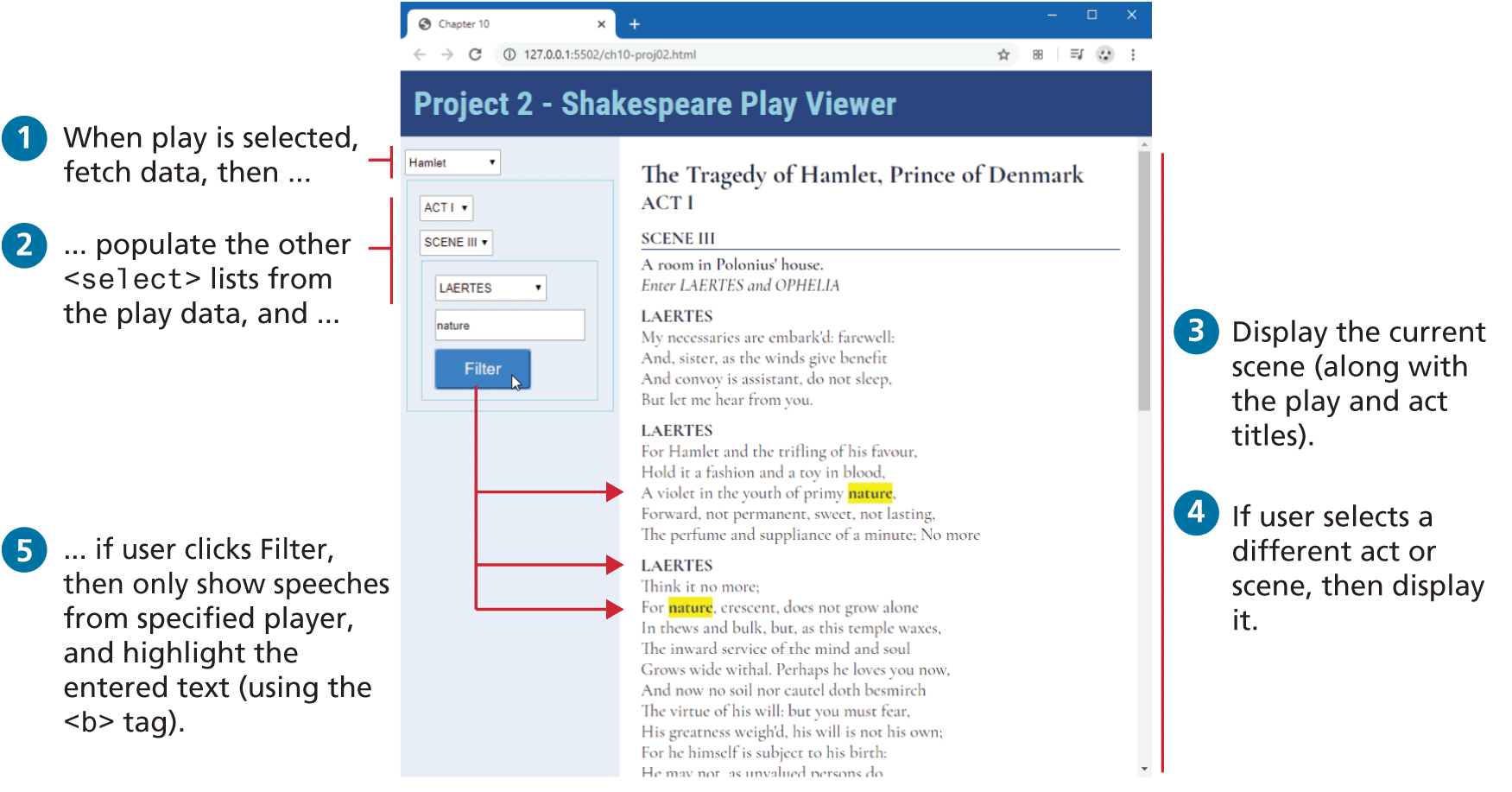
The browser window has a tab titled Chapter 10. The address bar reads, "127 dot 0 dot 0 dot 1 colon 5502 forward slash c h 10 hyphen proj 02 dot h t m l". Division 1 consists of 4 dropdown lists, a textbox, and a button are placed one below the other. Division 1: The first dropdown list with the value "Hamlet" is aligned to the top left at indentation level 0. The second dropdown list with the value "ACT Roman numeral 1" is aligned to the left at indentation level 1. The third dropdown list with the value "SCENE Roman numeral 3" is aligned to the left at indentation level 1. The fourth dropdown list with the value "LAERTES" is aligned to the left at indentation level 2. The textbox with the value "nature" is aligned to the left at indentation level 2. The button labeled "Filter" is aligned to the left at indentation level 2. Step 1: When play is selected, fetch data, then ellipsis corresponds to the dropdown list with the value Hamlet. Step 2: ellipsis populate the other open angle bracket select close angle bracket lists from the play data, and ellipsis corresponds to the dropdown lists with the values ACT Roman numeral 1, SCENE Roman numeral 3, and LAERTES. Arrows from the Filter button points to the occurrences of nature and LAERTES in division 2.
Division 2 placed at the right of division 1 consists of a level-1 heading at the top that reads "The Tragedy of Hamlet, Prince of Denmark ACT Roman numeral 1". The content relevant to the scene selected in division 1 is populated below the heading. Step 3: Display the current scene (along with the play and act titles). Step 4: If user selects a different act or scene, then display it. Steps 3 and 4 correspond to division 2. Step 5: ellipsis if user clicks Filter, then only show speeches from specified player, and highlight the entered text (using the open angle bracket b close angle bracket tag). Step 5 corresponds to the Filter button in division 1.
Back