Long description
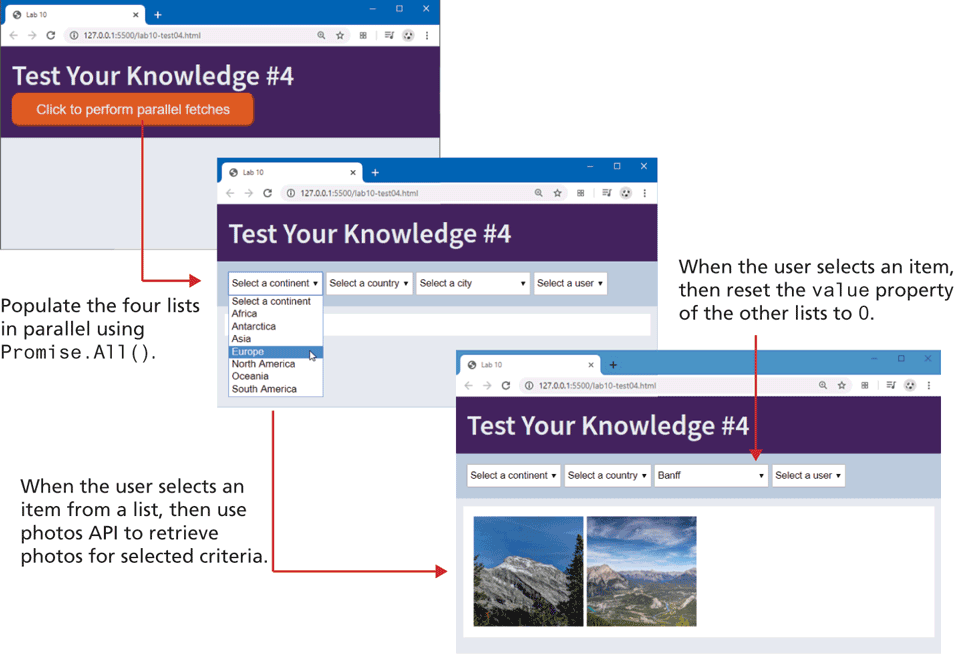
The first browser window has a tab titled Lab 10. The address bar reads, 127 dot 0 dot 0 dot 1 colon 5500 slash lab 10 hyphen test 0 4 dot h t m l. The browser window has a level-heading and a button. The level-1 text heading reads, Test Your Knowledge hash 4. The button labeled Click to perform parallel fetches is placed below the heading.
The Second browser window is placed at the bottom right of the first browser window and has a tab titled Lab 10. The address bar reads, 127 dot 0 dot 0 dot 1 colon 5500 slash lab 10 hyphen test 0 4 dot h t m l. The browser window has level-1 text heading and four dropdown menus. The level-1 heading reads, Test Your Knowledge hash 4. The dropdown menus are placed side-by-side below the heading. The first dropdown menu is labeled Select a continent and shows the list of seven continents, namely, Africa, Antarctica, Asia, Europe, North America, Oceania, and South America. A mouse object is shown over Europe, which is highlighted. The second dropdown menu is labeled Select a country. The third dropdown menu is labeled reads Select a city. The fourth dropdown menu is labeled Select a user. An arrow labeled Populate the four lists in parallel using Promise dot All open parenthesis close parenthesis points from the button in the first browser window to the dropdown menus in the second browser window.
The Third browser window is placed at the bottom right of the second browser window and has a tab titled Lab 10. The address bar reads, 127 dot 0 dot 0 dot 1 colon 5500 slash lab 10 hyphen test 0 4 dot h t m l. A level-1 text heading that reads, Test Your Knowledge hash 4 is placed at the top left of the third browser window. The browser window consists of four dropdown menus and three images. The dropdown menus are placed side-by-side below the heading. The first dropdown menu is labeled Select a continent. The second dropdown menu is labeled Select a country. The third dropdown menu is labeled Banff. The fourth dropdown menu is labeled Select a user. An arrow labeled When the user selects an item, then reset the value property of the other lists to 0 points to the third dropdown menu. Three equal sized images showing landscapes are placed below the dropdown menus. An arrow labeled When the user selects an item from a list, then use photos A P I to retrieve photos for selected criteria points from Europe in the dropdown menu list in the second browser window to the images in the third browser window.
Back