Long description
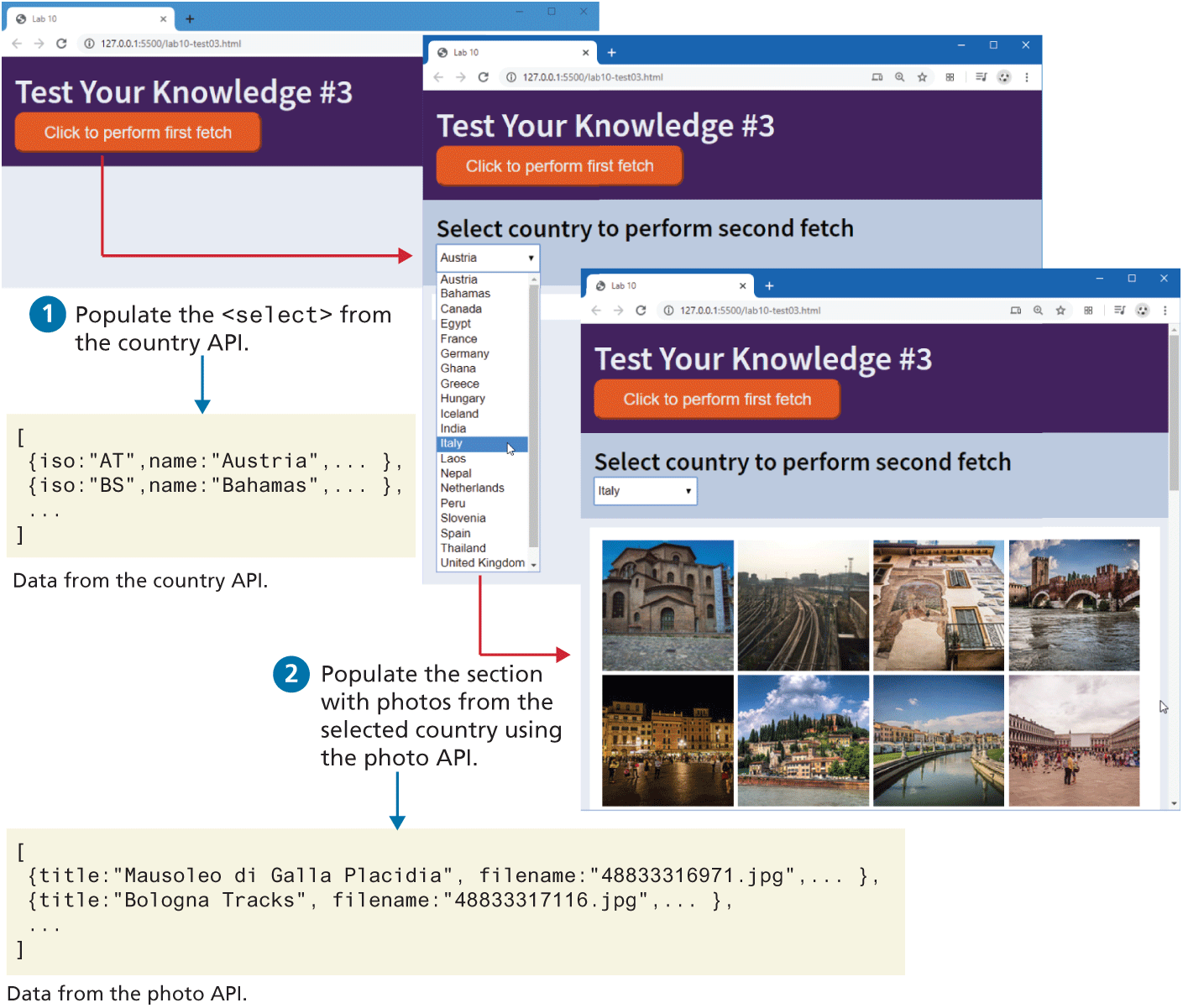
The browser windows have a tab titled Lab 10. The address bars read, "127 dot 0 dot 0 dot 1 colon 5500 forward slash lab 10 hyphen test 03 dot h t m l".
The first browser window consists of a level-1 heading and a button. The level-1 heading that reads, "Test Your Knowledge hash 3" is shown at the top left of the browser window. A button labeled "Click to perform first fetch" is placed below the heading.
The second browser window is placed at the bottom right of the first browser window and consists of a level-1 heading, a level-2 heading, a button, and a dropdown list. The level-1 heading that reads, "Test Your Knowledge hash 3"is shown at the top left of the browser window . A button labeled "Click to perform first fetch" is placed below the heading. The level-2 heading that reads, "Select country to perform second fetch" is placed below the button. The dropdown list is placed below the with a list of countries in alphabetical order. A mouse cursor is hovered over Italy, which is highlighted, indicating its selection. An arrow points from the button in the first browser window to the right at the dropdown list in the second browser window.
The second browser window is placed at the bottom right of the first browser window and consists of a level-1 heading, a level-2 heading, a button, a dropdown list, and 8 images. The level-1 heading that reads, "Test Your Knowledge hash 3" is shown at the top left of the browser window. A button labeled "Click to perform first fetch" is placed below the heading. The level-2 heading that reads, "Select country to perform second fetch" is placed below the button. A dropdown list with the value "Italy" is placed below the level-2 heading. 8 images are placed in 2 rows below the dropdown list.
The first block of code is shown below the first browser window and reads as follows. Line 1: open square bracket at indentation level 0. Line 2: open curly brace iso colon open double quotes “A” T close double quotes comma name colon open double quotes Austria close double quotes comma ellipsis close curly brace comma at indentation level 1. Line 3: open curly brace iso colon open double quotes B S close double quotes comma name colon open double quotes Bahamas close double quotes comma ellipsis close curly brace comma at indentation level 1. Line 4: Ellipsis at indentation level 1. Line 5: close square bracket at indentation level 0. An arrow labeled 1 Populate the open angle bracket select close angle bracket from the country “A” P I points to the first block of code. The first block of code refers to the data from the country “A” P I.
The second block of code is shown below the second browser window and reads as follows. Line 1: open square bracket at indentation level 0. Line 2: open curly brace title colon open double quotes Mausoleo di Galla Placidia close double quotes comma filename colon open double quotes 48833316971 dot j p g close double quotes comma ellipsis close curly brace comma at indentation level 1. Line 3: open curly brace title colon open double quotes Bologna Tracks close double quotes comma filename colon open double quotes 48833317116 dot j p g close double quotes comma ellipsis close curly brace comma at indentation level 1. Line 4: Ellipsis at indentation level 1. Line 5: close square bracket at indentation level 0. An arrow labeled 2 Populate the section with photos from the selected country using the photo API points to the second block of code. The second block of code refers to the data from the photo “A” P I.
Back