Long description
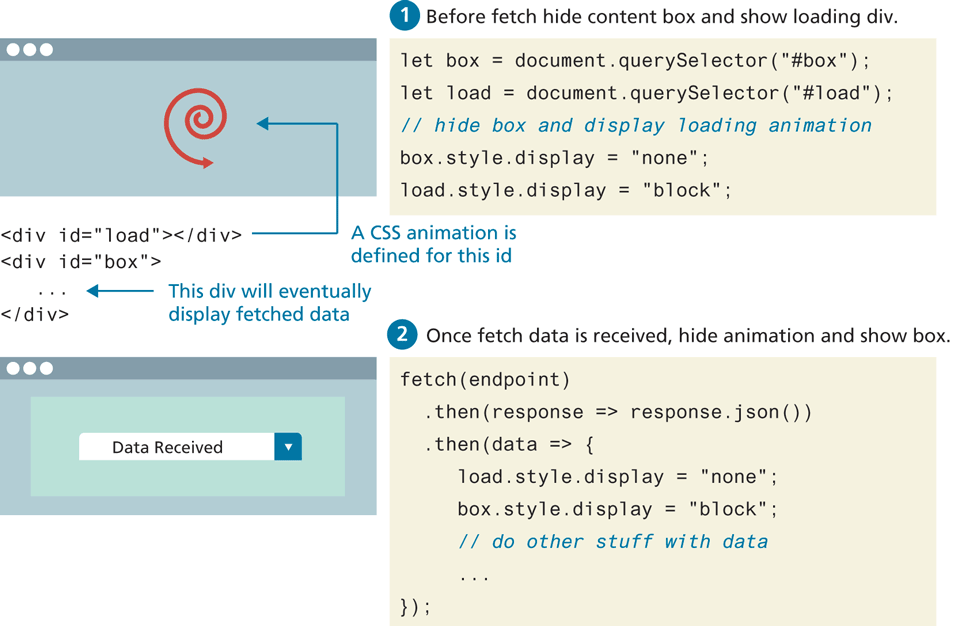
The first block of code is labeled 1 Before fetch hide content box and show loading div. The block of code reads as follows. Line 1: StartCommand let EndCommand box equals document dot querySelector open parenthesis open double quotes hash box close double quotes close parenthesis semicolon at indentation level 0. Line 2: StartCommand let EndCommand load equals document dot querySelector open parenthesis open double quotes hash load close double quotes close parenthesis semicolon at indentation level 0. Line 3: forward slash forward slash hide box and display loading animation at indentation level 0. Line 4: box dot style dot display equals open double quotes none close double quotes semicolon at indentation level 0. Line 5: load dot style dot display equals open double quotes block close double quotes semicolon at indentation level 0.
The first browser is placed at the left side of the first block of code. A spiral arrow that points in the counter clockwise direction is at the center of the browser.
The second block of code placed below the first browser reads as follows. Line 1: open angle bracket div i d equals open double quotes load close double quotes close angle bracket open angle bracket forward slash div close angle bracket at indentation level 1. Line 2: open angle bracket div i d equals open double quotes box close double quotes close angle bracket at indentation level 1. Line 3: Ellipsis. Line 4: open angle bracket forward slash div close angle bracket. An arrow labeled A C S S animation is defined for this i d points from line 1 to the spiral arrow in the first browser. An arrow labeled This div will eventually display fetched data points to Line 3.
The third block of code placed below the first block of code is labeled 2 Once fetch data is received, hide animation and show box. The block of code reads as follows. Line 1. fetch open parenthesis endpoint close parenthesis at indentation level 0. Line 2: dot then open parenthesis response equals arrow function response dot j son open parenthesis close parenthesis close parenthesis at indentation level 1. Line 3: dot then open parenthesis data arrow function open curly brace at indentation level 1. Line 4: load dot style dot display equals open double quotes none close double quotes semicolon at indentation level 2. Line 5: box dot style dot display equals open double quotes block close double quotes semicolon at indentation level 2. Line 6: forward slash forward slash do other stuff with data at indentation level 2. Line 7: close curly brace close parenthesis semicolon at indentation level 0.
The second browser is placed below the second block of code, at the left of the third block of code. The browser consists of a textbox with a dropdown menu. The textbox reads "Data Received".
Back