Long description
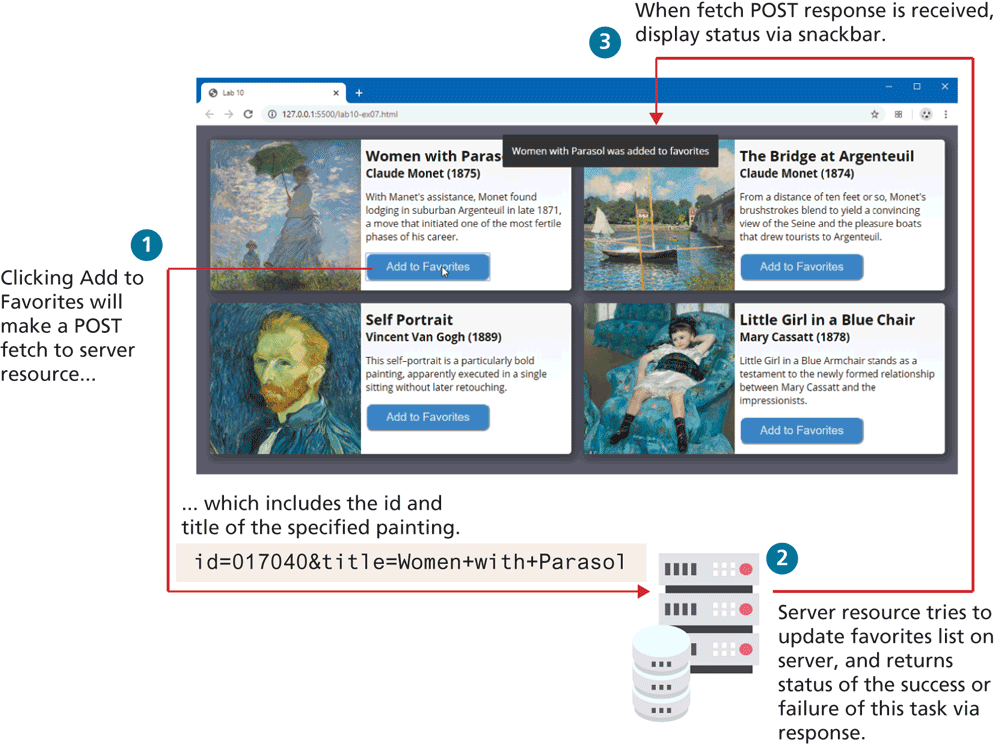
The figure consists of a browser window titled Lab 10.The address bar reads, 127 dot 0 dot 0 dot 1 colon 5500 forward slash lab10 hyphen ex07 dot h t m l. The browser window consists of four blocks of data. Each block has an image of a painting at the left and its details on the right. A button labeled Add to Favorites is placed below the details in each of the blocks.
The following steps illustrate the process flow for fetching data using the POST method.
Step 1: Clicking Add to Favorites will make a POST fetch to server resource which includes the i d and title of the specified painting. i d equals 0 1 7 0 4 0 ampersand title equals Women plus with plus Parasol.
Step 2: Server resource tries to update favorites list on the server, and returns a status of success or failure of this task via response.
Step 3: When fetch POST response is received, display status via snackbar.
The response in step 3 is shown as a message on the browser window and reads as follows: Women with Parasol was added to favorites.
Back