Long description
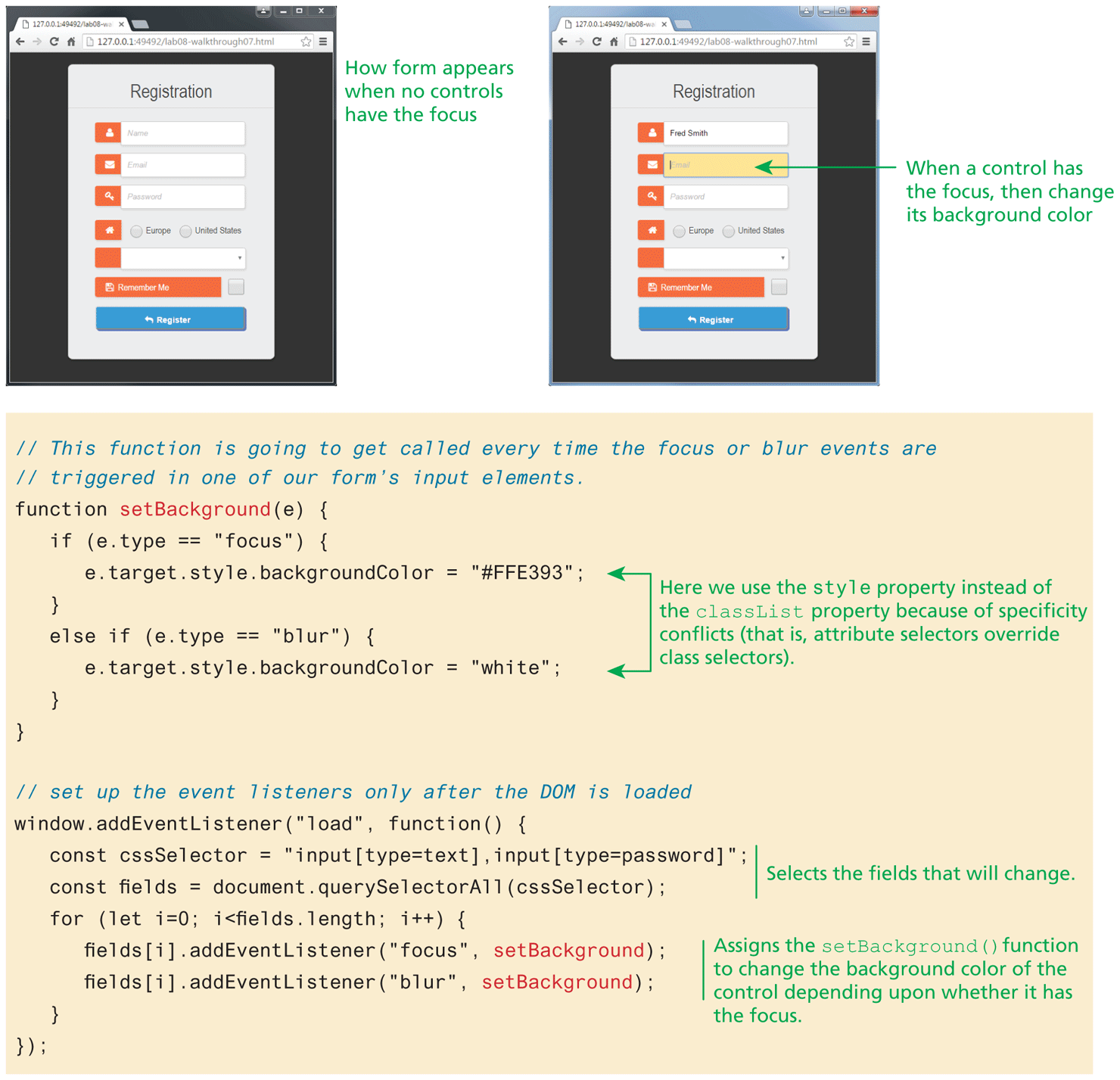
The first browser window on the top left side of the figure has a tab opened that shows a form. The form is titled Registration at the top center and consists of five textboxes, two radio buttons, two buttons, and a checkbox. The first textbox has an image of a human at the left and has the placeholder value Name. The first textbox is placed first at the top of the form below the title. The second textbox has an image of a mail at the left and has the placeholder value Email. The second textbox is placed below the first textbox. The third textbox has an image of a key at the left and has the placeholder value Password. The third textbox is placed below the second textbox. An image of a house is placed below the third textbox. The two radio buttons labeled Europe and Unites States are placed side-by-side next to the image of the house. The fourth textbox is a dropdown textbox that has a blank area at the left is placed below the image of the house. The first button labeled Remember me with an image of a floppy disk at the left is placed below the fourth textbox. The checkbox is placed at the right of the fourth textbox. The second button labeled Register with the symbol of a curved arrow is placed below the first button. The contents in button are centered. Note: The first browser window shows How a form appears when no controls have the focus.
The second browser window is placed at the right of the first browser window and has a tab opened that shows a form. The form is titled Registration at the top center and consists of five textboxes, two radio buttons, two buttons, and a checkbox. The first textbox has an image of a human at the left and has the value Fred Smith. The first textbox is placed first under the title of the form. The second textbox has an image of a mail at the left and has the placeholder value Email. The second textbox is placed below the first textbox. The second textbox is highlighted and an arrow labeled When a control has the focus, then change its background color points to the textbox. The third textbox has an image of a key at the left and has the placeholder value Password. The third textbox is placed below the second textbox. An image of a house is placed below the third textbox. The two radio buttons labeled Europe and Unites States are placed side-by-side next to the image of the house. The fourth textbox is a dropdown textbox that has a blank area at the left is placed below the image of the house. The first button labeled Remember me with an image of a floppy disk at the left is placed below the fourth textbox. The checkbox is placed at the right of the fourth textbox. The second button labeled Register with the symbol of a curved arrow is placed below the first button. The contents in button are centered. The blocks of code is placed below the browser windows. The first block of JavaScript code consists of 10 lines of code. Line 1: forward slash forward slash This function is going to get called every time the focus or blur events are at indentation level 0. Line 2: forward slash forward slash triggered in one of our form's input elements at indentation level 0. Line 3: function set Background open parenthesis e close parenthesis open curly brace at indentation level 0. Line 4: StartCommand if EndCommand open parenthesis e dot type equals equals open double quotes focus close double quotes close parenthesis open curly brace at indentation level 1. Line 5: e dot target dot style dot background Color equals open double quotes hash F F E 3 9 3 close double quotes semicolon at indentation level 2. Line 6: close curly brace at indentation level 1. Line 7: StartCommand else if EndCommand open parenthesis e dot type equals equals open double quotes blur close double quotes close parenthesis open curly brace at indentation level 1. Line 8: e dot target dot style dot backgroundColor equals open double quotes white close double quotes semicolon at indentation level 2. Line 9: close curly brace at indentation level 1. Line 10: close curly brace at indentation level 0. A double-headed arrow labeled Here we use the style property instead of the classList property because of specificity conflicts open parenthesis that is, attribute selectors override class selectors close parenthesis points to line 5 and 8.
The second block of code is placed below the first block of code and consists of 9 lines of code. Line 1. forward slash forward slash set up the event listeners only after the DOM is loaded at indentation level 0. Line 2: window dot addEventListener open parenthesis open double quotes load close double quotes comma function open parenthesis close parenthesis open curly brace at indentation level 0. Line 3: var c s s Selector equals open double quotes input open square bracket type equals text close square bracket comma input open square bracket type equals password close square bracket close double quotes semicolon at indentation level 1. Line 4: var fields equals document dot querySelectorAll open parenthesis c s s Selector close parenthesis semicolon at indentation level 1. Line 3 and 4 are collectively labeled Selects the fields that will change. Line 5: StartCommand for EndCommand open parenthesis StartCommand let EndCommand i equals 0 semicolon i less than fields dot length semicolon i increment close parenthesis open curly brace at indentation level 1. Line 6: fields open square bracket i close square bracket dot addEventListener open parenthesis open double quotes focus close double quotes comma setBackground close parenthesis semicolon at indentation level 2. Line 7: fields open square bracket i close square bracket dot addEventListener open parenthesis open double quotes blur close double quotes comma setBackground close parenthesis semicolon at indentation level 2. Line 6 and 7 are collectively labeled Assigns the set Background open parenthesis close parenthesis function to change the background color of the control depending upon whether it has the focus. Line 8: close curly brace at indentation level 1. Line 9: close curly brace close parenthesis semicolon at indentation level 0.
Back