Long description
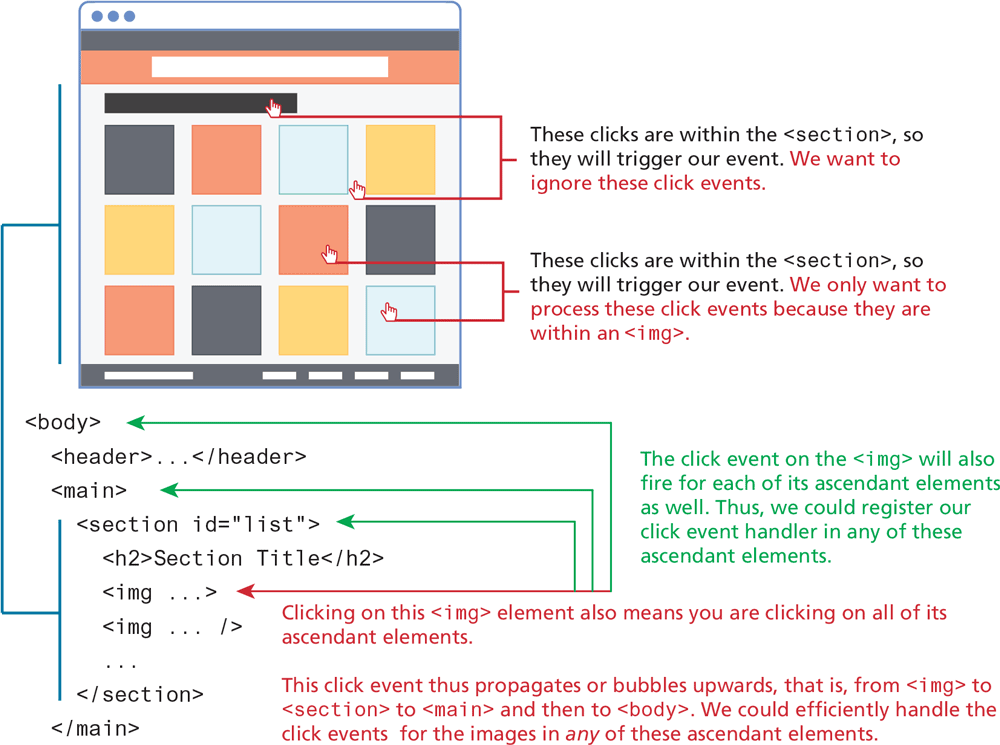
The browser consists of a header at the top, a rectangular section below it, and three rows of square sections placed in four columns below the rectangular section with equal space between them, and a footer at the bottom. A link select cursor is placed over the rectangular section and a link select cursor is placed in the space between the third and fourth square sections in the first row. Note: The link select cursors or clicks are within the open angle bracket section close angle bracket, so they will trigger our event. We want to ignore these click events. Two link select cursors are placed each in the third square section in the second row and the fourth square section in the third row. Note: The link select cursors or clicks are within the open angle bracket section close angle bracket, so they will trigger our event. We only want to process these click events because they are within an open angle bracket i m g close angle bracket.
The block of code placed below the browser reads as follows. Line 1: open angle bracket body close angle bracket at indentation level 0. Line 2: open angle bracket header close angle bracket ellipsis open angle bracket forward slash header close angle bracket at indentation level 1. Line 3: open angle bracket main close angle bracket at indentation level 1. Line 4: open angle bracket section i d equals open double quotes list close double quotes close angle bracket open angle bracket at indentation level 2. Line 5: open angle bracket h 2 close angle bracket Section Title open angle bracket forward slash h 2 close angle bracket at indentation level 3. Line 6: open angle bracket i m g ellipsis close angle bracket at indentation level 3. Line 7: open angle bracket i m g ellipsis forward slash close angle bracket at indentation level 3. Line 8: open angle bracket forward slash section close angle bracket at indentation level at 2. Line 9: open angle bracket forward slash main close angle bracket at indentation level 1. Lines 4 to 8 correspond to the sections placed in the browser. Line 1, 3, and 4 indicates that The click event on the open angle bracket i m g close angle bracket will also fire for each of its ascendant elements as well. Thus, we could register our click event handler in any of these ascendant elements. Line 6 indicates that Clicking on this open angle bracket i m g close angle bracket element also means you are clicking on all of its ascendant elements. This click event thus propagates or bubbles upwards, that is, from open angle bracket figure close angle bracket to open angle bracket section close angle bracket to open angle bracket main close angle bracket and then to open angle bracket body close angle bracket. We could efficiently handle the click events for the images in any of these ascendant elements.
Back