Long description
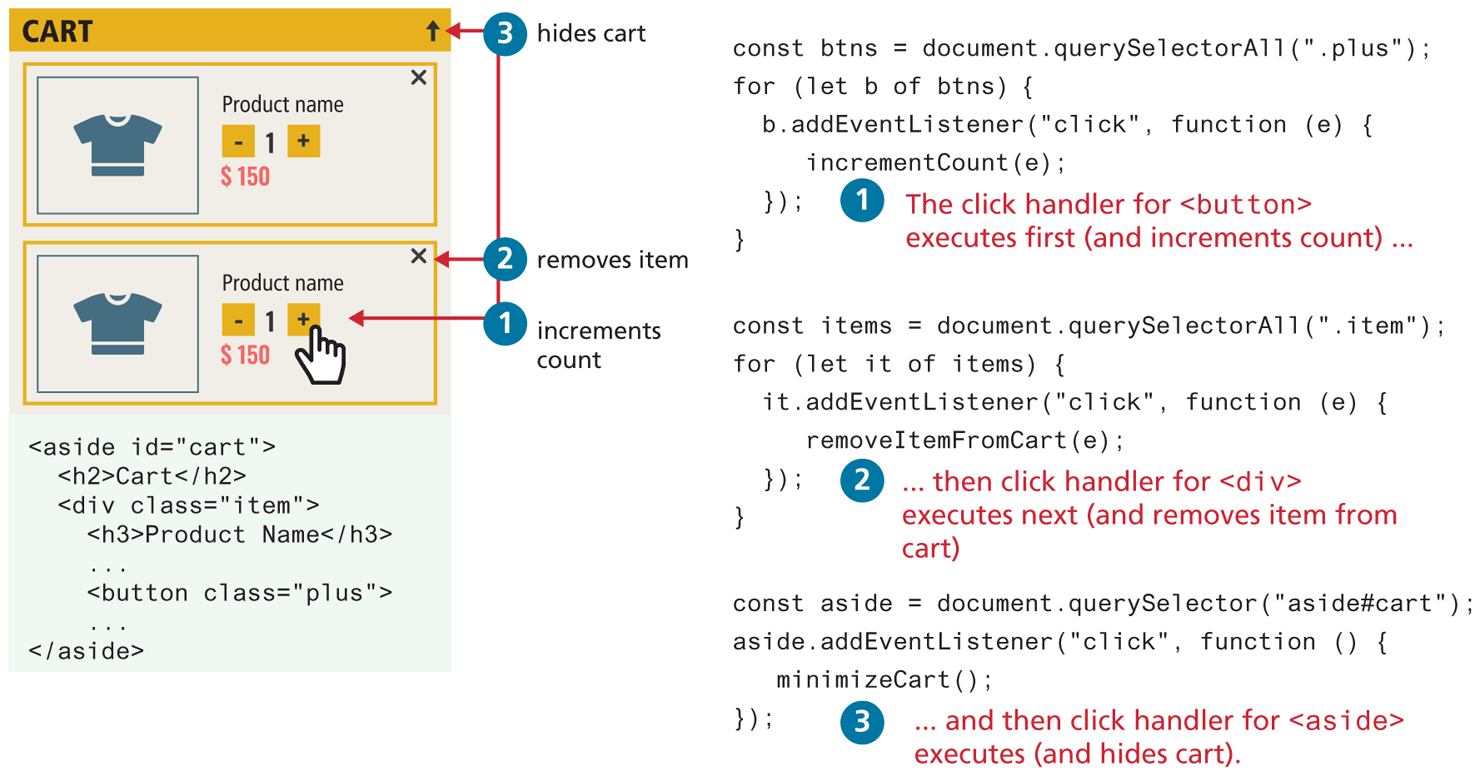
Set 1 consists of six lines of code. Line 1: const btns equals document dot querySelectorAll open parenthesis open double quotes dot plus close double quotes close parenthesis semicolon, at indentation level 0. Line 2: StartCommand for EndCommand open parenthesis StartCommand let EndCommand b of bins open parenthesis open curly brace, at indentation level 0. Line 3: b dot addEventListener open parenthesis open double quotes click close double quotes comma function open parenthesis e close parenthesis open curly brace, at indentation level 1. Line 4: incrementCount open parenthesis e close parenthesis semicolon, at indentation level 1. Line 5: close curly brace close parenthesis semicolon, at indentation level 1. Line 6: close curly brace, at indentation level 0.
Note: 1 The click handler for open angle bracket button close angle bracket executes first (and increments count) ellipsis.
Set 2 consists of six lines of code. Line 1: const items equals document dot querySelectorAll open parenthesis open double quotes dot item close double quotes close parenthesis semicolon, at indentation level 0. Line 2: StartCommand for EndCommand open parenthesis StartCommand let EndCommand it of items close parenthesis open curly brace, at indentation level 0. Line 3: it dot addEventListener open parenthesis open double quotes click close double quotes comma function open parenthesis e close parenthesis open curly brace, at indentation level 1. Line 4: removeItemFromCart open parenthesis e close parenthesis semicolon, at indentation level 2. Line 5: close curly brace close parenthesis semicolon, at indentation level 1. Line 4: close curly brace, at indentation level 0. Note: 2 ellipsis then click handler for open angle bracket div close angle bracket executes next (and removes item from cart).
Set 3 consists of four lines of code. Line 1: const aside equals document dot querySelector open parenthesis open double quotes aside hyphen cart close double quotes close parenthesis semicolon , at indentation level 0. Line 2: aside dot addEventListener open parenthesis open double quotes click close double quotes comma function open parenthesis close parenthesis open curly brace , at indentation level 0. Line 3: minimizeCart open parenthesis close parenthesis semicolon, at indentation level 2. Line 3: close curly brace close parenthesis semicolon, at indentation level 0.
Note: 3 ellipsis and then click handler for open angle bracket aside close angle bracket executes (and hides cart).
Set 4 consists of eight lines of code. Line 1: open angle bracket aside i d equals open double quotes cart close double quotes close angle bracket, at indentation level 0. Line 2: open angle bracket h 2 close angle bracket Cart open angle bracket forward slash h 2 close angle bracket, at indentation level 1. Line 3: open angle bracket div class equals open double quotes item close double quotes close angle bracket, at indentation level 1. Line 4: open angle bracket h 3 close angle bracket Product Name open angle bracket forward slash h3 close angle bracket, at indentation level 2. Line 5: Ellipsis.
Line 6: open angle bracket button class equals open double quotes plus close double quotes close angle bracket, at indentation level 2. Line 7: Ellipsis. Line 8: open angle bracket forward slash aside close angle bracket, at indentation level 0.
The browser window is titled: CART with an upward arrow symbol on the top right, labeled: 3 hides cart. The browser window consists of two divs placed one below the another. The first div shows an image on the left with a text at the right that reads: Product name next to it with a minus sign 1 plus sign below the text and dollar 150 below it. There is a close button on the top right of the div, labeled: 2 removes item. The next div is similar than the first div with a mouse hovered over the plus sign and is labeled 1 increments count.
Back