Long description
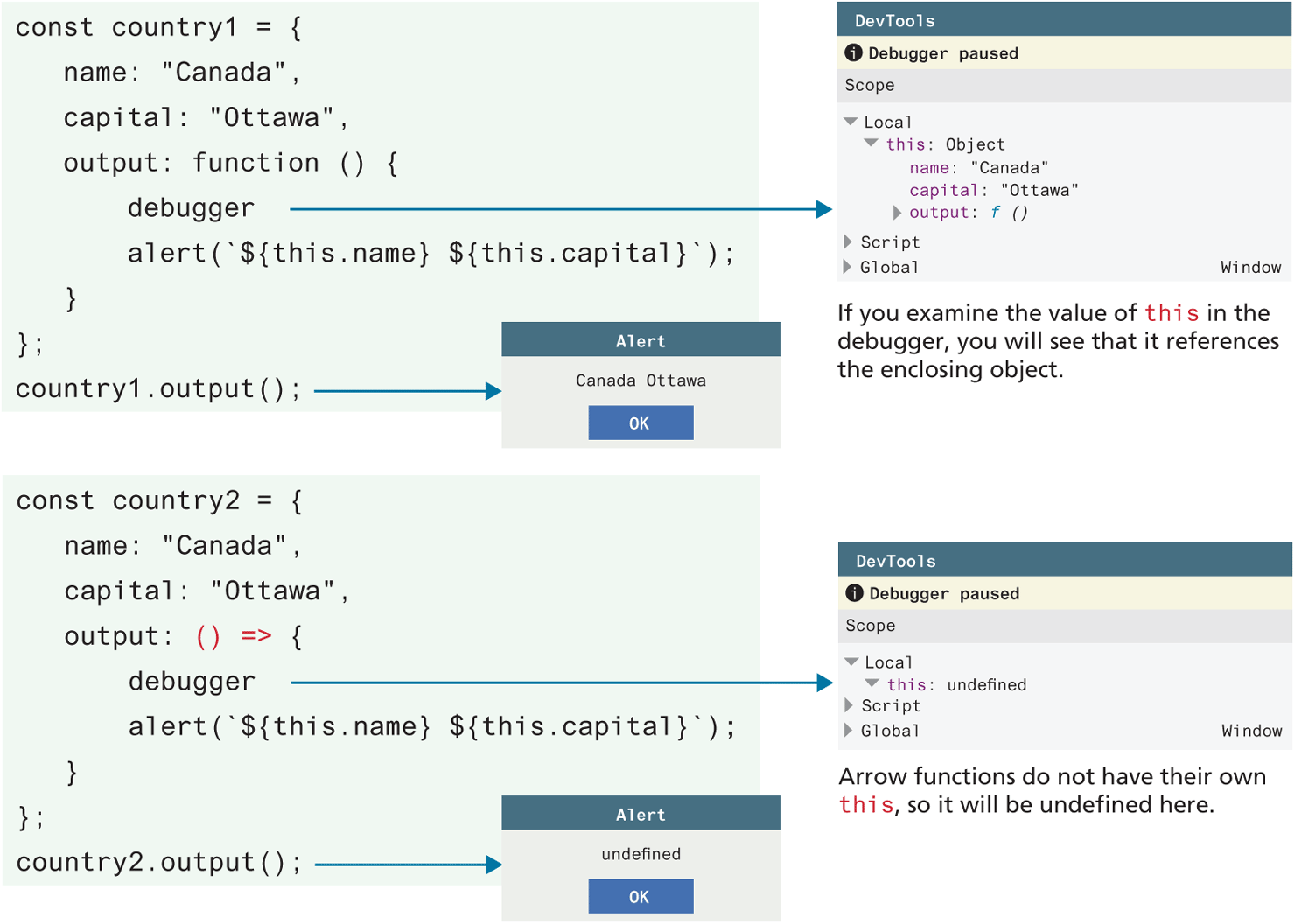
The first block of code at the top of the figure reads as follows. Line 1: const country1 equals open curly brace at indentation level 0. Line 2: name colon open double quotes Canada close double quotes, at indentation level 1. Line 3: capital colon open double quotes Ottawa close double quotes, at indentation level 1. Line 4: output colon function open parenthesis close parenthesis open curly brace at indentation level 1. Line 5: debugger at indentation level 2. Line 6: alert open parenthesis open backquote dollar open curly brace this dot name close parenthesis dollar open curly brace this dot capital close curly brace close backquote close parenthesis semicolon at indentation level 2. Line 7: close curly brace at indentation level 1. Line 8: close curly brace semicolon at indentation level 0. Line 9: country1 dot output open parenthesis close parenthesis semicolon at indentation level 0.
An arrow from debugger in line 5 of the first block of code points to the right at a browser window titled DevTools. The window consists of the information stored in the scope. Line 1: Local. Local stores four lines of information that reads as follows: this colon object, name colon open double quotes Canada close double quotes, capital colon open double quotes Ottawa close double quotes, output colon f open parenthesis close parenthesis. Line 2: Script. Line 3: Global.
Note: If you examine the value of this in the debugger, you will see that it references the enclosing object.
An arrow points from country1 dot output open parenthesis close parenthesis in the first block of code to the right at an alert window that reads, Canada Ottawa. A button labeled OK is at the bottom-center of the alert window.
The second block of code reads as follows. Line 1: const country equals open curly brace at indentation level 0. Line 2: name colon open double quotes Canada close double quotes, at indentation level 1. Line 3: capital colon open double quotes Ottawa close double quotes, at indentation level 1. Line 4: output colon open parenthesis close parenthesis equals close angle bracket open curly brace at indentation level 1. Line 5: debugger at indentation level 2. Line 6: alert open parenthesis open backquote dollar open curly brace this dot name close curly brace dollar open curly brace this dot capital close curly brace close backquote close parenthesis semicolon at indentation level 2. Line 7: close curly brace at indentation level 1. Line 8: close curly brace semicolon at indentation level 0. Line 9: country1 dot output open parenthesis close parenthesis semicolon at indentation level 0.
An arrow from debugger in line 5 of the second block of code points to the right at a browser window titled DevTools. The window consists of the information stored in the local. Line 1: Scope. Line 2: Local. Local stores a line of information that reads as follows: this colon undefined. Line 3: Script. Line 4: Global.
Note: Arrow functions do not have their own this, so it will be undefined here.
An arrow points from country2 dot output open parenthesis close parenthesis in the first block of code to the right at an alert window that reads, undefined. A button labeled OK is at the bottom-center of the alert window.
Back