Long description
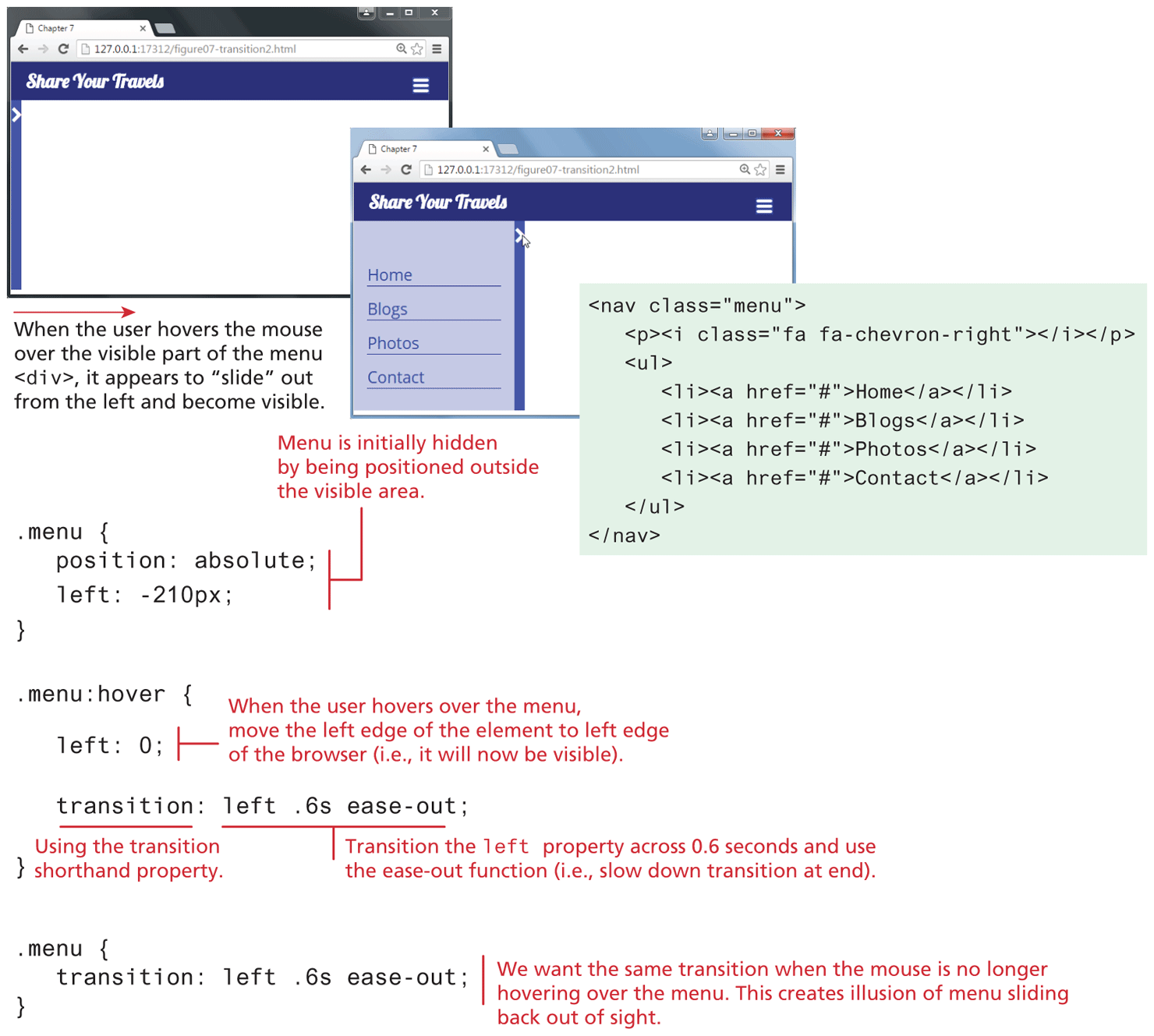
The first browser window that has a tab titled Chapter 7 is placed on the top left side of the figure. The address bar reads, 127 dot 0 dot 0 dot 1 colon 17312 forward slash figure 07 hyphen transition2 dot h t m l. The browser window consists of a level-1 heading that reads, "Share Your Travels." The heading is aligned to the top left of the browser window at indentation level 1. An arrowhead that points to the right is shown below the heading at indentation level 0. The rest of the browser window has an empty space. An arrow labeled When the user hovers the mouse over the visible part of the menu open angle bracket div close angle bracket, it appears to “slide” out from the left and become visible points from the first browser window to the right at the second browser window. The second browser window has a tab titled Chapter 7. The address bar reads, 127 dot 0 dot 0 dot 1 colon 17312 forward slash figure 07 hyphen transition2 dot h t m l. The browser window consists of a level-1 heading and a vertical navigation bar. The level-1 heading that reads, "Share Your Travels" is aligned to the top left at indentation level 1. The vertical navigation bar is shown below the heading aligned to the left at indentation level 1. A mouse cursor is shown hovered over an arrowhead that points to the right that appears at the top right corner of the vertical navigation bar. The vertical navigation bar has following tabs: Home, Blogs, Photos, and Contact. The code that corresponds to the vertical navigation bar reads as follows: Line 1: open angle bracket nav class equals open double quotes menu close double quotes close angle bracket at indentation level 0. Line 2: open angle bracket p close angle bracket open angle bracket i class equals open double quotes fa fa hyphen chevron hyphen right close double quotes close angle bracket open angle bracket forward slash i close angle bracket open angle bracket forward slash p close angle bracket at indentation level 1. Line 3: open angle bracket u l close angle bracket at indentation level 1. Line 4: open angle bracket l i close angle bracket open angle bracket “a” h ref equals open double quotes hash close double quotes close angle bracket Home open angle bracket forward slash “a” close angle bracket open angle bracket forward slash l i close angle bracket at indentation level 2. Line 5: open angle bracket l i close angle bracket open angle bracket “a” h ref equals open double quotes hash close double quotes close angle bracket Blogs open angle bracket forward slash “a” close angle bracket open angle bracket forward slash l i close angle bracket at indentation level 2. Line 6: open angle bracket l i close angle bracket open angle bracket “a” h ref equals open double quotes hash close double quotes close angle bracket Photos open angle bracket forward slash “a” close angle bracket open angle bracket forward slash l i close angle bracket at indentation level 2. Line 7: open angle bracket l i close angle bracket open angle bracket “a” h ref equals open double quotes hash close double quotes close angle bracket Contact open angle bracket forward slash “a” close angle bracket open angle bracket forward slash l i close angle bracket at indentation level 2. Line 8: open angle bracket forward slash u l close angle bracket at indentation level 1. Line 9: open angle bracket forward slash nav close angle bracket at indentation level 0.
The first block of code reads as follows. Line 1: dot menu open curly bracket at indentation level 0. Line 2: position colon absolute semicolon at indentation level 1. Line 3: left colon negative 210 p x semicolon at indentation level 1. Line 4: close curly bracket at indentation level 0. The first block of code refers to the Menu that is initially hidden by being positioned outside the visible area.
The second block of code reads as follows. Line 1: dot menu colon hover open curly bracket at indentation level 0. Line 2: left colon 0 semicolon at indentation level 1. Line 3: transition colon left .6 s ease hyphen out semicolon at indentation level 1. Line 4: close curly bracket at indentation level 0. The second block of code refers to the state When the user hovers over the menu, move the left edge of the element to left edge of the browser (i.e., it will now be visible). Transition in line 3 shows the use of the transition shorthand property. Left .6 s ease hyphen out refers to transition of the left property across 0.6 seconds and use the ease-out function (i.e., slow down transition at end).
The third block of code reads as follows. Line 1: dot menu open curly bracket at indentation level 0. Line 2: transition colon left .6 s ease hyphen out semicolon at indentation level 1. Line 3: close curly bracket at indentation level 0. The third block of code refers to the same transition when the mouse is no longer hovering over the menu. This creates illusion of menu sliding back out of sight.
Back