Long description
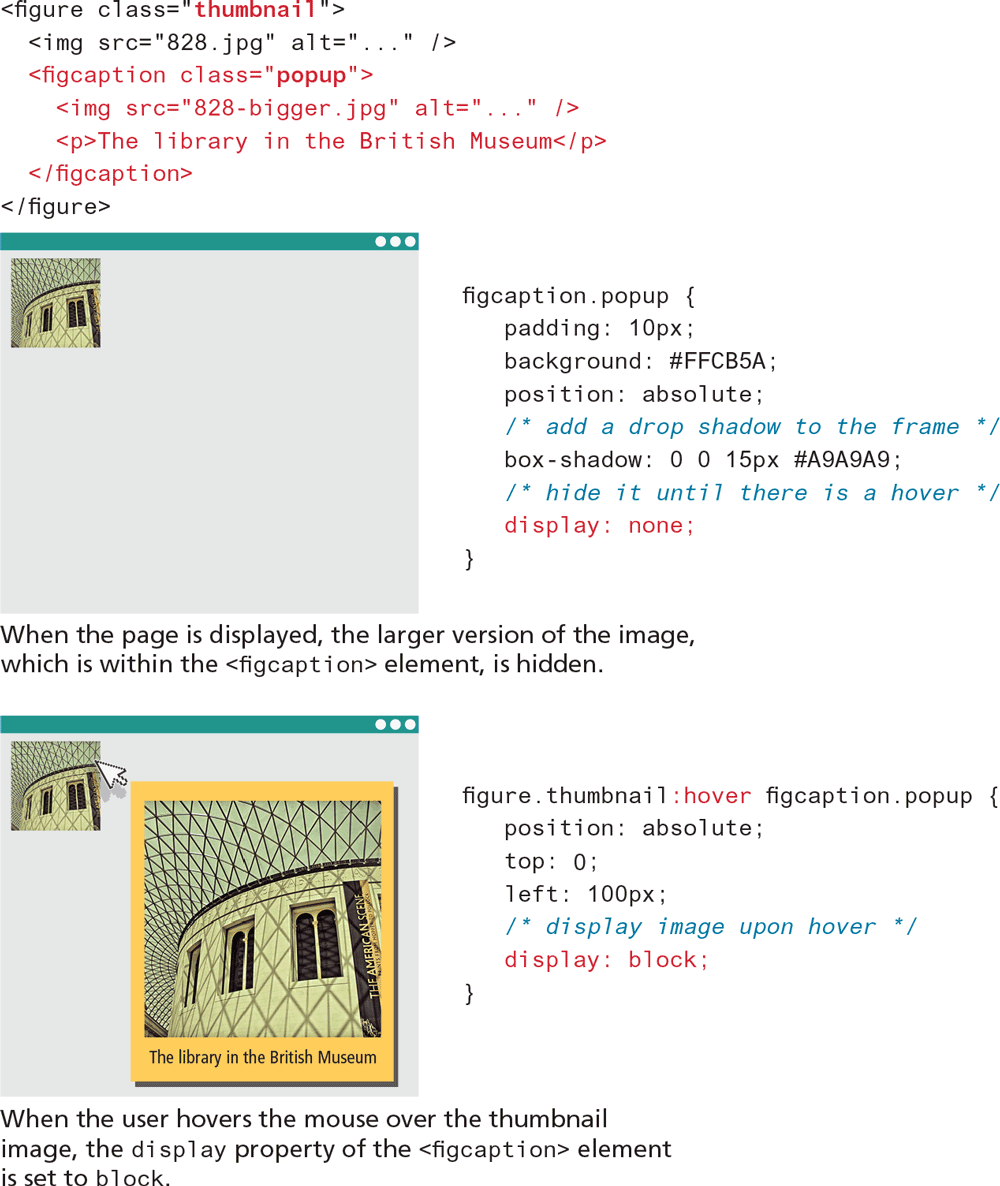
The first H T M L code consists of seven lines of code that reads as follows. Line 1: open angle bracket figure class equals open double quotes thumbnail close double quotes close angle bracket at indentation level 0. Line 2: open angle bracket i m g s r c equals open double quotes 828 dot j p g close double quotes alt equals open double quotes ellipsis close double quote space forward slash close angle bracket at indentation level 1. Line 3: open angle bracket fig caption class equals open double quotes popup close double quotes close angle bracket at indentation level 1. Line 4: open angle bracket i m g s r c equals open double quotes 828 hyphen bigger dot j p g close double quotes alt equals open double quotes ellipsis close double quotes forward slash close angle bracket at indentation level 2. Line 5: open angle bracket p close angle bracket The library in the British Museum open angle bracket forward slash p close angle bracket at indentation level 1. Line 6: open angle bracket forward slash fig caption close angle bracket at indentation level 1. Line 7: open angle bracket forward slash figure close angle bracket at indentation level 0.
The first browser window is placed below the first block code. The browser contains a small image that is aligned to top left corner. A line of text that reads, When the page is displayed, the larger version of the image, which is within the open angle bracket fig caption close angle bracket element, is hidden is written below the first browser.
The second block of code is placed at the right side of the first browser window. The code has nine lines of code. Line 1: fig caption dot popup open curly brace at indentation level 0. Line 2: padding colon 10 p x semicolon at indentation level 1. Line 3: background colon hash F F C B 5 "A" semicolon at indentation level 1. Line 4: position colon absolute semicolon at indentation level 1. Line 5: forward slash asterisk space add a drop shadow to the frame space asterisk forward slash at indentation level 1. Line 6: box hyphen shadow colon 0 0 15 p x hash "A" 9 "A" 9 "A" 9 semicolon at indentation level 1. Line 7: forward slash asterisk space hide it until there is a hover space asterisk forward slash at indentation level 1. Line 8: display colon space none semicolon at indentation level 1. Line 9: close curly brace at indentation level 0.
The second browser window is placed below the first browser window. The browser window consists of two images that are similar. The first image is smaller and is aligned to the top left corner. The second image is larger and is aligned to the right of the first image. The second image has a border and padding on its sides and is labeled The library in the British Museum. A line of text that reads, When the user hovers the mouse over the thumbnail image coma the display property of the open angle bracket fig caption close angle bracket element is set to block is placed below the second browser window.
The third block of code is placed at the right of the second browser window. The third block of code has nine lines of code. Line 1: figure dot thumbnail colon hover fig caption dot pop up open curly brace at indentation level 0. Line 2: position colon space absolute semicolon at indentation level 1. Line 3: top colon space 0 semicolon at indentation level 1. Line 4: left colon space 100 p x semicolon at indentation level 1. Line 5: forward slash asterisk space display image upon hover space asterisk forward slash at indentation level 1. Line 6: display colon space block semicolon at indentation level 1. Line 7: close curly brace at indentation level 0.
Back