Long description
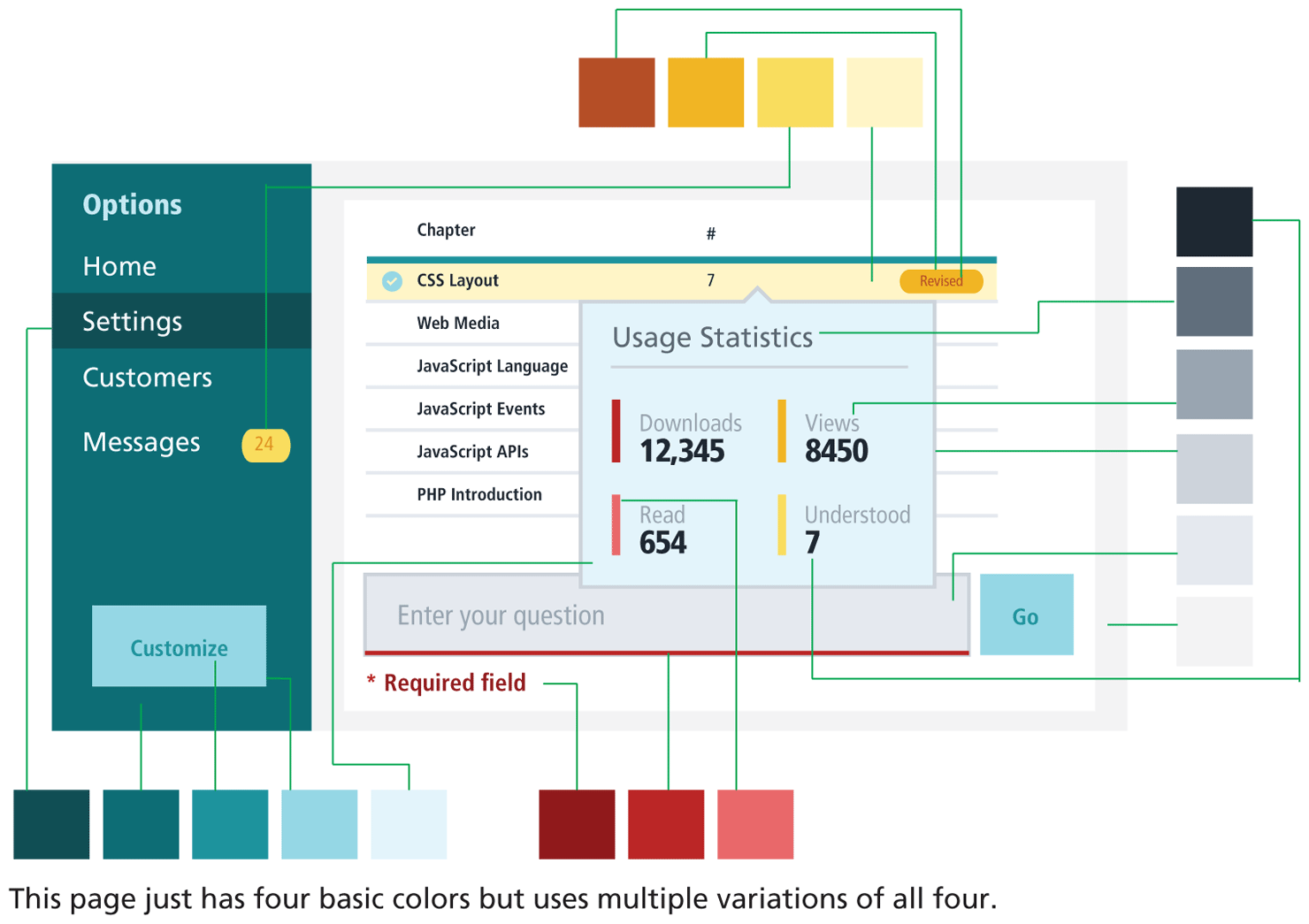
The interface has multiple elements that are displayed in different colors.
The left side of interface has a vertical navigation bar colored in a dark shade of green with multiple tabs labeled Options, Home, Settings, Customers, and Messages. The Settings tab is highlighted in a dark shade of green indicating its selection. There is a yellow colored box labeled 24 in red that appears to the right of the Messages tab. A button labeled Customize appears in a shade of green at the bottom of the navigation bar.
A table of 6 rows and 3 columns is shown at the right side of the navigation bar. The headings of the first two columns read as follows: Chapter, hash. The third column does not have a heading. The first row contains the following values: C S S Layout, 7, a yellow colored button labeled Revised in brown. The first row is highlighted in a shade of yellow. A tick mark within a green circle is shown at the beginning of the first row. The rest of the values in the table are written in black text against a white background. A light green dialog box with a heading, separators, fields and values appear from the center of the first row. The heading in the dialog box is written in dark gray. The separators and fields are written in shades of light gray. The values are written in black along with vertical lines in shades of red and yellow at the left. A gray textbox with a placeholder value in a shade of gray is at the bottom of the table. The textbox has a red border at the bottom. A green box labeled Go, written in a darker shade of blue is at the right side of the textbox. A line of text below the textbox that reads, asterisk Required field is written in a shade of red.
A row of 5 boxes with different shades of green starting with the darkest shade at the left to the lightest at the right is placed below the navigation bar. A row of 3 boxes with different shades of red starting with the darkest shade at the left to the lightest at the right is placed below the browser window.
A column of 6 boxes with different shades of black starting with the darkest shade at the top to the lightest shade of gray at the bottom is placed at the right of the browser window.
A row of 4 boxes with different shades of yellow starting with brown at the left followed by a shade of dark yellow to the lightest at the right is placed above the browser window.
The group of items mentioned below use the basic color as green but use darker to light variants of the color. Background of highlighted text in left side, background color of button, button text color, background color of left side pane, background color of dialog box on the right.
The group of items mentioned below use the basic color as brown but use darker to light variants of the color. Highlighted number to the right of Message under Options, Background of highlighted row in Table, Background of button & button text to the right of highlighted row.
The group of items mentioned below use the basic color as red but use darker to light variants of the color. Special text mentioned below the table, Border at the bottom of text box, Vertical side in dialog box.
The group of items mentioned below use the basic color as black but use darker to light variants of the color. Heading of dialog box, Text inside dialog box, Numerical text in dialog box, Border of dialog box, Background color of textbox below table.
Note: This page just has four basic colors but uses multiple variations of all four.
Back