Long description
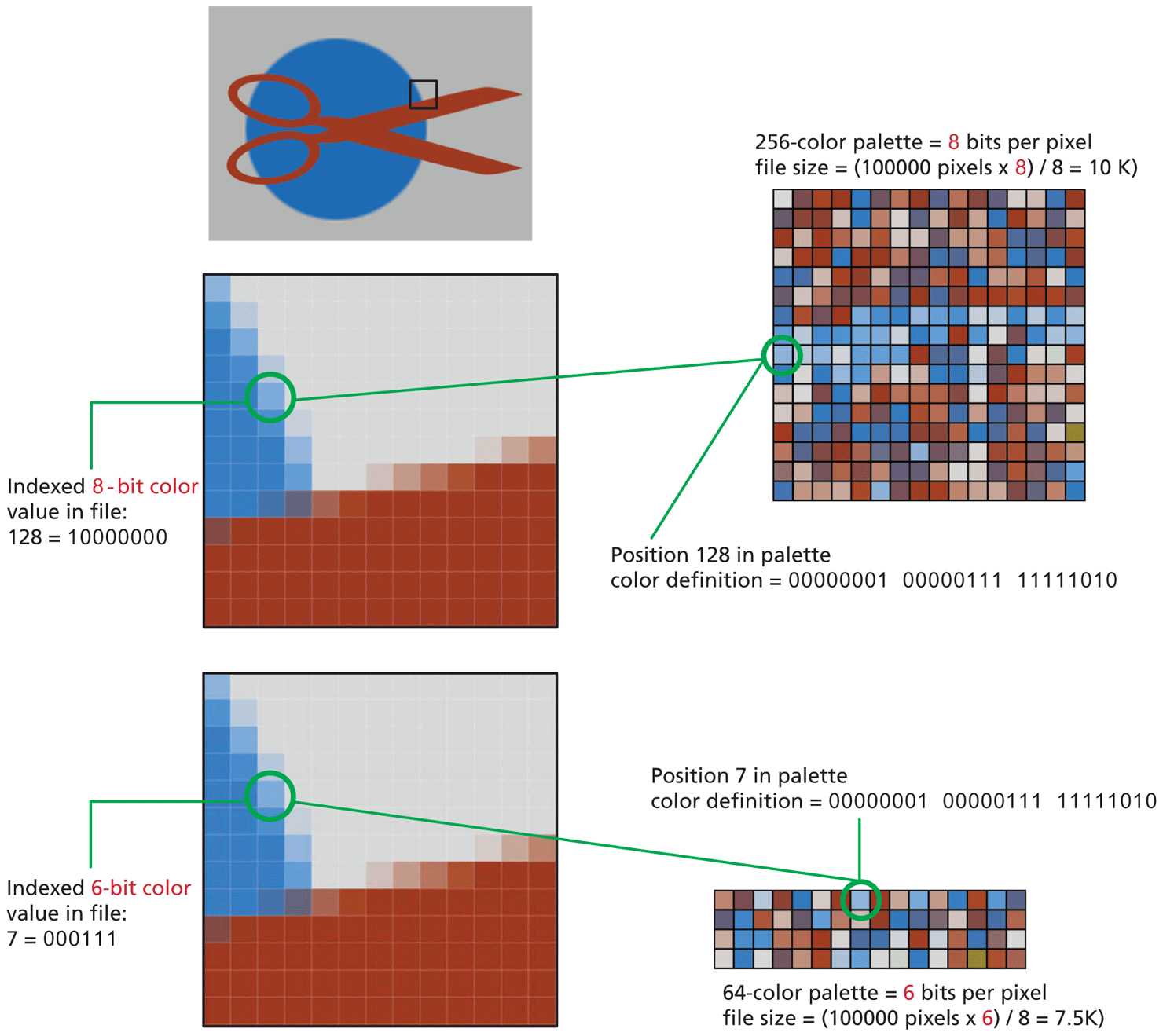
Image 1: This shows the symbol of a pair of scissors in red color appearing above a blue circle. A small section of the image is highlighted with a black border box indicating its selection.
Image 2: This shows the zoomed version of the section selected in image 1. The image shows multiple pixels, where each of the pixels has different colors. A pixel selected in the image is highlighted that indicates an Indexed 8-bit color value in file: 128 equals 10000000.
Image 3: This shows a color palette with 256 colors arranged in 16 rows and 16 columns. There is a text above the image that reads, 256-color palette equals 8 bits per pixel; file size equals open parenthesis 100000 pixels multiplied by 8 close parenthesis divided by 8 equals 10 K close parenthesis. First element in the tenth row is highlighted, which shows the color of the pixel selected in image 2. The element also indicates the position of the color in the palette as the 128th color with the color definition equals 0 0 0 0 0 0 0 1 space 0 0 0 0 0 1 1 1 space 1 1 1 1 1 0 1 0.
Image 4: This shows the zoomed version of the section selected in image 1. The image shows multiple pixels, where each of the pixels has different colors. A pixel selected in the image is highlighted that indicates an Indexed 6-bit color value in file: 7 equals 0 0 0 1 1 1.
Image 5: This shows a color palette with 256 color arranged in 4 rows and 16 columns. There is a text below the image that reads, 64 hyphen color palette equals 6 bits per pixel; file size equals open parenthesis 100000 pixels multiplied by 6 close parenthesis divided by 8 equals 7.5 K close parenthesis. The eighth element in the first row is highlighted, which shows the color of the pixel selected in image 4. The element also indicates the position of the color in the palette as the 7th color with the color definition equals 0 0 0 0 0 0 0 1 space 0 0 0 0 0 1 1 1 space 1 1 1 1 1 0 1 0.
Back