Long description
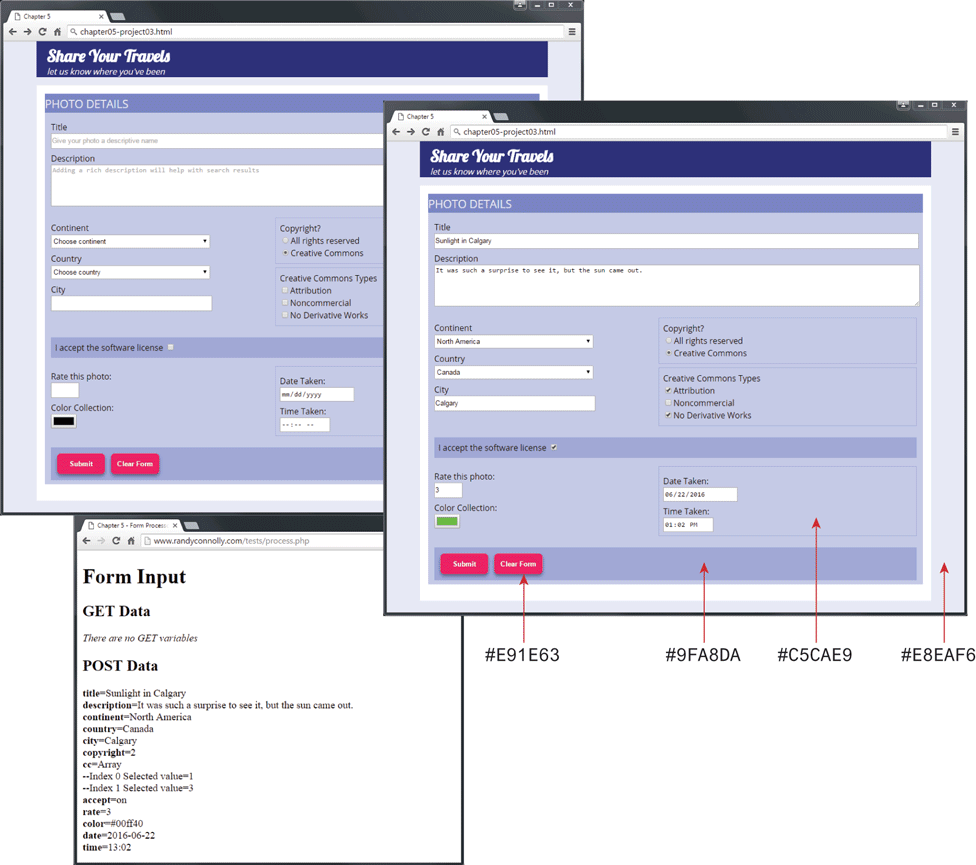
Browser 1: The Browser Window titled Chapter 5 has an address bar that reads, chapter hyphen 05 hyphen project 03 dot H T M L. There are 2 Sections in the Browser Window placed one below other. Section 1 is the header that has a level-1 heading that reads, Share Your Travels. There is a text data below the heading that reads, let us know where you've been.
Section 2 shows a User Form titled PHOTO DETAILS. The form consists of 9 textboxes, 2 radio buttons, 4 checkboxes, and 2 buttons. followed by 7 rows of data. The first textbox labeled Title is placed at the top of the for with a placeholder value Give your photo a descriptive name. The second textbox labeled Description is placed below the first textbox and has a placeholder value Adding a rich description will help with search results. The third textbox labeled Continent has a dropdown list that reads, Choose a continent. The fourth textbox labeled Country is placed below the third textbox and has a dropdown list that reads, Choose country. The fifth textbox labeled City is placed below the fourth textbox. Two rectangular boxes are placed one below the other at the right side of the third, fourth, and fifth textboxes. The first rectangular box has a heading that reads, Copyright question mark. The 2 radio buttons labeled All rights reserved and Creative Commons are placed below the heading. The radio button labeled Creative Commons is checked. The second rectangular box has a heading that reads, Creative Common Types. Three checkboxes labeled Attribution, Non commercial, and No Derivative Works are placed below the heading. The Attribution checkbox and No Derivative Works are checked. The fourth checkbox is placed below the fifth textbox and has a text at its left that reads, I accept the software license. The fourth textbox is checked. The sixth textbox labeled Rate this photo colon is placed below the fourth checkbox. The seventh textbox labeled Color Collection colon is filled with solid black color and is placed below the sixth textbox. A rectangular box with the eighth and ninth textboxes is placed at the right side of the sixth and seventh textboxes. The eighth textbox is labeled Date Taken colon with a placeholder value m m forward slash d d forward slash y y y y. The ninth textbox labeled Time Taken colon is placed below the eighth textbox. The format of the ninth textbox is dash dash colon dash dash dash dash. The Submit and Clear Form buttons are placed side-by-side below the seventh textbox.
Browser 2: The Browser Window titled Chapter 5 has an address bar that reads, chapter hyphen 05 hyphen project 03 dot H T M L. The browser window has the same structure as browser 1 and has the same fields but with different values. The textbox labeled Title contains the value Sunlight in Calgary. The textbox labeled Description contains the value It was such a surprise to see it, but the sun came out. The textbox labeled Continent contains the value North America. The textbox labeled Country contains the value Canada. The textbox labeled City contains the value Calgary. Two checkboxes labeled Attribution and No Derivative Works under Creative Common Types are checked. The textbox labeled Rate this photo colon contains the value 3. The textbox labeled Color Collection is shaded green. The textbox labeled Date Taken colon contains the value 06 forward slash 22 forward slash 2016. The textbox labeled Time Taken colon contains the value 01 colon 02 P M.
Section 2: There is User Form Data that is titled PHOTO DETAILS followed by 7 rows of data. Row 1: Textbox labeled Title that has text that reads Sunlight in Calgary. Row 2: Larger Textbox labeled Description that text that reads, It was such a surprise to see it, but the sun came out. Row 3: Drop down menu titled Continent that has highlighted text that reads, North America. Row 4: Drop down menu titled Country that has highlighted text that reads, Canada. Row 5: Textbox labeled City with text that reads Calgary. Row 6: Textbox labeled Rate this photo colon with text that reads 3. Row 7: A small solid green colored box that is labeled Color Collection colon. An arrow labeled hash E 9 1 E 6 3 points to the color in the Clear Form button. An arrow labeled hash 9 F “A” 8 D “A” points to the color in the background of the two buttons. An arrow labeled hash C 5 C “A” E 9 points to the color in the background of the rectangular box that contains the Date Taken and Time Taken textboxes. An arrow labeled hash E 8 E “A” F 6 points to the color in the background of the browser window.
Browser 3: The Browser Window titled Chapter hyphen 5 hyphen Form Processing has an address bar that reads, www dot Randy Connolly dot com forward slash tests forward slash process dot p h p. The Browser Windows has a level-1 heading at the top, which is aligned to the left, and reads, Form Input. All the other text below the heading are aligned to the left.
A level-2 heading that reads, GET Data is placed below the level-1 heading and has a text below that reads, There are no GET variables. A level-2 heading that reads, POST Data is placed below. This is followed by 14 lines of text that reads as follows. Line 1: title equals Sunlight in Calgary. Line 2: description equals It was such a surprise to see it, but the sun came out. Line 3: continent equals North America. Line 4: country equals Canada. Line 5: city equals Calgary. Line 6: copyright equals 2. Line 7: c c equals Array. Line 8: hyphen hyphen Index 0 Selected Value equals 1. Line 9: hyphen hyphen Index 1 Selected Value equals 3. Line 10: accept equals on. Line 11: rate equals 3. Line 12: color equals hash 0 0 f f 4 0. Line 13: date equals 2016 hyphen 06 hyphen 22. Line 14: time equals 13 colon 02.
Back