Long description
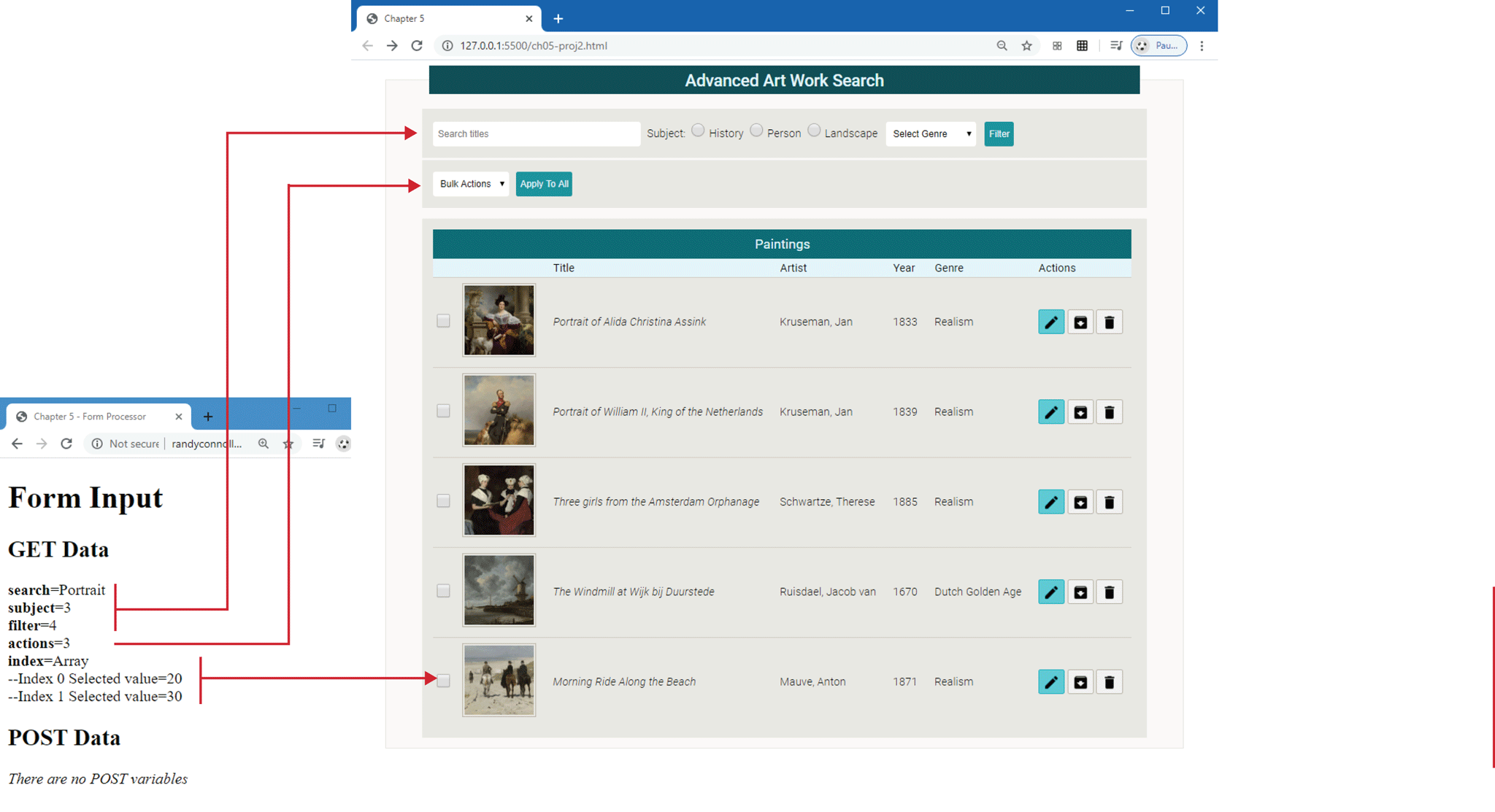
The first browser window that has a tab titled Chapter 5 is placed at the top right of the figure. The address bar reads, 127 dot 0 dot 0 dot 1 colon 5500 forward slash c h 05 hyphen proj 2 dot h t m l. The browser window consists of a webpage with the header titled Advanced Art Work Search. A textbox labeled Subject with the placeholder value Search titles is placed at the left below the header. Three radio buttons labeled History, Person, and Landscape are placed side-by-side at the right side of the textbox. A dropdown list labeled Select Genre is placed at the right side of the radio buttons. A button labeled Filter is placed at the right side of the dropdown list. A dropdown list labeled Bulk Actions is placed below the Subject textbox. A button labeled Apply to All is placed at the right side of the Bulk Actions dropdown list. A section labeled Paintings along with a list of five paintings are placed below the Bulk Actions dropdown list. The list shows a checkbox, preview of the painting, title, artist, year, and genre as follows.
Title: Portrait of Alida Christine Assink. Artist: Kruseman, Jan. Year: 1833. Genre: Realism.
Title: Portrait of William N, Artist: King of the Netherlands, Kruseman, Jan, Year: 1839. Genre: Realism.
Title: Three girls from the Amsterdam Orphanage. Artist: Schwartze, Therese. Year: 1885. Genre: Realism.
Title: The Windmill at Wijk bij Duurstede. Artist: Ruisdael, Jacob van. Year: 1670. Genre: Dutch Golden Age.
Title: Morning Ride Along the Beach Morning Ride Along the Beach. Artist: Mauve, Anton. Year: 1871. Genre: Realism.
There is a list of actions at the end of each list item that shows an Edit button, Save button, and Delete button.
The second browser window has a tab titled Chapter 5 hyphen Forms Processor. The browser window consists of a level-1 heading, two level-2 heading, and a list of variables.
The level-1 heading that reads, "Form Input" is at the top left of the browser window. The first level-2 heading that reads, "GET Data" is placed below the level-1 heading. The list of variables are placed below GET Data and reads as follows. Variable 1: search equals Portrait. Variable 2: subject equals 3. Variable 3: filter equals 4. Variables 1, 2, and 3 point to the Subject textbox in the first browser window. Variable 4: actions equals 3. Variable 4 points to the Bulk Actions dropdown list in the first browser window. Variable 5: Index equals Array. Variable 6: hyphen Index 0 Selected value equals 20. Variable 7: hyphen Index 1 Selected value equals 30. Variables 6 and 7 point to the last checkbox in the list.
The second level-2 heading that reads, “POST data” is placed below the list of attributes. The next line reads, There are no POST variables.
Back