Long description
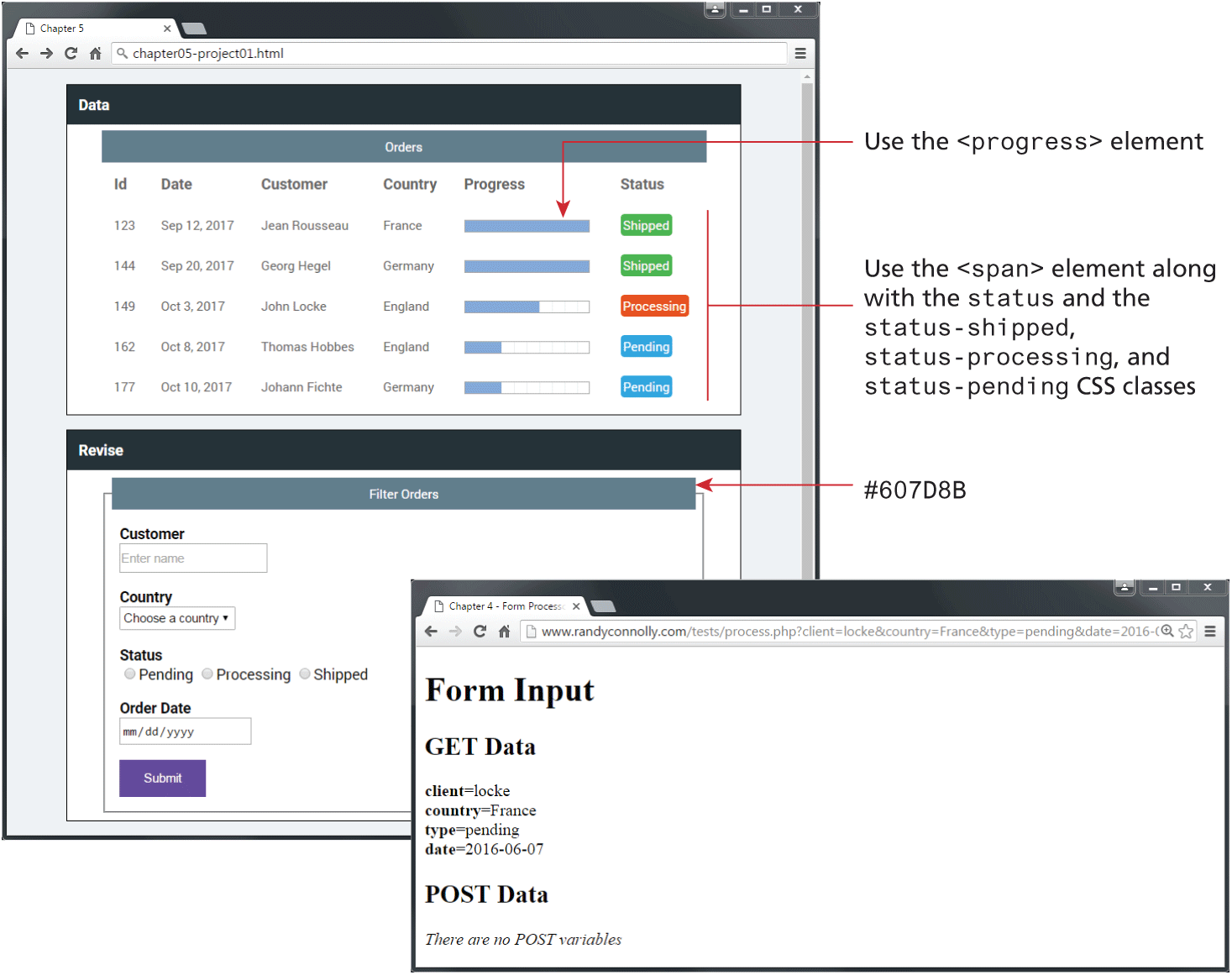
Browser 1: The Browser Window titled Chapter 5 has an address bar that reads, chapter hyphen 05 hyphen project 01 dot H T M L. The browser window is divided into two sections. Section 1: The section is titled Data and has a table titled Orders. The table consists of 5 rows and 6 columns. The column names read as follows: I d, Date, Customer, Country, Progress, and Status. Row 1, I d: 123. Row 1, Date: Sep 12, 2017. Row 1, Customer: Jean Rousseau. Row 1, Country: France. Row 1, Progress: Progress Bar with 100 percent progress. Row 1, Status: Textbox labeled Shipped, which is shaded solid green. Row 2, I d: 144. Row 2, Date: Sep 20, 2017. Row 2, Customer: Georg Hegel. Row 2, Country: Germany. Row 2, Progress: Progress Bar with 100 percent progress. Row 2, Status: Textbox labeled Shipped, which is shaded solid green. Row 3, I d: 149. Row 3, Date: Oct 3, 2017. Row 3, Customer: John Locke. Row 3, Country: England. Row 3, Progress: Progress Bar with 60 percent progress. Row 3, Status: Textbox labeled Processing, which is shaded solid orange. Row 4, I d: 162. Row 4, Date: Oct 8, 2017. Row 4, Customer: Thomas Hobbes. Row 4, Country: England. Row 4, Progress: Progress Bar with 30 percent progress. Row 4, Status: Textbox labeled Pending, which is shaded solid blue. Row 5, I d: 177. Row 5, Date: Oct 10, 2017. Row 5, Customer: Johann Fichte. Row 5, Country: Germany. Row 5, Progress: Progress Bar with 30 percent progress. Row 5, Status: Textbox labeled Pending, which is shaded solid blue. An arrow labeled Use the open angular bracket progress close angular bracket element points at the Progress Bar in Row 1. The Status column corresponds to the following text: Use the open angle bracket span close angle bracket element along with the status and the status hyphen shipped, status hyphen processing, and status hyphen pending C S S classes.
Section 2: The section is titled Revise and has a User Form titled Filter Orders. The form consists of 3 textboxes, 3 radio buttons, and a button placed one below the other. The first textbox is labeled Customer with a placeholder value Enter name. The second textbox labeled Country has a dropdown list that reads, Choose a country. A label that reads Status is placed below the second textbox and shows 3 radio buttons labeled Pending, Processing, and Shipped placed side-by-side. The third textbox labeled Order date with a placeholder value m m forward slash d d forward slash y y y y is shown below the radio buttons. The Submit button is placed below the third textbox. An arrow points from outside to the Form Data that reads, hash 6 0 7 D 8 B.
Browser 2: The Browser Window titled Chapter 4 Hyphen Form Process has an address bar and Navigation options. The Browser Window has a level-1 heading at the top, which is aligned to the left and reads, Form Input. A level-2 heading, which is aligned to the left and reads, GET Data is placed below the level-1 heading. This is followed by 4 lines of text that reads as follows. Line 1: client equals locke. Line 2: country equals France. Line 3: type equals pending. Line 4: date equals 2016 hyphen 06 hyphen 07. This is followed by another level-2 heading, which is aligned to the left and reads, POST Data. This is followed by a line of text, which is aligned to the left and reads, There are no POST variables.
Back