Long description
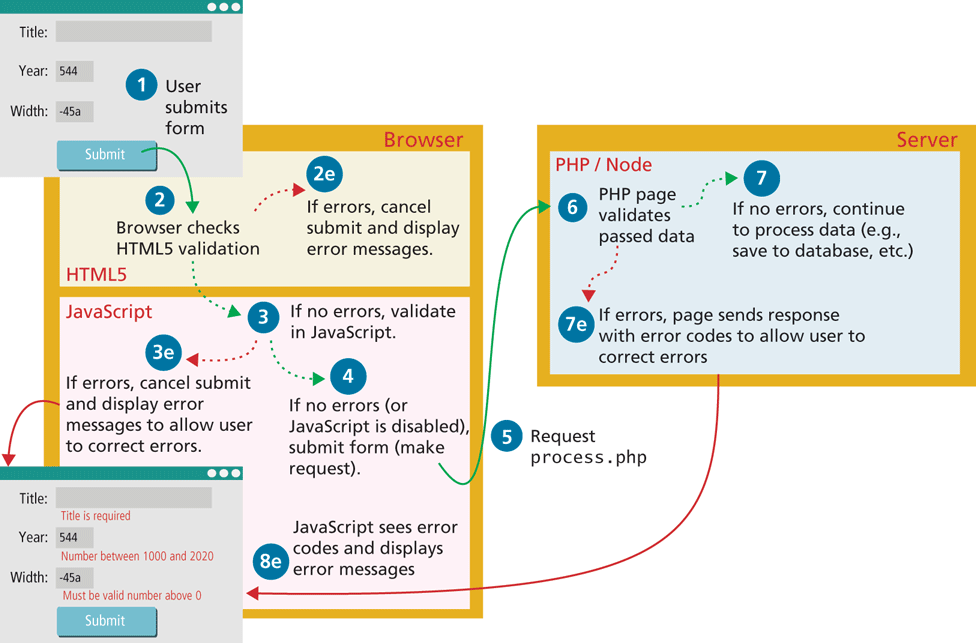
The first user form is placed at the top left of the figure and shows 3 textboxes and a button. The first textbox is labeled Title colon. The second textbox is labeled Year colon and contains the value 544. The third textbox labeled Width colon contains the value negative 45 “a”. The Submit button is placed below the textboxes, at the center of the form. The form shows, Step 1: User submits form.
The browser with 2 sections is placed below the first user form. The first section is titled H T M L 5 and the second section is titled JavaScript. An arrow from the submit button in the first user form points to the H T M L 5 section that shows, Step 2: Browser checks H T M L 5 validation. An arrow points from step 2 to step 2 e in the same section that reads, Step 2e: If errors, cancel submit and display error messages. An arrow points from step 2 to step 3 in the JavaScript section. Step 3: If no errors, validate in JavaScript. An arrow from step 3 points to step 3 e in the same section that reads, Step 3e: If errors, cancel submit and display error messages to allow user to correct errors. Another arrow from step 3 points to step 4 that reads, Step 4: If no errors (or JavaScript is disabled), submit form (make request). An arrow from step 4 points to the Server block, which is placed at the right side of the Browser block. The arrow is labeled Step 5: Request process dot p h p. The server block has a section titled P H P forward slash Node. The step 5 arrow points at step 6: P H P page validates passed data. An arrow from step 6 points to step 7 in the same section that reads, Step 7: If no errors, continue to process data (e.g., save to database, etc.) Another arrow from step 6 points to step 7 e in the same section that reads, Step 7e: If errors, page sends response with error codes to allow user to correct errors. An arrow from the server block and step 3 e points to the second user form. The arrow is labeled Step 8 e: JavaScript sees error codes and displays error messages. The second user form consists of 3 textboxes and a button placed one below the other. The first textbox labeled Title colon. A line of text below the first textbox reads, Title is required. The second textbox labeled Year colon contains the value 544. A line of text below the second textbox reads, Number between 1000 and 2020. The third textbox labeled Width contains the value negative 45 “a”. A line of text below the third textbox reads, Must be valid number above 0. The Submit button is placed below the third textbox, at the bottom center of the form.
Back