Long description
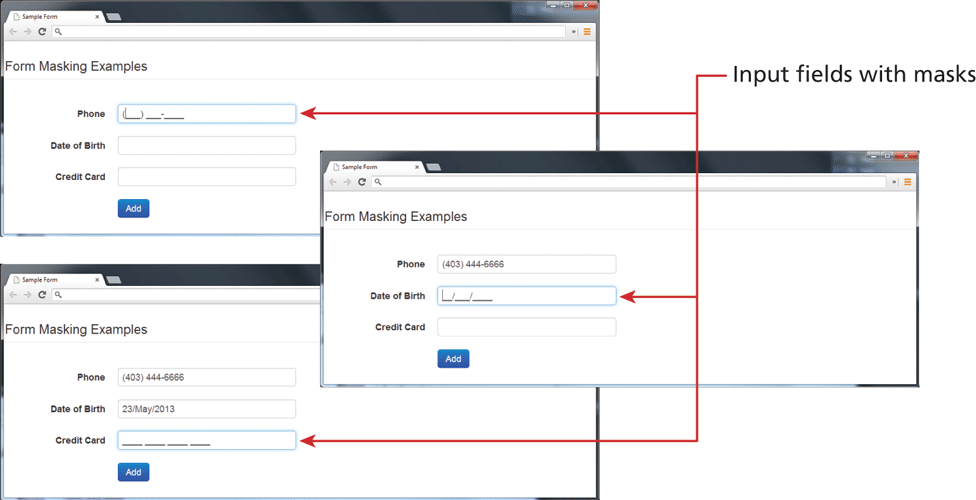
The first browser window titled "Sample Form" is shown on the top left side of the figure. The browser window consists of a level-1 heading and form content. The level-1 heading that reads, "Form Masking Examples" is placed at the top left of the browser window. Three textboxes are placed one below the other below the level-1 heading. The first textbox labeled Phone contains the value open parenthesis blank close parenthesis blank hyphen blank. The second textbox labeled Date of Birth is placed below the first textbox. The third textbox labeled Credit Card is placed below the second textbox. A button labeled Add is placed below the third textbox.
The second browser window titled "Sample Form" is shown at the bottom right of the first browser window. The browser consists of a level-1 heading and form content. The level-1 heading that reads "Form Masking Examples" is placed at the top left of the browser window. Three textboxes are placed one below the other below the level-1 heading. The first textbox labeled Phone contains the value open parenthesis 403 close parenthesis 444 hyphen 6666. The second textbox labeled Date of Birth is placed below the first textbox and contains the value blank forward slash blank forward slash blank. The third textbox labeled Credit Card is placed below the second textbox. A button labeled Add is placed below the third textbox.
The third browser window titled "Sample Form" is shown below the first browser window at the bottom left of the second browser window. The browser window consists of a level-1 heading and form content. The level-1 heading that reads, "Form Masking Examples" is placed at the top left of the browser window. Three textboxes are placed one below the other below the level-1 heading. The first textbox labeled Phone contains the value open parenthesis 403 close parenthesis 444 hyphen 6666. The second textbox labeled Date of Birth is placed below the first textbox and contains the value 23 forward slash May forward slash 2013. The third textbox labeled Credit Card is placed below the second textbox and contains the value blank blank blank blank. A button labeled Add is placed below the third textbox.
An arrow labeled Input fields with masks points at the textbox labeled Phone in the first browser window, the textbox labeled Date of Birth in the second browser window, and the textbox labeled Credit Card in the third browser window.
Back