Long description
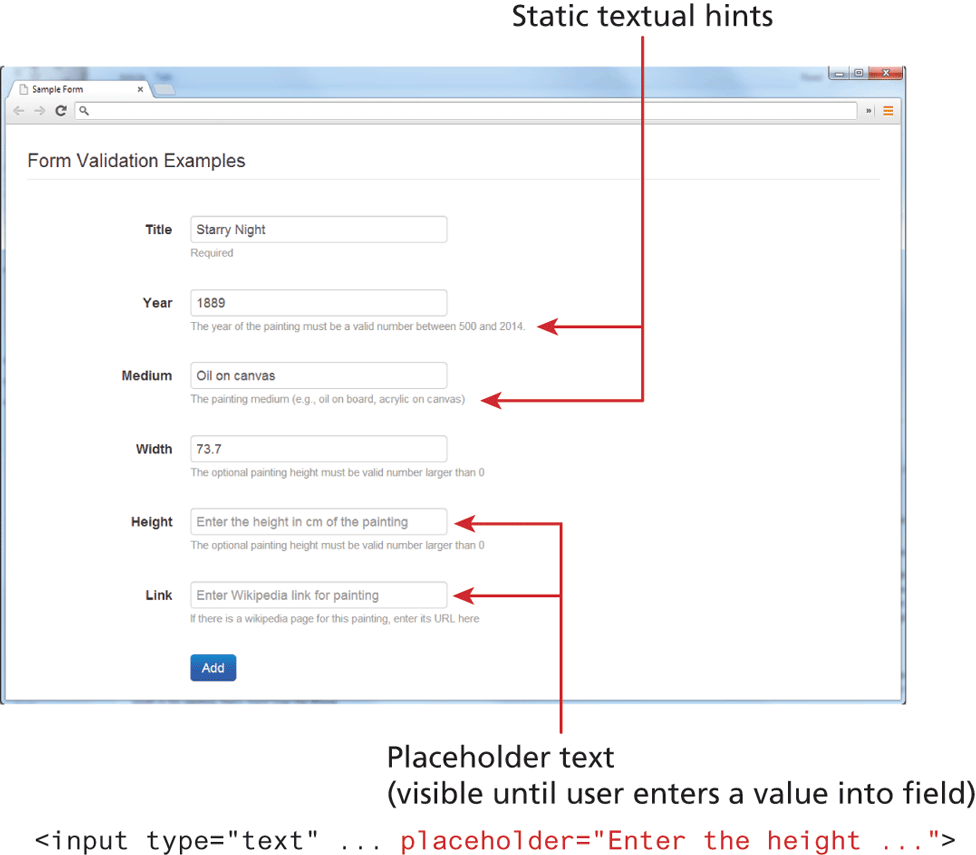
The browser window that has a tab titled Sample Form is shown at the top of the figure. The browser window consists of a level-1 heading and a form content. The level-1 heading that reads "Form Validation Examples" is aligned to the left at indentation level 1. The form contents are placed one below the other as follows: label, textbox. Title, textbox 1 with the value "Starry Night". Hint: Title is a Required field. Next Year, textbox 3 with the value 1889. Hint: Textbox 2 has a condition that "The year of the painting must be a valid number between 500 and 2014." Next Medium, textbox 3 with the value Oil on canvas. Hint: Textbox 3 needs the painting medium (example oil on board, acrylic on canvas). Next Width, textbox 4 with the value “73.7.” Hint: Textbox 4 has a condition that "The painting height must be a valid number larger than 0." Next Height, textbox 5 with placeholder value "Enter the height in c m of the painting." Hint: Textbox 5 has a condition that "The painting height must be valid number larger than 0." Last Link, textbox 6 with placeholder value "Enter Wikipedia link for painting." Hint: Textbox 6 has a suggestion that "If there is a Wikipedia page for this painting, enter the U R L here". A button labeled Add is placed below textbox 6. Note: The hints given after each textbox are static textual hints.
The placeholder text (visible until user enters a value into field) corresponds to the following code: open angle bracket input type equals open double quotes text close double quotes placeholder equals open double quotes Enter the height ellipsis close double quotes close angle bracket.
Back