Long description
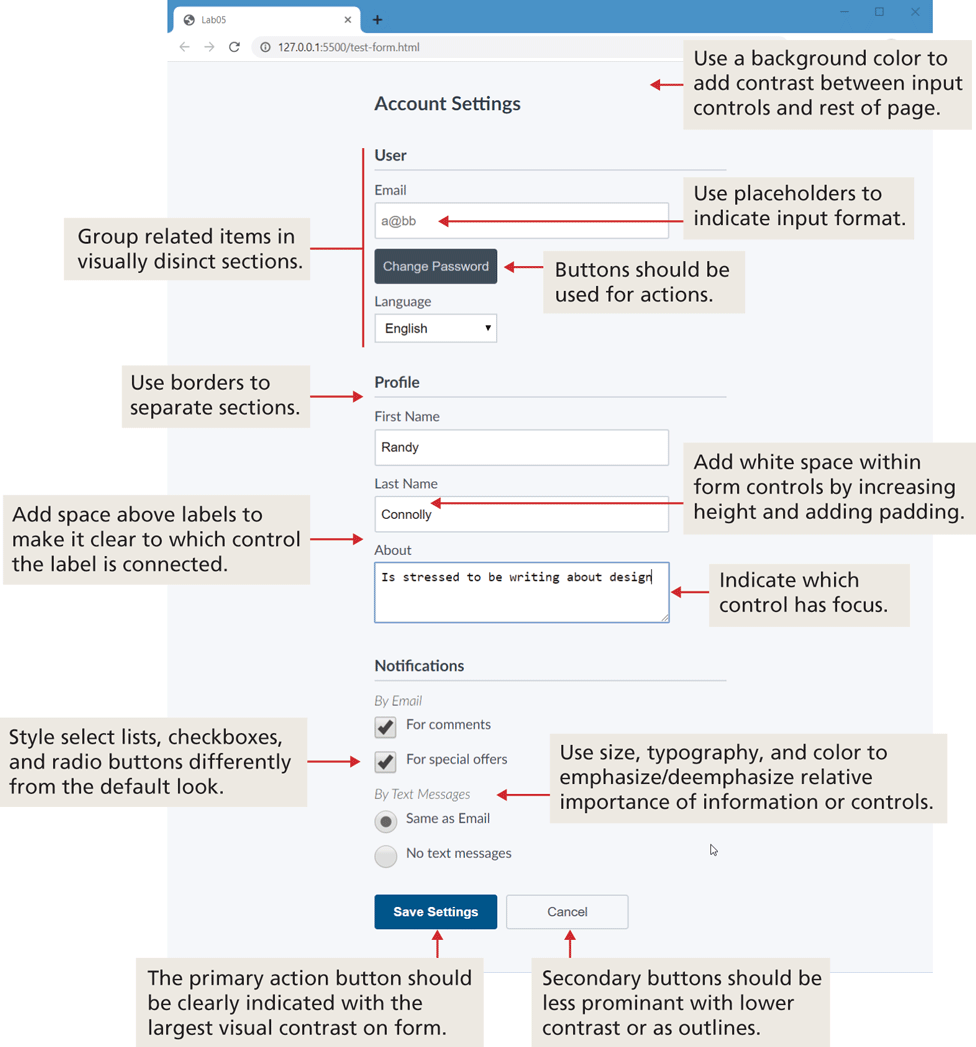
Title: Lab 05.
Address bar: 127 dot 0 dot 0 dot 15500 forward slash test hyphen form dot h t m l.
The form consists of a level-1 heading, three level-2 headings, three textboxes, a text area, a dropdown list, three buttons, two checkboxes, and two radio buttons. The form contents are aligned to the left at indentation level 5 on a gray background. Use a background color to add contrast between input controls and rest of page.
Level-1 heading: Account Settings.
Next is a level-2 heading, User, followed by group of items.
Next Line: Email.
Next Line: Text box 1 with placeholder value “a” at the rate b b.
Note: Use placeholders to indicate input format.
Next Line: Button labeled "Change Password".
Note: Buttons should be used for actions.
Next Line: Language.
Next Line: a dropdown list with the value "English".
Note: The Level-2 heading: “User” to the dropdown list with the value "English" is grouped together.
Note: Group related items in visually distinct sections.
Next is a level-2 heading, Profile followed by group of items.
Use borders to separate sections.
Next Line: First Name.
Next Line: text box 2 with the value "Randy".
Next Line: Last Name.
Next Line: Text box 3 with the value "Connolly".
Note: Add white space within form controls by increasing height and adding padding.
Note: Add space above labels to make it clear to which control the label is connected.
Next Line: About.
Next Line: Text box 4 with the value "Is stressed to be writing about design". Indicate which control has focus.
Next is a level-2 heading, Notifications.
Next Line: By Email.
Next Line: checkbox 1 checked and labeled For comments.
Next Line: checkbox 2 checked and labeled For special offers.
Note: Style select lists, checkboxes, and radio buttons differently from the default look.
Next Line: By Text messages.
Note: Use size, typography, and color to emphasize/deemphasize relative importance of information or controls.
Next Line: radio button 1 checked and labeled Same as Email.
Next Line: Radio button 3 labeled No text messages.
Next Line: 2 buttons. Button 1: Save Settings. Button 2: Cancel.
Note for save settings button: The primary action button should be clearly indicated with the largest visual contrast on form.
Note for cancel button: Secondary buttons should be less prominent with lower contrast or as outlines.
Back