Long description
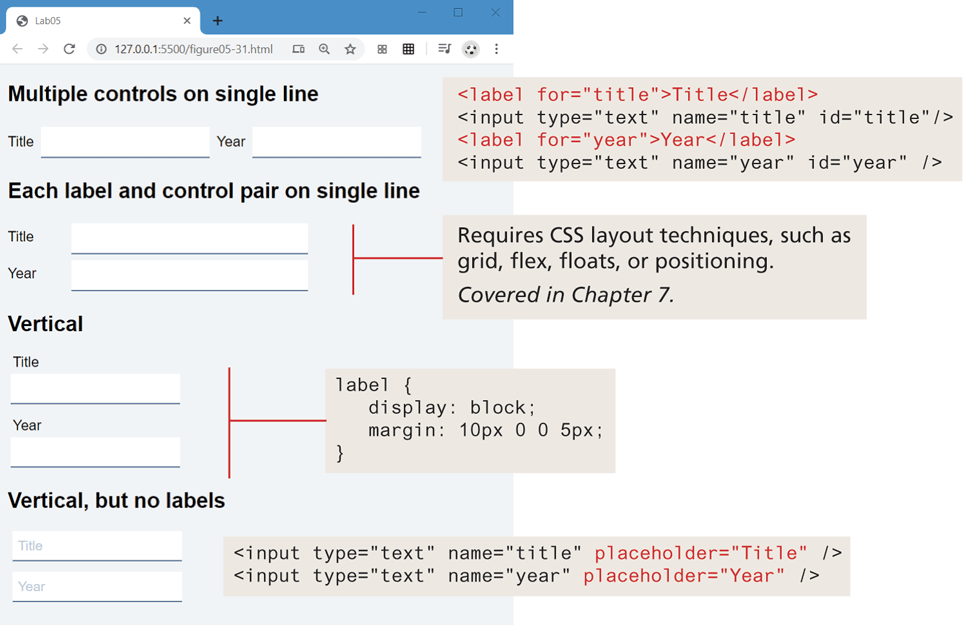
The browser window has a tab titled Lab 05. The address bar reads, 127 dot 0 dot 0 dot 1 colon 5500 forward slash figure 05 hyphen 31 dot h t m l. The browser window consists of a form content with 4 level-1 headings and its corresponding blocks of code. The first level-1 heading reads, "Multiple controls on single line". Two textboxes with a border at the bottom are placed side-by-side below the heading. The textbox on the left is labeled Title and the textbox on the right is labeled Year. The corresponding block of code reads as follows: Line 1: open angle bracket label for equals open double quotes title close double quotes close angle bracket Title open angle bracket forward slash label close angle bracket at indentation level 0. Line 2: open angle bracket input type equals open double quotes text close double quotes name equals open double quotes title close double quotes i d equals open double quotes title close double quotes forward slash close angle bracket at indentation level 0. Line 3: open angle bracket label for equals open double quotes year close double quotes close angle bracket Year open angle bracket forward slash label close angle bracket at indentation level 0. Line 4: open angle bracket input type equals open double quotes text close double quotes name equals open double quotes year close double quotes id equals open double quotes year close double quotes forward slash close angle bracket at indentation level 0.
The second level-1 heading that reads, "Each label and control pair on single line" is placed below the textboxes. Two textboxes with a border at the bottom are placed one below the other without any space between them, below the first level-1 heading. The textbox on the top is labeled Title and the textbox below it is labeled Year. Note: This requires C S S layout techniques, such as grid, flex, floats, or positioning.
The third level-1 heading that reads, "Vertical" is placed below the textboxes. Two textboxes with a border at the bottom are placed one below the other with some space between them, below the second level-1 heading. The textbox on the top is labeled Title and the textbox below it is labeled Year. The corresponding block of code reads as follows: Line 1: label open curly brace at indentation level 0. Line 2: display colon block semicolon at indentation level 1. Line 3: margin colon 10 p x 0 0 5 p x semicolon at indentation level 1. Line 4: close curly brace at indentation level 0.
The fourth level-1 heading that reads, "Vertical, but no labels" is placed below the textboxes. Two textboxes with a border at the bottom are placed one below the other with some space between them. The textbox on the top shows placeholder value Title and the textbox below it shows placeholder value Year. The corresponding block of code reads as follows: Line 1: open angle bracket input type equals open double quotes text close double quotes name equals open double quotes title close double quotes placeholder equals open double quotes Title close double quotes forward slash close angle bracket. Line 2: open angle bracket input type equals open double quotes text close double quotes name equals open double quotes year close double quotes placeholder equals open double quotes Year close double quotes forward slash close angle bracket.
Back