Long description
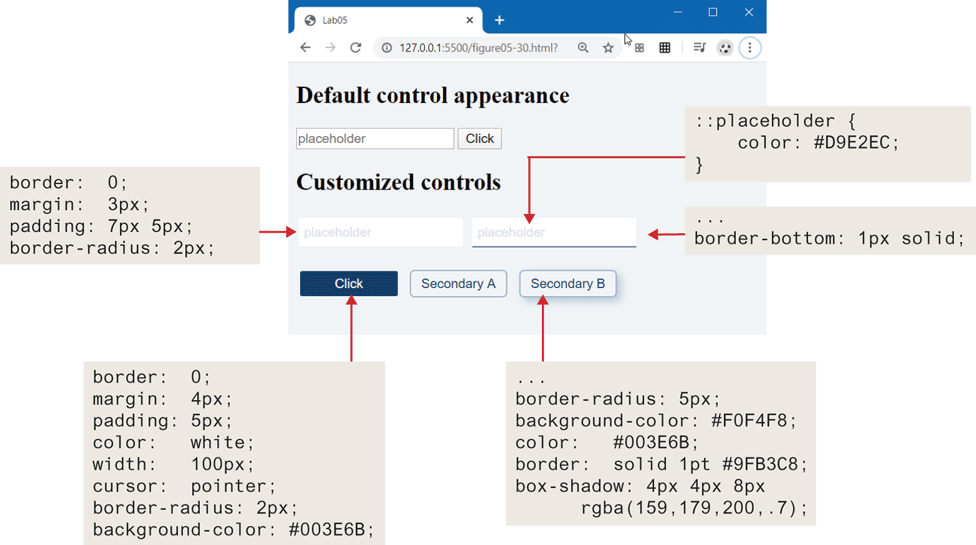
The browser window has a tab titled Lab 05. The address bar reads, colon hyphen 127 dot 0 dot 0 dot 1 colon 5500 forward slash figure 05 hyphen 30 dot h t m l. The browser window consists of two level-1 headings, three textboxes, and four buttons. The level-1 heading that reads, "Default control appearance" is at the top of the browser window. The first textbox is an empty textbox that is placed below the level-1 heading with a button at the right labeled Click. The first textbox contains the placeholder value "placeholder". The second level-1 heading that reads, "Customized controls" is placed below the first textbox. The second and third textboxes are placed side-by-side below the second level-1 heading. The second and third textboxes contain the placeholder value “placeholder.” The third textbox has a border at the bottom. The second, third, and fourth buttons labeled Click, Secondary “A”, and Secondary B are placed side-by-side below the second and third textboxes.
The first block of code that consists of four lines of code are placed at the left of the browser window. The code reads as follows: Line 1: border colon 0 semicolon. Line 2: margin colon 3 p x semicolon. Line 4: padding colon 7 p x 5 p x semicolon. Line 5: border hyphen radius colon 2 p x semicolon. An arrow points from the first block of code to the second textbox in the browser window.
The second block of code that consists of three lines of code is placed at the right of the browser window. The code reads as follows: Line 1: colon colon placeholder open curly brace at indentation level 0. Line 2 color colon hash D 9 E 2 E C semicolon at indentation level 1. Line 3: close curly brace at indentation level at 0. An arrow points from the second block of code to the placeholder value in the third textbox placed in the browser window.
The third block of code that consists of two lines of code is placed at the right of the browser window. The code reads as follows: Line 1: Ellipsis. Line 2: border hyphen bottom colon 1 p x solid semicolon. An arrow from the third block of code points to the border in the third textbox.
The fourth block of code that consists of eight lines of code is placed at the bottom left of the browser window. The code reads as follows: Line 1: border colon 0 semicolon. Line 2: margin colon 4 p x semicolon. Line 3: padding colon 5 p x semicolon. Line 4: color colon white semicolon. Line 5: width colon 100 p x semicolon. Line 6: cursor colon pointer semicolon. Line 7: border hyphen radius colon 2 p x semicolon. Line 8: background hyphen color colon hash 003 E 6 B semicolon. An arrow points from the fourth block of code to the button labeled Click.
The fifth block of code that consists of five lines of code is placed at the bottom right of the browser window. The code reads as follows: Line 1: border hyphen radius colon 5 p x semicolon. Line 2: background hyphen color colon hash F O F 4 F 8 semicolon. Line 3: color colon hash 003 E 6 B semicolon. Line 4: border colon solid 1 p t hash 9 F B 3 C 8 semicolon. Line 5: box hyphen shadow colon 4 p x 4 p x 8 p x r g b “a” open parenthesis 159 comma 179 comma 200 comma .7 close parenthesis semicolon. An arrow that points from the fifth block of code points to the button labeled Secondary B.
Back