Long description
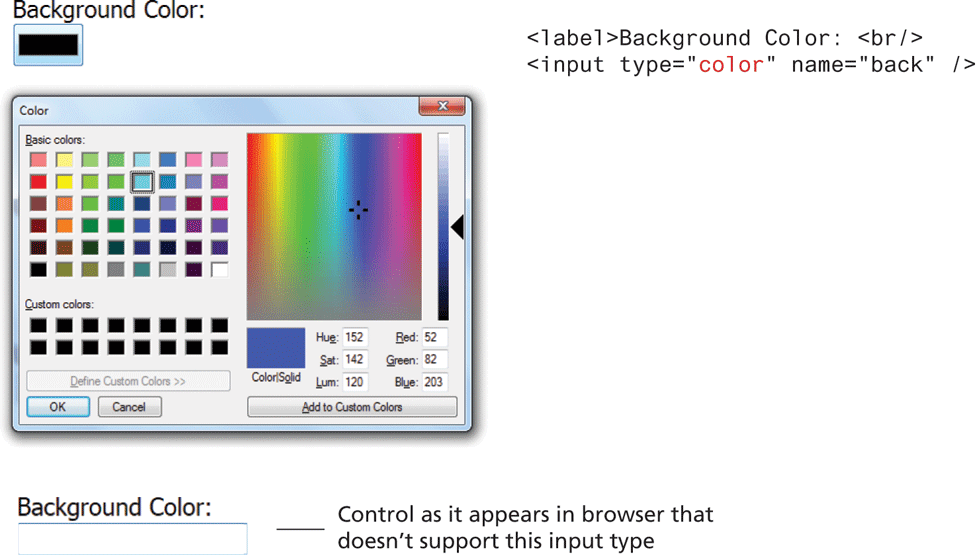
Block 1 is placed at the top left of the figure. It shows a small solid box, titled Background Color colon that has a black background color and thick light blue border.
The block of code placed at the right side of block 1 and reads as follows: Line 1: open angular bracket label close angular bracket Background Color colon open angular bracket b r forward slash close angular bracket. Line 2: open angular bracket input type equal open double quotes color close double quotes name equals open double quotes back close double quotes forward slash close angular bracket.
Block 2 is placed below block 1. This shows a typical color palette window that allows users to select colors. Users can choose from the available 48 Base colors, 16 Custom colors, spectrum of colors. Users can also enter specific values for Hue, Sat, Lum, Red, Green, and Blue and add them to custom colors.
Block 3 is placed below block 2 and shows a small solid box titled Background Color colon that has a white background color with light blue border. This indicates the Control as it appears in browser that doesn’t support this input type.
Back