Long description
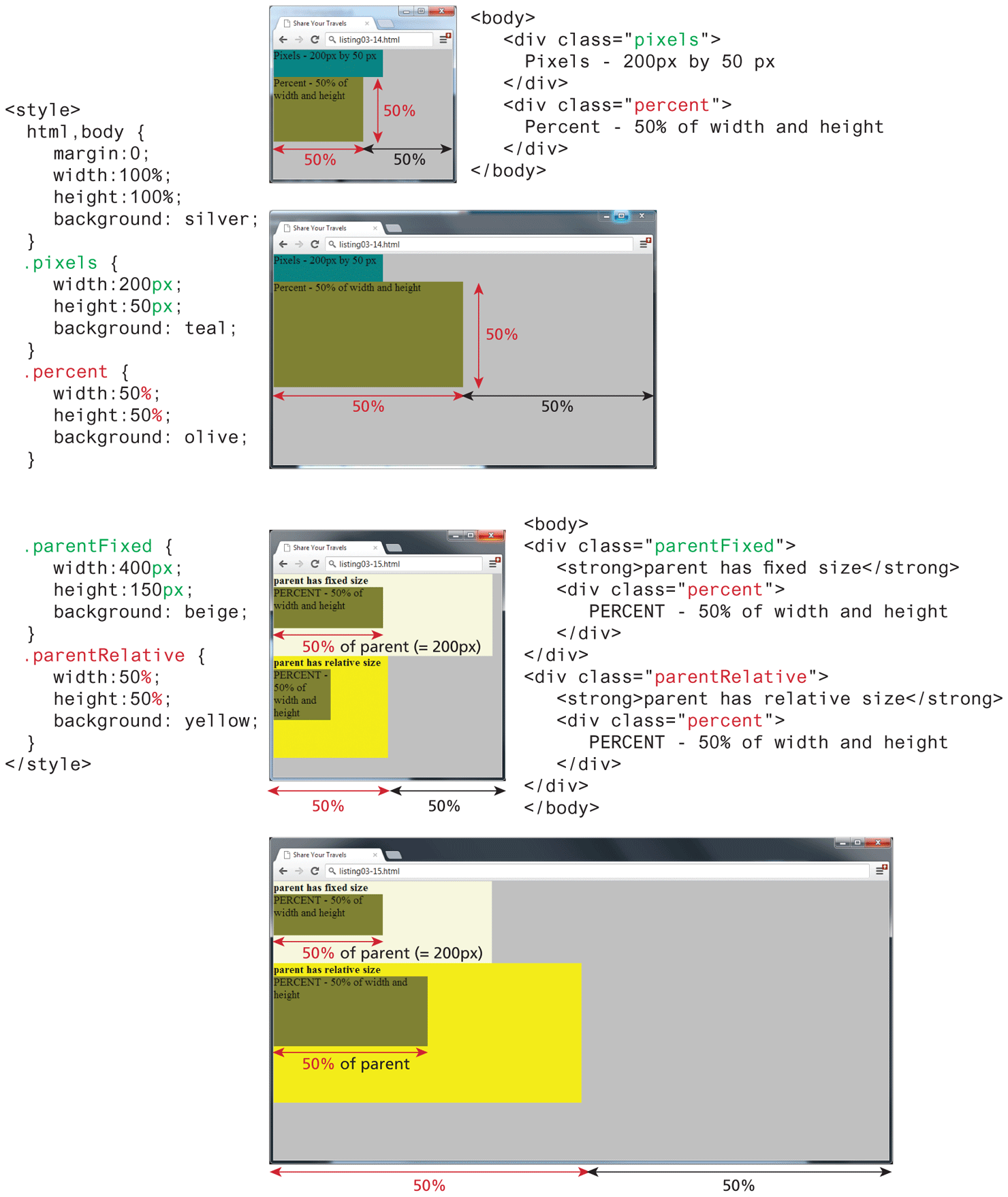
The first browser window has a tab titled Share your Travels is placed at the top. The address bar reads, listing 03 hyphen 14 dot h t m l. The browser window consists of 2 blocks. The background of the browser window is shaded silver. The first block that reads, "Pixels hyphen 200 p x by 50 p x" is a small horizontal rectangle shaded teal and is placed at the top of the browser window. The second block that reads, "Percent hyphen 50 percent of width and height" is a large horizontal rectangle attached to the bottom of the small rectangle. The length of the small rectangle is more than that of the large rectangle. The large rectangle is shared olive. A double-headed arrow labeled 50 percent indicates the height of the large rectangle. Two double-headed arrows labeled 50 percent are placed side-by-side indicating that the large rectangle covers 50 percent of the width of the browser window.
The first block of code is at the right side of the first browser window that reads, Line 1: open angle bracket body close angle bracket at indentation level 0. Line 2: open angle bracket div class equals open double quotes pixels close double quotes close angle bracket at indentation level 1. Line 3: Pixels hyphen 200 p x by 50 p x at indentation level 2. Line 4: open angle bracket forward slash div close angle bracket at indentation level 1. Line 5: open angle bracket div class equals open double quotes percent close double quotes close angle bracket at indentation level 1. Line 6: Percent hyphen 50 percent of width and height at indentation level 2. Line 7: open angle bracket forward slash div close angle bracket at indentation level 1. Line 8: open angle bracket forward slash body close angle bracket at indentation level 0.
The second block of code is at the left side of the first browser that reads, Line 1: open angle bracket style close angle bracket at indentation level 0. Line 2: h t m l comma body open curly brace at indentation level 2. Line 3: margin colon 0 semicolon at indentation level 2. Line 4: width colon 100 percent semicolon at indentation level 2. Line 5: height colon 100 percent semicolon at indentation level 2. Line 6: background colon silver semicolon at indentation level 1. Line 7: close curly brace at indentation level 1. Line 8: dot pixels open curly brace at indentation level 2. Line 9: width colon 200 p x semicolon at indentation level 2. Line 10: height colon 50 p x semicolon at indentation level 2. Line 11: background colon teal semicolon at indentation level 1. Line 12: close curly brace at indentation level 1. Line 13: dot percent open curly brace at indentation level 2. Line 14: width colon 50 percent semicolon at indentation level 2. Line 15: height colon 50 percent semicolon at indentation level 2. Line 16: background colon olive semicolon at indentation level 2. Line 17: close curly brace at indentation level 1.
The second browser window is placed below the first browser window that has a tab titled Share your Travels. The address bar reads, listing 03 hyphen 14 dot h t m l. The browser consists of 2 blocks. The background of the browser window is shaded silver. The first block that reads, "Pixels hyphen 200 p x by 50 p x" is a small horizontal rectangle shaded teal and is placed at the top of the browser window. The second block that reads, "Percent hyphen 50 percent of width and height" is a large horizontal rectangle attached to the bottom of the small rectangle. The length of the large rectangle is more than that of the small rectangle. The large rectangle is shared olive. A double-headed arrow labeled 50 percent indicates the height of the large rectangle. Two double-headed arrows labeled 50 percent are placed side-by-side indicating that the large rectangle covers 50 percent of the width of the browser window.
The third block of code is placed below the second block of code that reads, Line 1: dot parentFixed open curly brace at indentation level 1. Line 2: width colon 400 p x semicolon at indentation level 2. Line 3: height colon 150 p x semicolon at indentation level 2. Line 4: background colon beige semicolon at indentation level 1. Line 5: close curly brace at indentation level 1. Line 7: dot parentRelative open curly brace at indentation level 2. Line 8: width colon 50 percent semicolon at indentation level 2. Line 9: height colon 50 percent semicolon at indentation level 2. Line 10: background colon yellow semicolon at indentation level 0.
Line 11: close curly brace at indentation level 1. Line 12: open angle bracket forward slash style close angle bracket at indentation level 0.
The third browser window that has a tab titled Share your Travels is placed below the second browser window. The address bar reads, listing 03 hyphen 15 dot h t m l. The background of the browser window is shaded silver. The browser window consists of 2 blocks. The first block that reads, “PERCENT – 50 percent of width and height” is an olive colored rectangle placed on a rectangular background labeled parent has fixed size and is shaded beige. A double-headed arrow labeled 50 percent of parent (equals 200 p x) placed below the first block indicates that the first block covers 50 percent of the width of the rectangular background, which is the parent block of the first block. The second block that reads, "Percent hyphen 50 percent of width and height" is an olive colored square placed on a square background labeled parent has relative size and is shaded yellow. Two double-headed arrows labeled 50 percent are placed side-by-side below the third browser window that indicates the width of the square background is 50 percent of the width of the browser window.
The fourth block of code is at the right side of the third browser window and reads as follows:
Line 1: open angle bracket body close angle bracket at indentation level 0. Line 2: open angle bracket div class equals open double quotes parentFixed close double quotes close angle bracket at indentation level 0. Line 3: open angle bracket strong close angle bracket parent has fixed size open angle bracket forward slash strong close angle bracket at indentation level 1. Line 4: open angle bracket div class equals double quotes percent double quotes close angle bracket at indentation level 1. Line 5: PERCENT hyphen 50 percent of width and height at indentation level 2. Line 6: open angle bracket forward slash div close angle bracket at indentation level 1. Line 7: open angle bracket forward slash div close angle bracket at indentation level 0. Line 8: open angle bracket div class equals open double quotes parentRelative close double quotes close angle bracket at indentation level 0. Line 9: open angle bracket strong close angle bracket parent has relative size open angle bracket forward slash strong close angle bracket at indentation level 1. Line 10: open angle bracket div class equals open double quotes percent close double quotes close angle bracket at indentation level 1. Line 11: PERCENT hyphen 50 percent of width and height at indentation level 2. Line 12: open angle bracket forward slash div close angle bracket at indentation level 1. Line 13: open angle bracket forward slash div close angle bracket at indentation level 0. Line 14: open angle bracket forward slash body close angle bracket at indentation level 0.
The fourth browser window that has a tab titled Share your Travels is placed below the third browser window. The address bar reads, listing 03 hyphen 15 dot h t m l. The browser window consists of 2 blocks. The block that reads, "Percent hyphen 50 percent of width and height" is an olive colored rectangle placed on a rectangular background labeled parent has fixed size and is shaded beige. The block that reads, "Percent hyphen 50 percent of width and height" is an olive colored big rectangle placed on a bigger rectangular background labeled parent has relative size and is shaded yellow. A double-headed arrow labeled 50 percent of parent (equals 200 p x) is placed below the rectangle in the first block indicating that its width is half the size of the rectangular background in the first block. A double-headed arrow labeled 50 percent of parent is placed below the rectangle in the second block indicating that its width is half the size of the rectangular background in the second block. Two double-headed arrows placed side-by-side below the fourth browser indicates that the rectangular background in the second block covers 50 percent of the width of the browser window.
Back