Long description
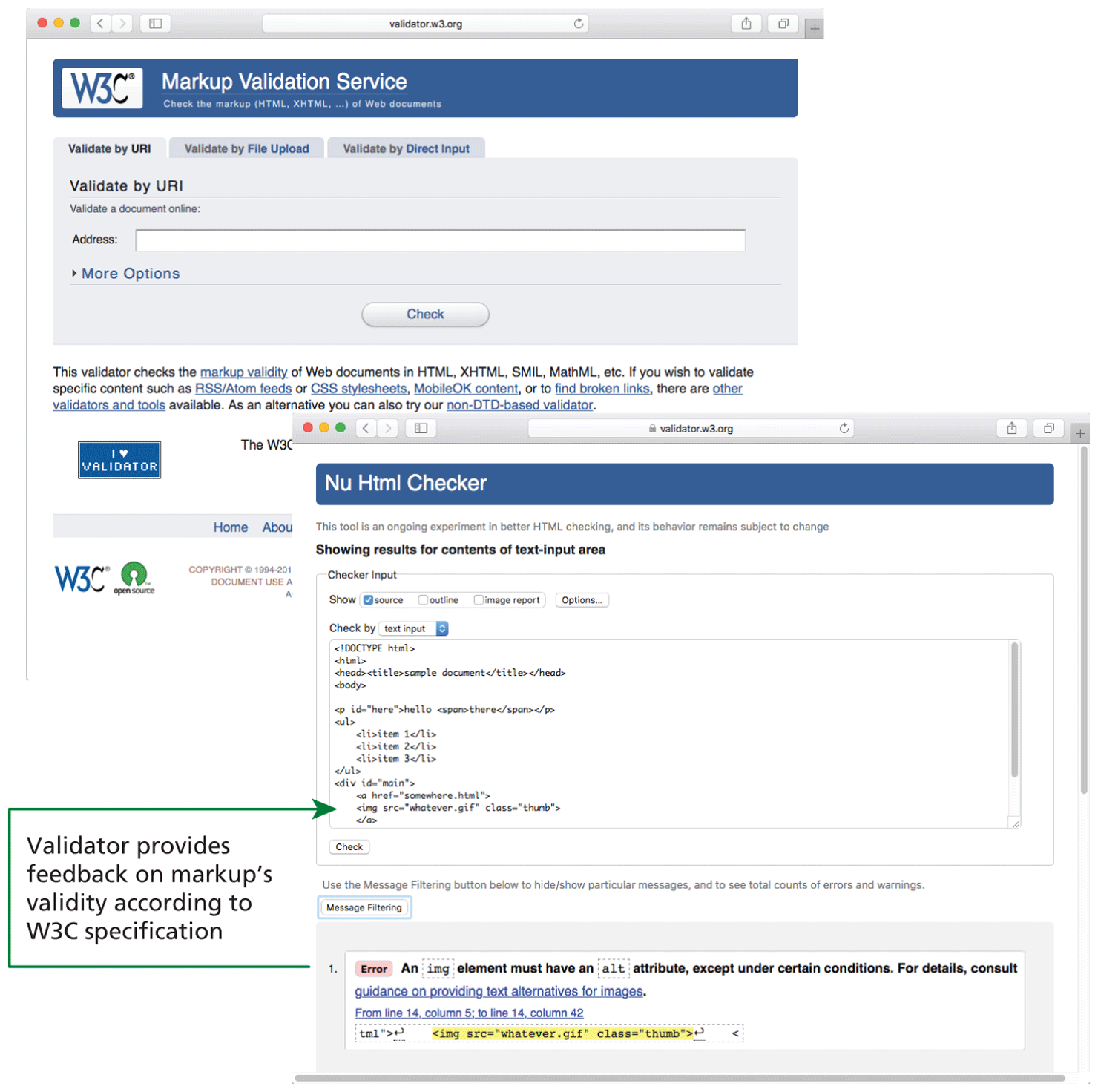
The first browser window titled validator dot w 3 dot org is placed at the top left of the figure. A level-1 heading that reads, Markup Validation Service is placed in the header of the window. A navigation bar with three tabs labeled Validate by U R I, Validate by File Upload, and Validate by Direct Input is shown at the top of a form below the header. Validate by U R I is selected that shows a level-2 heading that reads, Validate a document online colon. A textbox with a label at the left that reads, Address colon is shown below the level-2 heading. A dropdown that reads, More Options is available below the textbox. A button labeled Check is at the bottom of the form. The footer of the window reads as follows. This validator checks the markup validity of Web documents in H T M L, X H T M L, S M I L, Math M L, etc. If you wish to validate specific content such as R S S or Atom feeds or C S S stylesheets, Mobile O K content, or to find broken links, there are other validators and tools available. As an alternative you can also try our non hyphen D T D hyphen based validator.
The second browser window titled validator dot w 3 dot org is placed at the bottom right of the first browser window. The second browser window is divided into two sections. The first section shows the results for contents of text-input area. The result shows an H T M L code that reads as follows. Line 1: open angle bracket exclamation DOCTYPE h t m l close angle bracket at indentation level 0. Line 2: open angle bracket h t m l close angle bracket at indentation level 0. Line 3: open angle bracket head close angle bracket open angle bracket title close angle bracket sample document open angle bracket forward slash title close angle bracket open angle bracket forward slash head close angle bracket at indentation level 0. Line 4: open angle bracket body close angle bracket at indentation level 0. Line 5: open angle bracket p i d equals open double quotes here close double quotes close angle bracket hello open angle bracket span close angle bracket there open angle bracket forward slash span close angle bracket open angle bracket forward slash p close angle bracket at indentation level 0. Line 6: open angle bracket u l close angle bracket at indentation level 0. Line 7: open angle bracket l i close angle bracket item 1 open angle bracket forward slash l i close angle bracket at indentation level 1. Line 8: open angle bracket l i close angle bracket item 2 open angle bracket forward slash l i close angle bracket at indentation level 1. Line 9: open angle bracket l i close angle bracket item 3 open angle bracket forward slash l i close angle bracket at indentation level 1. Line 10: open angle bracket forward slash u l close angle bracket at indentation level 0. Line 11: open angle bracket div i d equals open double quotes main close double quotes close angle bracket at indentation level 0. Line 12: open angle bracket “a” h ref equals open double quotes somewhere dot h t m l close double quotes close angle bracket at indentation level 1. Line 13: open angle bracket i m g s r c equals open double quotes whatever dot gif close double quotes class equals open double quotes thumb close double quotes close angle bracket at indentation level 1. Line 14: open angle bracket forward slash “a” close angle bracket at indentation level 1. A button labeled Check is placed below the block of code.
The second section of the second browser shows a line of text at the top that reads, Use the Message Filtering button below the hide or show particular messages, and to see total counts of errors and warnings. A button labeled Message Filtering is placed below the line of text. A message is shown below the button that reads as follows. Error An i m g element must have an alt attribute, except under certain conditions. For details, consult guidance on providing text alternatives for images. From Iine 14, column 5: to line 14, column 42. t m l open double quotes open angle bracket leftward arrow with hook close angle bracket open angle bracket i m g s r c open double quotes whatever dot gif close double quotes class equals open double quotes thumb close double quotes close angle bracket leftward arrow with hook open angle bracket. The error message indicates that the validator provides feedback on markup’s validity in line 13 of the h t m l code, according to W 3 C specification.
Back