Long description
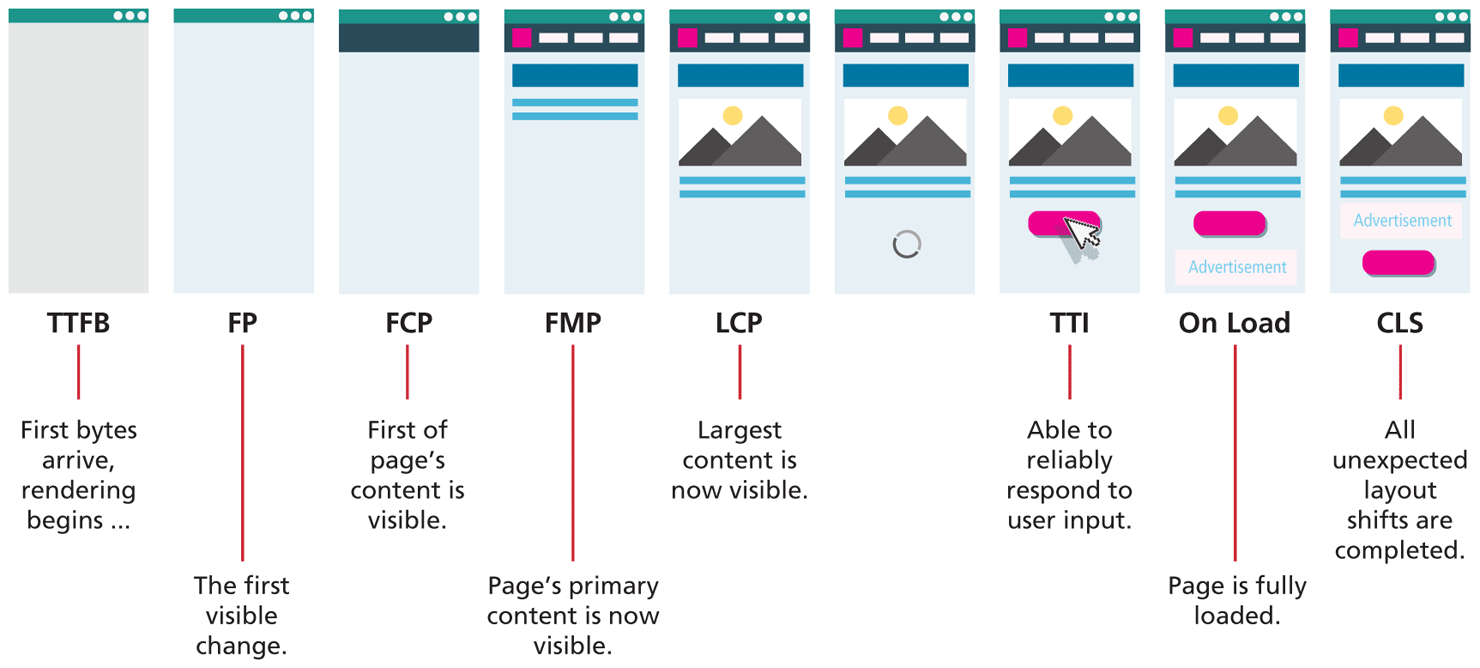
Browser 1: Browser Window labeled T T F B with no title and blank content. This means that the first bytes arrive and rendering of data begins in the browser.
Browser 2: Browser Window labeled F P with no title, blank content, different background-color in comparison to Browser 1. This means the first visible change is observed in the browser.
Browser 3: Browser Window labeled F C P with no title, solid strip at the top that covers 10 percent of browser window. This means the first of page’s content is visible in the browser.
Browser 4: Browser Window labeled F M P with no title, Navigation bar, and 3 solid striped lines. This means that the page’s primary content is now visible in the browser.
Browser 5: Browser Window labeled L C P with no title, Navigation bar, 1 image followed by 2 solid striped lines. This means that the largest content is now visible in the browser.
Browser 6: Browser Window with no title, Navigation bar, 1 image followed by 2 solid striped lines. Below the image there is a refresh icon.
Browser 7: Browser Window labeled T T I with no title, Navigation bar, 1 image followed by 2 solid striped lines. Below the image there is a button with a cursor icon hovered above the button indicating a click action. This means that the browser is now able to reliably respond to user input.
Browser 8: Browser Window labeled On Load with no title, Navigation bar, 1 image followed by 2 solid striped lines. Below the image there is a button that is followed by a large Textbox that contains the value Advertisement. This means that the page is fully loaded in the browser.
Browser 9: Browser Window labeled C L S with no title, Navigation bar, 1 image followed by 2 solid striped lines. Below the image there is a large Textbox that contains the value Advertisement. Below the textbox there is a button. This means that all unexpected layout shifts are completed in the browser.
Back