4 Discovery
So far, we explored how to create a reliable and secure channel between two processes located on different machines. However, to create a new connection with a remote process, we still need to discover its IP address. To resolve hostnames into IP addresses, we can use the phone book of the Internet: the Domain Name System (DNS) — a distributed, hierarchical, and eventually consistent key-value store.
In this chapter, we will look at how DNS resolution works in a browser, but the process is the same for any other client. When you enter a URL in your browser, the first step is to resolve the hostname’s IP address, which is then used to open a new TLS connection.
Concretely, let’s take a look at how the DNS resolution works when you type www.example.com in your browser (see Figure 4.1).
The browser checks whether it has resolved the hostname before in its local cache. If so, it returns the cached IP address; otherwise it routes the request to a DNS resolver. The DNS resolver is typically a DNS server hosted by your Internet Service Provider.
The resolver is responsible for iteratively translating the hostname for the client. The reason why it’s iterative will become evident in a moment. The resolver first checks its local cache for a cached entry, and if one is found, it’s returned to the client. If not, the query is sent to a root name server (root NS).
The root name server maps the top-level domain (TLD) of an incoming request, like .com, to the name server’s address responsible for it.
The resolver, armed with the address of the TLD, sends the resolution request to the TLD name server for the domain, in our case .com.
The TLD name server maps the domain name of a request to the address of the authoritative name server responsible for it. An authoritative name server is responsible for a specific domain and holds all records that map the hostnames to IP addresses within that domain.
The resolver finally queries the authoritative name server for www.example.com, which checks its entries for the www hostname and returns the IP address associated with it back to the resolver.
If the query included a subdomain of example.com, like, e.g., news.example.com, the authoritative name server would have returned the address of the name server responsible for the subdomain.
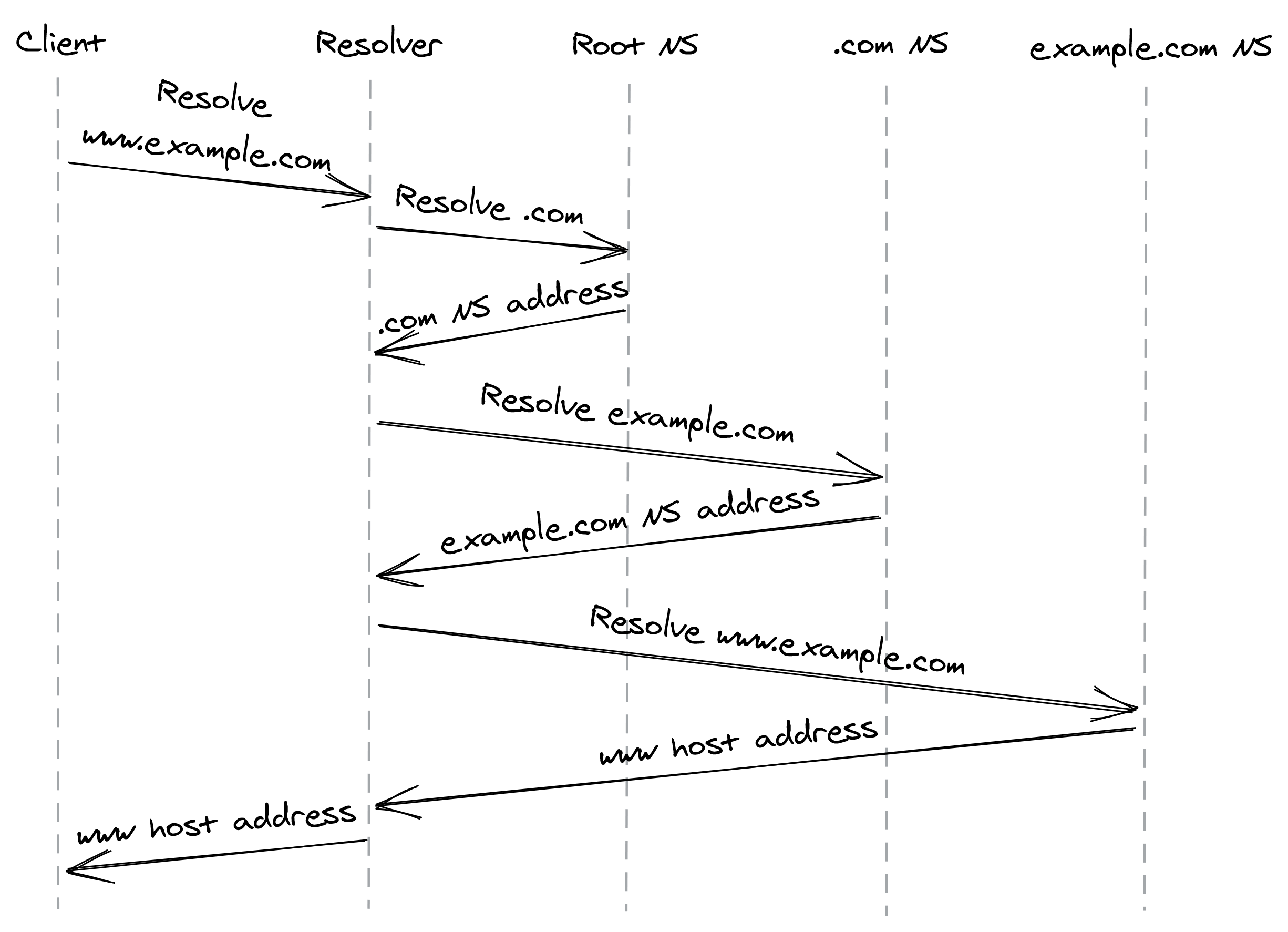
Figure 4.1: DNS resolution process
The resolution process involves several round trips in the worst case, but its beauty is that the address of a root name server is all that’s needed to resolve any hostname. Given the costs involved resolving a hostname, it comes as no surprise that the designers of DNS thought of ways to reduce them.
DNS uses UDP to serve DNS queries as it’s lean and has a low overhead. UDP at the time was a great choice as there is no price to be paid to open a new connection. That said, it’s not secure, as requests are sent in the clear over the Internet, allowing third parties to snoop in. Hence, the industry is pushing slowly towards running DNS on top of TLS.
The resolution would be slow if every request had to go through several name server lookups. Not only that, but think of the scale requirements on the name servers to handle the global resolution load. Caching is used to speed up the resolution process, as the mapping of domain names to IP addresses doesn’t change often — the browser, operating system, and DNS resolver all use caches internally.
How do these caches know when to expire a record? Every DNS record has a time to live (TTL) that informs the cache how long the entry is valid. But, there is no guarantee that the client plays nicely and enforces the TTL. Don’t be surprised when you change a DNS entry and find out that a small fraction of clients are still trying to connect to the old address days after the change.
Setting a TTL requires making a tradeoff. If you use a long TTL, many clients won’t see a change for a long time. But if you set it too short, you increase the load on the name servers and the average response time of requests because the clients will have to resolve the entry more often.
If your name server becomes unavailable for any reason, the smaller the record’s TTL is and the higher the number of clients impacted will be. DNS can easily become a single point of failure — if your DNS name server is down and the clients can’t find the IP address of your service, they won’t have a way to connect it. This can lead to massive outages.