Chapter 9
Use Cases
Use cases are a technique for capturing the functional requirements of a system. Use cases work by describing the typical interactions between the users of a system and the system itself, providing a narrative of how a system is used.
Rather than describe use cases head-on, I find it easier to sneak up on them from behind and start by describing scenarios. A scenario is a sequence of steps describing an interaction between a user and a system. So if we have a Web-based on-line store, we might have a Buy a Product scenario that would say this:
The customer browses the catalog and adds desired items to the shopping basket. When the customer wishes to pay, the customer describes the shipping and credit card information and confirms the sale. The system checks the authorization on the credit card and confirms the sale both immediately and with a follow-up e-mail.
This scenario is one thing that can happen. However, the credit card authorization might fail, and this would be a separate scenario. In another case, you may have a regular customer for whom you don’t need to capture the shipping and credit card information, and this is a third scenario.
All these scenarios are different yet similar. The essence of their similarity is that in all these three scenarios, the user has the same goal: to buy a product. The user doesn’t always succeed, but the goal remains. This user goal is the key to use cases: A use case is a set of scenarios tied together by a common user goal.
In use case–speak, the users are referred to as actors. An actor is a role that a user plays with respect to the system. Actors might include customer, customer service rep, sales manager, and product analyst. Actors carry out use cases. A single actor may perform many use cases; conversely, a use case may have several actors performing it. Usually, you have many customers, so many people can be the customer actor. Also, one person may act as more than one actor, such as a sales manager who does customer service rep tasks. An actor doesn’t have to be human. If the system performs a service for another computer system, that other system is an actor.
Actor isn’t really the right term; role would be much better. Apparently, there was a mistranslation from Swedish, and actor is the term the use case community uses.
Use cases are well known as an important part of the UML. However, the surprise is that in many ways, the definition of use cases in the UML is rather sparse. Nothing in the UML describes how you should capture the content of a use case. What the UML describes is a use case diagram, which shows how use cases relate to each other. But almost all the value of use cases lies in the content, and the diagram is of rather limited value.
Content of a Use Case
There is no standard way to write the content of a use case, and different formats work well in different cases. Figure 9.1 shows a common style to use. You begin by picking one of the scenarios as the main success scenario. You start the body of the use case by writing the main success scenario as a sequence of numbered steps. You then take the other scenarios and write them as extensions, describing them in terms of variations on the main success scenario. Extensions can be successes—user achieves the goal, as in 3a—or failures, as in 6a.
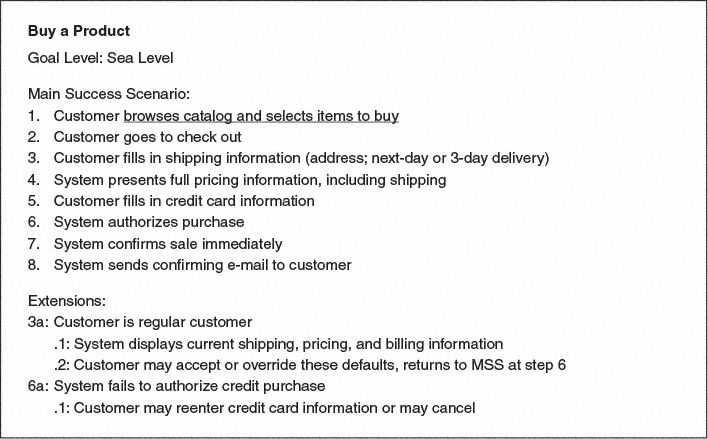
Each use case has a primary actor, which calls on the system to deliver a service. The primary actor is the actor with the goal the use case is trying to satisfy and is usually, but not always, the initiator of the use case. There may be other actors as well with which the system communicates while carrying out the use case. These are known as secondary actors.
Each step in a use case is an element of the interaction between an actor and the system. Each step should be a simple statement and should clearly show who is carrying out the step. The step should show the intent of the actor, not the mechanics of what the actor does. Consequently, you don’t describe the user interface in the use case. Indeed, writing the use case usually precedes designing the user interface.
An extension within the use case names a condition that results in different interactions from those described in the main success scenario (MSS) and states what those differences are. Start the extension by naming the step at which the condition is detected and provide a short description of the condition. Follow the condition with numbered steps in the same style as the main success scenario. Finish these steps by describing where you return to the main success scenario, if you do.
The use case structure is a great way to brainstorm alternatives to the main success scenario. For each step, ask, How could this go differently? and in particular, What could go wrong? It’s usually best to brainstorm all the extension conditions first, before you get bogged down working out the consequences. You’ll probably think of more conditions this way, which translates to fewer goofs that you have to pick up later.
A complicated step in a use case can be another use case. In UML terms, we say that the first use case includes the second. There’s no standard way to show an included use case in the text, but I find that underlining, which suggests a hyperlink, works very nicely and in many tools really will be a hyperlink. Thus in Figure 9.1, the first step includes the use case “browse catalog and select items to buy.”
Included use cases can be useful for a complex step that would clutter the main scenario or for steps that are repeated in several use cases. However, don’t try to break down use cases into sub–use cases and subsub–use cases using functional decomposition. Such a decomposition is a good way to waste a lot of time.
As well as the steps in the scenarios, you can add some other common information to a use case.
A pre-condition describes what the system should ensure is true before the system allows the use case to begin. This is useful for telling the programmers what conditions they don’t have to check for in their code.
A guarantee describes what the system will ensure at the end of the use case. Success guarantees hold after a successful scenario; minimal guarantees hold after any scenario.
A trigger specifies the event that gets the use case started.
When you’re considering adding elements, be skeptical. It’s better to do too little than too much. Also, work hard to keep the use case brief and easy to read. I’ve found that long, detailed use cases don’t get read, which rather defeats the purpose.
The amount of detail you need in a use case depends on the amount of risk in that use case. Often, you need details on only a few key use cases early on; others can be fleshed out just before you implement them. You don’t have to write all the detail down; verbal communication is often very effective, particularly within an iterative cycle in which needs are quickly met by running code.
Use Case Diagrams
As I said earlier, the UML is silent on the content of a use case but does provide a diagram format for showing them, as in Figure 9.2. Although the diagram is sometimes useful, it isn’t mandatory. In your use case work, don’t put too much effort into the diagram. Instead, concentrate on the textual content of the use cases.
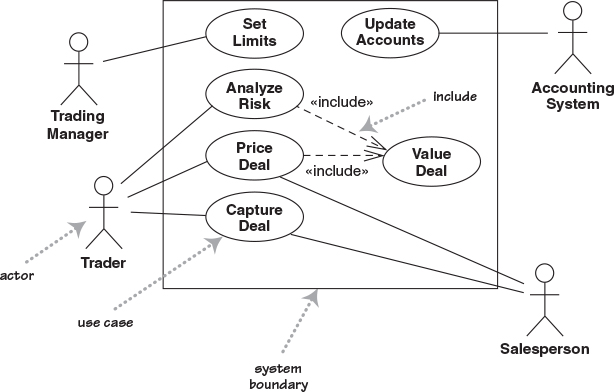
The best way to think of a use case diagram is that it’s a graphical table of contents for the use case set. It’s also similar to the context diagram used in structured methods, as it shows the system boundary and the interactions with the outside world. The use case diagram shows the actors, the use cases, and the relationships between them:
Which actors carry out which use cases
Which use cases include other use cases
The UML includes other relationships between use cases beyond the simple includes, such as «extend». I strongly suggest that you ignore them. I’ve seen too many situations in which teams can get terribly hung up on when to use different use case relationships, and such energy is wasted. Instead, concentrate on the textual description of a use case; that’s where the real value of the technique lies.
Levels of Use Cases
A common problem with use cases is that by focusing on the interaction between a user and the system, you can neglect situations in which a change to a business process may be the best way to deal with the problem. Often, you hear people talk about system use cases and business use cases. The terms are not precise, but in general, a system use case is an interaction with the software, whereas a business use case discusses how a business responds to a customer or an event.
[Cockburn, use cases] suggests a scheme of levels of use cases. The core use cases are at “sea level.” Sea-level use cases typically represent a discrete interaction between a primary actor and the system. Such use cases will deliver something of value to the primary actor and usually take from a couple of minutes to half an hour for the primary actor to complete. Use cases that are there only because they are included by sea-level use cases are fish level. Higher, kite-level use cases show how the sea-level use cases fit into wider business interactions. Kite-level use cases are usually business use cases, whereas sea and fish levels are system use cases. You should have most of your use cases at the sea level. I prefer to indicate the level at the top of the use case, as in Figure 9.1.
Use Cases and Features (or Stories)
Many approaches use features of a system—Extreme Programming calls them user stories—to help describe requirements. A common question is how features and use cases interrelate.
Features are a good way of chunking up a system for planning an iterative project, whereby each iteration delivers a number of features. Use cases provide a narrative of how the actors use the system. Hence, although both techniques describe requirements, their purposes are different.
Although you can go directly to describing features, many people find it helpful to develop use cases first and then generate a list of features. A feature may be a whole use case, a scenario in a use case, a step in a use case, or some variant behavior, such as adding yet another depreciation method for your asset valuations, that doesn’t show up in a use case narrative. Usually, features end up being more fine grained than use cases.
When to Use Use Cases
Use cases are a valuable tool to help understand the functional requirements of a system. A first pass at use cases should be made early on. More detailed versions of use cases should be worked just prior to developing that use case.
It is important to remember that use cases represent an external view of the system. As such, don’t expect any correlations between use cases and the classes inside the system.
The more I see of use cases, the less valuable the use case diagram seems to be. With use cases, concentrate your energy on their text rather than on the diagram. Despite the fact that the UML has nothing to say about the use case text, it is the text that contains all the value in the technique.
A big danger of use cases is that people make them too complicated and get stuck. Usually, you’ll get less hurt by doing too little than by doing too much. A couple of pages per use case is just fine for most cases. If you have too little, at least you’ll have a short, readable document that’s a starting point for questions. If you have too much, hardly anyone will read and understand it.
Where to Find Out More
Use cases were originally popularized by Ivar Jacobson in [Jacobson, OOSE].
Although use cases have been around for a while, there’s been little standardization on their use. The UML is silent on the important contents of a use case and has standardized only the much less important diagrams. As a result, you can find a divergent range of opinions on use cases.
In the last few years, however, [Cockburn, use cases] has become the standard book on the subject. In this chapter, I’ve followed the terminology and advice of that book for the excellent reason that when we’ve disagreed in the past, I’ve usually ended up agreeing with Alistair Cockburn in the end. He also maintains a Web site at http://usecases.org. [Constantine and Lockwood] provides a convincing process for deriving user interfaces from use cases; also see http://foruse.com.