Cryptographic primitives and protocols are often described as isolated building blocks as if they were running in a galaxy far, far away from any adversary. In practice, this is an unrealistic assumption that has often proven wrong. In the real world, cryptography runs in all kinds of environments and is subject to all sorts of threats. In this chapter, we’ll look at the more extreme scenarios—the highly adversarial environments—and what you can do to protect your keys and your data in these situations. (Spoiler alert: it involves using specialized hardware.)
Present-day computer and network security starts with the assumption that there is a domain that we can trust. For example: if we encrypt data for transport over the Internet, we generally assume the computer that’s doing the encrypting is not compromised and that there’s some other “endpoint” at which it can be safely decrypted.
—Joanna Rutkowska (“Intel x86 considered harmful,” 2015)
Cryptography used to be about “Alice wants to encrypt a message to Bob without Eve being able to intercept it.” Today, a lot of it has moved to something more like “Alice wants to encrypt a message to Bob, but Alice has been compromised.” It’s a totally different attacker model, which is often not anticipated for in theoretical cryptography. What do I mean by this? Let me give you some examples:
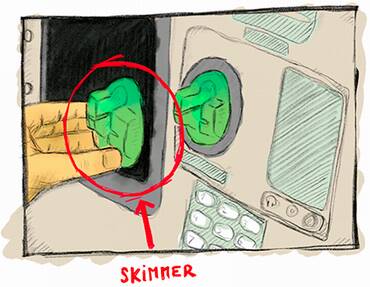
Using your credit card on an automated teller machine (ATM) that might be augmented with a skimmer, which is a device that a thief can place on top of the card reader in order to copy the content of your bank card (see figure 13.1)
Downloading an application on your mobile phone that compromises the operating system (OS)
Hosting a web server in a shared web-hosting service, where another malicious customer might be sharing the same machine as you
Managing highly sensitive secrets in a data center that gets visited by spies from a different country
Figure 13.1 A skimmer, a malicious device that can be placed in front of ATM or payment terminal card readers in order to copy data contained in the card magnetic stripe. The magnetic stripe usually contains the account number, the expiration date, and other metadata that’s used by you to pay online or in a number of payment terminals. Skimmers are sometimes accompanied with a hidden camera to obtain your PIN as well, potentially enabling the thief to use ATM withdrawals and payment terminals enforcing PIN entry.
All of these examples are a modern use of cryptography in a threat model that many cryptographers ignore or are totally unaware of. Indeed, most of the cryptographic primitives that you read about in the literature will just assume that Alice, for example, has total control of her execution environment, and only when ciphertext (or a signature or a public key or . . .) leaves her computer to go over the network will man-in-the-middle (MITM) attackers be able to perform their tricks. But, in reality and in these modern times, we often use cryptography in much more adversarial models.
Warning Security is, after all, a product of your assumptions and what you expect of a potential attacker. If your assumptions are wrong, you’re in for a bad time.
How do real-world applications reconcile theoretical cryptography with these more powerful attackers? They make compromises. In other words, they try to make the attackers’ lives more difficult. The security of such systems is often calculated in cost (how much does the attacker have to spend to break the system?) rather than computational complexity.
A lot of what you’ll learn in this chapter will be imperfect cryptography, which in the real world, we call defense in depth. There’s a lot to learn, and this chapter comes with lots of new acronyms and different solutions that different vendors and their marketing teams and sales people have come up with. So let’s get started and learn about trusted systems in untrusted environments.
There are different ways to attack a system in practice. One way to categorize them is to think:
Software attacks—Attacks that leverage code run on your device
Hardware attacks—Attacks that require the adversary to be physically close to your device
While I already talked repeatedly about software attacks that target cryptography and how to mitigate them in previous chapters, there are some software attacks that are easier to defend if you leverage hardware solutions. For example, by generating and using cryptographic keys on a separate device connected to your computer, a virus hitting your computer wouldn’t be able to extract the keys.
Hardware attacks, however, are more tricky because attackers who get access to a device can pretty much do anything they want: data on disk can be arbitrarily modified, lasers can be shot on targeted places to force a computation to produce an erroneous value (so-called fault attacks), chips can be opened to reveal their parts, focused ion beam (FIB) microscopes can be used to reverse-engineer components, and so on. The sky’s the limit, and it is hard to protect against such motivated attackers. Typically, the different solutions available boil down to adding as many layers of defenses as you can in an attempt to make the attacker’s life much more difficult. It is all about raising the costs!
Of course, all systems don’t necessarily need to defend against the most powerful hardware attacks, and not all applications deal with the same level of threat. Different hardware solutions exist for different contexts, so the rest of this section is about understanding the differences between “such and such.”
Before getting into hardware solutions for untrusted environments, why not use software solutions? Can cryptography provide primitives that do not leak their own keys?
White box cryptography is exactly this: a field of cryptography that attempts to scramble a cryptographic implementation with the key it uses. The goal is to prevent extraction of the key from observers. The attacker obtains the source code of some white box AES implementation with a fixed key, and it encrypts and decrypts just fine, but the key is mixed so well with the implementation that it is too hard for anyone to extract it from the algorithm. That’s the theory at least. In practice, no published white box crypto algorithm has been found to be secure, and most commercial solutions are closed-source due to this fact.
Note Security through obscurity and obfuscation (scrambling code to make it look unintelligible) are techniques that are generally frowned on as they haven’t been proven to work effectively. That being said, in the real world, these techniques sometimes have their place and can be used to delay and frustrate adversaries.
All in all, white box cryptography is a big industry that sells dubious products to businesses in need of digital rights management (DRM) solutions (tools that control how much access a customer can get to a product they bought). For example, you can find these white-box solutions in the hardware that plays movies you bought in a store or in the software that plays movies you are watching on a streaming service. In reality, DRM does not strongly prevent these attacks; it just makes the life of their customers more difficult. On a more serious note, there is a branch of cryptography called indistinguishability obfuscation (iO) that attempts to do this cryptographically. iO is a theoretical, impractical, and so far, not-a-really-proven field of research. We’ll see how that one goes, but I wouldn’t hold my breath.
White box cryptography is not great, but that’s pretty much the best software solution for defending against powerful adversaries. So let’s turn to the hardware side for solutions. (Spoiler alert: things are about to get much more complicated and confusing.) If you thought that real-world cryptography was messy and that there were too many standards or ways to do the same thing, wait until you read what’s going on in the hardware world. Different terms have been made up and used in different ways, and standards have, unfortunately, proliferated as much as (if not more than) cryptography standards.
To understand what all of these hardware solutions are and how they differ from one another, let’s start with some necessary history. Smart cards are small chips usually seen packaged inside plastic cards (like bank cards) and were invented in the early 1970s following advances in microelectronics. Smart cards started out as a practical way to get everyone a pocket computer! Indeed, a modern smart card embeds its own CPU, different types of programmable or non-programmable memory (ROM, RAM, and EEPROM), inputs and outputs, a hardware random number generator (also called TRNG as you learned in chapter 8), and so on.
They’re “smart” in the sense that they can run programs, unlike the not-so-smart cards that could only store data via a magnetic stripe, which could be easily copied via the skimmers I talked about previously. Most smart cards allow developers to write small, contained applications that can run on the card. The most popular standard supported by smart cards is JavaCard, which allows developers to write Java-like applications.
To use a smart card, you first need to activate it by inserting it into a card reader. More recently, cards have been augmented with the Near Field Communication (NFC) protocol to achieve the same result via radio frequencies. This allows you to use the card by getting close to a card reader, as opposed to physically touching it.
Smart cards mix a number of physical and logical techniques to prevent observation, extraction, and modification of their execution environment and parts of their memory (where secrets are stored). There exist many attacks that attempt to break these cards and hardware devices in general. These attacks can be classified in three different categories:
Non-invasive attacks—Attacks that do not affect the targeted device. For example, differential power analysis (DPA) attacks evaluate the power consumption of a smart card while it simultaneously performs cryptographic operations in order to extract its keys.
Semi-invasive attacks—Attacks that use access to the chip’s surface in a non-damaging way to mount exploits. For example, differential fault analysis (DFA) attacks make use of heat, lasers, and other techniques to modify the execution of a program running on the smart card in order to leak keys.
Invasive attacks—Attacks that open the chip to probe or modify the circuitry in the silicon itself in order to alter the chip’s function and reveal its secrets. These attacks are noticeable because they can damage devices and have a greater chance of rendering devices unusable.
The fact that hardware chips are extremely small and tightly packaged can make attacks difficult. But specialized hardware usually goes much further by using different layers of materials to prevent depackaging and physical observation and by using hardware techniques to increase the inaccuracy of known attacks.
Smart cards got really popular really fast, and it became obvious that having such a secure black box in other devices could be useful. The concept of a secure element was born: a tamper-resistant microcontroller that can be found in pluggable form (for example, the SIM card in your phone required to access your carrier’s network) or directly bonded on chips and motherboards (for example, the embedded secure element attached to an iPhone’s NFC chip for payments). A secure element is really just a small, separate piece of hardware meant to protect your secrets and their usage in cryptographic operations.
Secure elements are an important concept to protect cryptographic operations in the Internet of Things (IoT), a colloquial (and overloaded) term referring to devices that can communicate with other devices (think credit cards, phones, biometric passports, garage keys, smart home sensors, and so on). You can see all of the solutions that follow in this section as secure elements implemented in different form factors, using different techniques to achieve pretty much the same thing, but providing different levels of security and speed.
The main definitions and standards around secure elements have been produced by Global Platform, a nonprofit association created from the need of the different players in the industry to facilitate interoperability among different vendors and systems. There exist more standards and certifications that focus on the security claims of secure elements from standard bodies like Common Criteria (CC), NIST, or the EMV (for Europay, Mastercard, and Visa).
As secure elements are highly secretive recipes, integrating them in your product means that you will have to sign nondisclosure agreements and use closed-source hardware and firmware. For many projects, this is seen as a serious limitation in transparency, but can be understood, as part of the security in these chips come from the obscurity of their design.
If you understood what a secure element is, well a hardware security module (HSM) is basically a bigger and faster secure element, and like some secure elements, some HSMs can run arbitrary code as well. This is not always true, however. Some HSMs are small (like the YubiHSM, a tiny USB dongle that resembles a YubiKey), and the term hardware security module can be used to mean different things by different people.
Many would argue that all of the hardware solutions discussed so far are HSMs of different forms and that secure elements are just HSMs specified by GlobalPlatform, while TPMs (Trusted Platform Modules) are HSMs specified by the Trusted Computing Group. But most of the time, when people talk about HSMs, they mean the big stuff.
HSMs are often classified according to FIPS 140-2, “Security Requirements for Cryptographic Modules.” The document is quite old, published in 2001, and naturally, does not take into account a number of attacks discovered after its publication. Fortunately, in 2019, it was superseded by the more modern version, FIPS 140-3. FIPS 140-3 now relies on two international standards:
ISO/IEC 19790:2012—Defines four security levels for hardware security modules. Level 1 HSMs do not provide any protection against physical attacks (you can think of these as pure software implementations), while level 3 HSMs wipe their secrets if they detect any intrusion!
ISO 24759:2017—Defines how HSMs must be tested in order to standardize certifications for HSM products.
Unfortunately, the two standards are not free. You’ll have to pay if you want to read them.
The US, Canada, and some other countries mandate certain industries like banks to use devices that have been certified according to the FIPS 140 levels. Many companies worldwide follow these same recommendations as well.
Note Wiping secrets is a practice called zeroization. Unlike level 3 HSMs, level 4 HSMs can overwrite secret data multiple times, even in cases of power outages, thanks to backup internal batteries.
Typically, you find an HSM as an external device with its own shelf on a rack (see figure 13.2) plugged to an enterprise server in a data center, as a PCIe card plugged into a server’s motherboard, or even as small dongles that resemble hardware security tokens. They can be plugged into your hardware via USB devices (if you don’t mind the lower performance). To go full circle, some of these HSMs can be administered using smart cards to install applications, to back up secret keys, and so on.
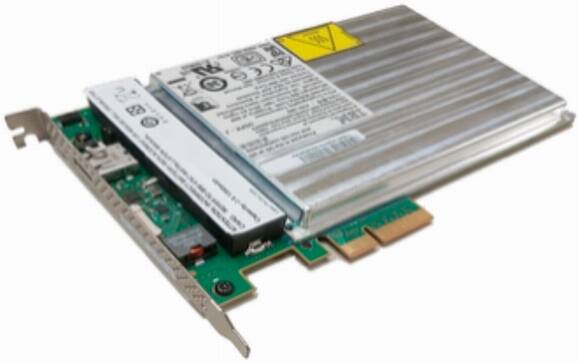
Figure 13.2 An IBM 4767 HSM as a PCI card. Photo from Wikipedia (http://mng.bz/XrAG).
Some industries highly utilize HSMs. For example, every time you enter your PIN in an ATM, the PIN ends up being verified by an HSM somewhere. Whenever you connect to a website via HTTPS, the root of trust comes from a certificate authority (CA) that stores its private key in an HSM, and the TLS connection is possibly terminated by an HSM. Do you have an Android or iPhone? Chances are that Google or Apple keep a backup of your phone safe with a fleet of HSMs. This last case is interesting because the threat model is reversed: the user does not trust the cloud with its data and, thus, the cloud service provider claims that its service can’t see the user’s encrypted backup nor can it access the keys used to encrypt it.
HSMs don’t really have a standard interface, but most of them will, at least, implement Public Key Cryptography Standard 11 (PKCS#11), one of the old standards that were started by the RSA company and that were progressively moved to the OASIS organization in 2012 to facilitate adoption of the standards. While the last version of PKCS#11 (v2.40) was released in 2015, it is merely an update of a standard that originally started in 1994. For this reason, it specifies a number of old cryptographic algorithms, or old ways of doing things, which can lead to vulnerabilities. Nevertheless, it is good enough for many uses and specifies an interface that allows different systems to easily interoperate with each other. The good news is that PKCS#11 v3.0 was released in 2020, including a lot of modern cryptographic algorithms like Curve25519, EdDSA, and SHAKE to name a few.
While the real goal for HSMs is to make sure nobody can extract key material from them, their security is not always shining. A lot about the security of these hardware solutions really relies on their high price, the hardware defense techniques not being disclosed, and the certifications (like FIPS and Common Criteria) that mostly focus on the hardware side of things. In practice, devastating software bugs were found, and it is not always straightforward if the HSM you use is at risk to any of these vulnerabilities. In 2018, Jean-Baptiste Bédrune and Gabriel Campana showed in their research (“Everybody be Cool, This is a Robbery”) a software attack to extract keys out of popular HSMs.
Note Not only is the price of one HSM high (it can easily be tens of thousands of dollars depending on the security level), but in addition to one HSM, you often have at least another HSM you use for testing and at least one more for backup (in case your first HSM dies with its keys in it). It can add up!
Furthermore, I still haven’t touched on the “elephant in the room” with all of these solutions: while you might prevent most attackers from reaching your secret keys, you can’t prevent attackers from compromising the system and making their own calls to the HSM (unless the HSM has logic that requires several signatures or the presence of a threshold of smart cards to operate). But, in most cases, the only service that an HSM provides is to prevent an attacker from stealthily stealing secrets and using those at some other time. When integrating hardware solutions like HSMs, it is good to first understand your threat model, the types of attacks you’re looking to thwart, and if threshold schemes like the multi-signatures I mentioned in chapter 8 aren’t a better solution.
While secure elements and HSMs prove to be useful, they are limited to specific use cases, and the process to write custom applications is known to be tedious. For this reason, the Trusted Computing Group (TCG) (another nonprofit organization formed by industry players) came up with a ready-to-use alternative that targets personal as well as enterprise computers. This is known as the Trusted Platform Module (TPM).
The TPM is not a chip but, instead, a standard (the TPM 2.0 standard); any vendor who so chooses can implement it. A TPM complying with the TPM 2.0 standard is a secure microcontroller that carries a hardware random number generator, secure memory for storing secrets, can perform cryptographic operations, and the whole thing is tamper-resistant. This description might sound familiar, and indeed, it is common to see TPMs implemented as a repackaging of secure elements. You usually find a TPM directly soldered or plugged into the motherboard of enterprise servers, laptops, and desktop computers (see figure 13.3).
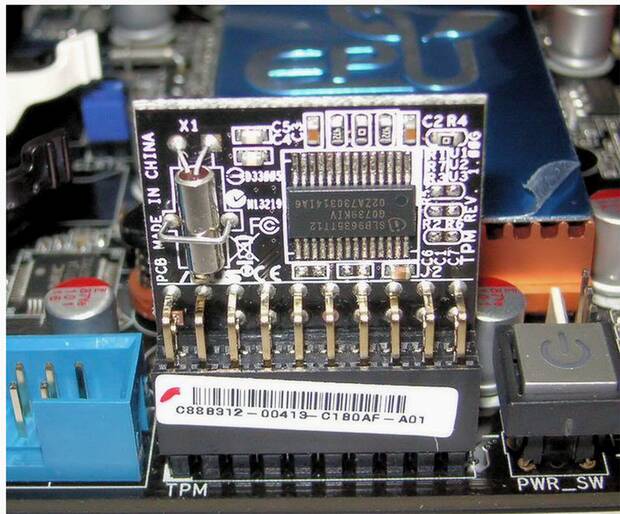
Figure 13.3 A chip implementing the TPM 2.0 standard, plugged into a motherboard. This chip can be called by the system’s motherboard components as well as user applications running on the computer’s OS. Photo from Wikipedia (http://mng.bz/Q2je).
Unlike smart cards and secure elements, a TPM does not run arbitrary code. Instead, it offers a well-defined interface that a greater system can take advantage of. TPMs are usually pretty cheap, and today many commodity laptops carry one.
Now the bad: the communication channel between a TPM and a processor is usually just a bus interface, which can easily be intercepted if you manage to steal or gain temporary physical access to the device. While many TPMs provide a high level of resistance against physical attacks, the fact that their communication channel is somewhat open does reduce their use cases to mostly defending against software attacks.
To solve these issues, there’s been a move to TPM-like chips that are integrated directly into the main processor. For example, Apple has the Secure Enclave and Microsoft has Pluton. Unfortunately, none of these security processors seem to follow a standard, which means it could be difficult, perhaps impossible, for user applications to leverage their functionalities. Let’s see some examples to get an idea of what hardware security chips like TPMs can do.
The simplest use case for TPMs is to protect data. To protect keys, it’s easy: just generate them in the secure chip and disallow extraction. If you need the keys, ask the chip to perform the cryptographic operations. To protect data, encrypt it. That concept is called file-based encryption (FBE) if you’re encrypting individual files and full-disk encryption (FDE) if it’s the whole disk. FDE sounds much better as it’s an all or nothing approach. That’s what most laptops and desktops use. In practice, FDE is not that great though: it doesn’t take into account how we, human beings, use our devices. We often leave our devices locked, as opposed to turned off, so that background functionalities can keep running. Computers deal with this by keeping the data-encryption key (DEK) around, even if your computer is locked. (Think about that the next time you go to the restroom at Starbucks, leaving your locked computer unattended.) Modern phones offer more security, encrypting different types of files depending on whether your phone is locked or turned off.
Note In practice, both FDE and FBE have many implementation issues. In 2019, Meijer and Gastel (in “Self-encrypting deception: Weaknesses in the encryption of solid state drives (SSDs)”) showed that several SSD vendors had completely insecure solutions. In 2021, Zinkus et al., (in “Data Security on Mobile Devices: Current State of the Art, Open Problems, and Proposed Solutions”) found that phone disk encryption also had many issues.
Of course, the user should be authenticated before data can be decrypted. This is often done by asking the user for a PIN or password. A PIN or password is not enough though, as it would allow simple brute force attacks (especially on 4- or 6-digit PINs). In general, solutions try to tie the DEK to both a user credential and a symmetric key kept on the enclave.
But a chip manufacturer can’t hardcode the same key in every device they produce; it leads to attacks like the DUHK attack (https://duhkattack.com), where thousands of devices were found hardcoding the same secret. This, in turn, means that the compromise of one device leads to the compromise of all the devices! The solution is a per-device key that is either fused into the chip at manufacturing time or created by the chip itself via hardware components called physical unclonable functions. For example, each Apple Secure Enclave has a UID, each TPM has a unique endorsement key and attestation key, etc. To prevent brute force attacks, Apple’s Secure Enclave mixes both the UID key and the user PIN with a password-based key derivation function (we covered this in chapter 2) to derive the DEK. Except that I lied: to allow users to change their PIN quickly, the DEK is not derived directly, but instead encrypted by a key encryption key (KEK).
Another example is secure boot. When booting your computer, there are different stages that run until you finally get to the screen you want. One problem users face are viruses and malwares, and how if they infect the boot process, you then run on an evil OS.
To protect the integrity of boot, TPMs and integrated secure chips provide a root of trust, something that we trust 100% and that allows us to trust other stuff down the line. This root of trust is generally some read-only memory (ROM) that cannot be overwritten (also called one-time programmable memory as it’s written during manufacturing and can’t be changed). For example, when powering up a recent Apple device, the first code that gets executed is the boot ROM, located inside the Apple’s Secure Enclave ROM. That boot ROM is tiny, so usually the only thing it does is:
Prepare some protected memory and load the next program to run there (usually some other boot loader)
Hash the program and verify its signature against the hardcoded public key in the ROM
The next boot loader does the same thing, and so on, until finally a boot loader starts the OS. This is, by the way, how OS updates that are not signed by Apple can’t be installed on your phone.
TPMs and integrated TPM-like chips are an interesting development, and they greatly increased the security of our devices in recent years. As they become cheaper and a winning standard arises, more devices will be able to benefit from them.
Smart cards, secure elements, HSMs, and TPMs are standalone chips or modules; they carry their own CPU, memory, TRNG, and so on, and other components can talk to them via some wires or radio frequency in NFC-enabled chips. TPM-like chips (Microsoft’s Pluton and Apple’s Secure Enclave) are standalone chips as well, although tightly coupled with the main processor inside of a system on chip (SoC). In this section, I will talk about the next logical step you can take in this taxonomy of security hardware, integrated security, hardware-enforced security within the main processor itself.
Processors that integrate security are said to create a trusted execution environment (TEE) for user code by extending the instruction set of a processor to allow for programs to run in a separate, secure environment. The separation between this secure environment and the ones we are used to dealing with already (often called a rich execution environment) is done via hardware. What ends up happening is that modern CPUs run both a normal OS as well as a secure OS simultaneously. Both have their own set of registers but share most of the rest of the CPU architecture. By using CPU-enforced logic, data from the secure world cannot be accessed from the normal world. For example, a CPU usually splits its memory, giving one part for the exclusive use of the TEE. Because a TEE is implemented directly on the main processor, not only does this mean a TEE is a faster and cheaper product than a TPM or secure element, it also comes for free in a lot of modern CPUs.
The TEE, like all other hardware solutions, is a concept developed independently by different vendors and a standard (by Global Platform) trying to play catch-up. The most known TEEs are Intel’s Software Guard Extensions (SGX) and ARM’s TrustZone.
What are TEEs good for? Let’s look at an example. For the last few years, there’s a new paradigm—the cloud—with big companies running servers to host your data. Amazon has AWS, Google has GCP, and Microsoft has Azure. Another way to put this is that people are moving from running things themselves to running things on someone else’s computer. This creates some issues in some scenarios where privacy is important. To fix that, confidential computing attempts to offer solutions to run client code without being able to see it or modify its behavior. SGX’s primary use case seems to be exactly that these days: clients running code that servers can’t see or tamper with.
One interesting problem that arises is how can one trust that the response from a request came from SGX, for example, and not from some impersonator. This is what attestation tries to solve. There are two kinds of attestation:
Local attestation—Two enclaves running on the same platform need to communicate and prove to each other that they are secure enclaves.
Remote attestation—A client queries a remote enclave and needs to make sure that it is the legitimate enclave that produced the result from the request.
Each SGX chip is provided with unique key pairs (the Root Sealing Keys) at manufacturing time. The public key part is then signed by some Intel CA. The first assumption, if we ignore the assumption that the hardware is secure, is that Intel is correctly signing public keys for secure SGX chips only. With that in mind, you can now obtain a signed attestation from Intel’s CA that you’re talking to a real SGX enclave and that it is running some specific code.
TEE’s goal is to first and foremost thwart software attacks. While the claimed software security seems to be attractive, it is, in practice, hard to segregate execution on the same chip due to the extreme complexity of modern CPUs and their dynamic states. This is attested to by the many software attacks against SGX and TrustZone (https://foreshadowattack.eu, https://mdsattacks.com, https://plundervolt.com, and https://sgaxe.com).
TEE as a concept provides some resistance against physical attacks because things at this microscopic level are way too tiny and tightly packaged together to analyze without expensive equipment. Against a motivated attacker, things might be different.
You have learned about many hardware products in this chapter. As a recap, here’s the list, which I illustrate in figure 13.4 as well:
Smart cards are microcomputers that need to be turned on by an external device like a payment terminal. They can run small custom Java-like applications. Bank cards are an example of a widely used smart card.
Secure elements are a generalization of smart cards, which rely on a set of Global Platform standards. SIM Cards are an example of secure elements.
HSMs (hardware security modules) can be seen as larger pluggable secure elements for enterprise servers. They are faster and more flexible and are seen mostly in data centers to store secret keys, making attacks on keys more obvious.
TPMs (Trusted Platform Modules) are repackaged secure elements plugged into personal and enterprise computer motherboards. They follow a standardized API by the Trusted Computing Group that can provide functionalities for operating systems and end users.
Security processors are TPM-like chips built extremely close to the main processor and are not programmable. They follow no standards, and different players have come out with different technologies.
TEEs (trusted execution environments) like TrustZone and SGX can be thought of as programmable secure elements implemented within the CPU instruction set. They are faster and cheaper, mostly providing resistance against software attacks. Most modern CPUs ship with TEEs and various levels of defense against hardware attacks.
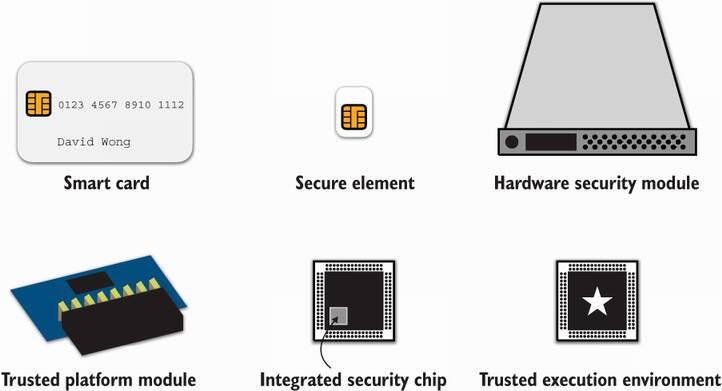
Figure 13.4 The different hardware solutions you learned in this chapter and an idea of what they look like.
What is the best solution for you? Try to narrow your choice by asking yourself some questions:
In what form factor? For example, the need for a secure element in a small device dictates what solutions you won’t be able to use.
How much speed do you need? Applications that need to perform a high number of cryptographic operations per second will be highly constrained in the solutions they can use, probably limited to HSMs and TEEs.
How much security do you need? Certifications and claims by vendors correspond to different levels of software or hardware security. The sky’s the limit.
Keep in mind that no hardware solution is the panacea; you’re only increasing the attack’s cost. Against a sophisticated attacker all of this is pretty much useless. Design your system so that one compromised device doesn’t imply that all devices are compromised.
We saw how hardware attempts to prevent direct observation and extraction of secret keys, but there’s only so much that hardware can do. At the end of the day, it is possible for the software to not care and give out the key despite all of this hardware hardening. The software can do so somewhat directly (like a backdoor) or it can do it indirectly by leaking enough information for someone to reconstruct the key. This latter option is called a side channel, and side-channel vulnerabilities are unintentional bugs most of the time (at least one would hope).
I mentioned timing attacks in chapter 3, where you learned that MAC authentication tags had to be compared in constant time; otherwise, attackers could infer the correct tag after sending you many incorrect ones and measuring how long they waited for you to respond. Timing attacks are usually taken seriously in all areas of real-world cryptography as they can potentially be remotely performed over the network, unlike physical side channels.
The most important and known side channel is power consumption, which I mentioned earlier in this chapter. This was discovered as an attack, called differential power analysis (DPA), by Kocher, Jaffe, and Jun in 1998, when they realized that they could hook an oscilloscope to a device and observe variance in the electricity consumed by the device over time while performing encryptions of known plaintexts. This variance clearly depends on the bits of the key used, and the fact that operations like XORing would consume more or less power, depending if the operand bits were set or not. This observation led to a key-extraction attack (so-called total breaks).
This concept can be illustrated with simple power analysis (SPA) attack. In ideal situations and when no hardware or software mitigations are implemented against power analysis attacks, it suffices to measure and analyze the power consumption of a single cryptographic operation involving a secret key. I illustrate this in figure 13.5.
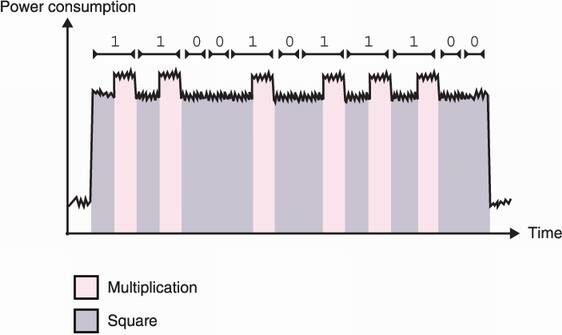
Figure 13.5 Some cryptographic algorithms leak so much information via their power consumption that a simple power analysis of a single power trace (a measure of the power consumed in time) can leak the private key of the algorithm. For example, this figure represents a trace of an RSA exponentiation (the message being exponentiated to the private exponent; see chapter 6). The RSA exponentiation is implemented with a square-and-multiply algorithm that iterates through the bits of the private exponent; for each bit it applies a square operation followed by a multiply operation only if the bit is set. In this example, multiplication is obviously consuming more power; hence, the clarity of the power trace.
Power is not the only physical side channel. Some attacks rely on electromagnetic radiations, vibrations, and even the sound emitted by the hardware. Let me still mention two other nonphysical side-channels. I know we are in a hardware-focused chapter, but these nonphysical side-channel attacks are important as they need to be mitigated in many real-world cryptographic applications.
First, returned errors can sometimes leak critical information. For example, in 2018, the ROBOT attack figured out a way to exploit the Bleichenbacher attack (mentioned in chapter 6) on a number of servers that implemented RSA PKCS#1 v1.5 decryption in the TLS protocol (covered in chapter 9). Bleichenbacher’s attack only works if you can distinguish if an RSA ciphertext has a valid padding or not. To protect against that attack, safe implementations perform the padding validation in constant time and avoid returning early if they detects that the padding is invalid. For example, in an RSA key exchange in TLS, the server has to fake its response as if it completed a successful handshake if the padding of the RSA payload is incorrect. Yet, if at the end of the padding validation an implementation decides to return a different error to the client (based on the validity of the padding), then this was all for nothing.
Second, accessing memory can take more or less time, depending if the data was previously accessed or not. This is due to the numerous layers of caching that exist in a computer. For example if the CPU needs something, it first checks if it has been cached in its internal memory. If not, it then reaches into caches that are further and further away from it. The further away the cache, the more time it’ll take. Not only that, but some caches are specific to a core (L1 cache, for example), while some caches are shared among cores in a multicore machine (L3 cache, RAM, disk).
Cache attacks exploit the fact that it is possible for a malicious program to run on the same machine, using the same cryptographic library as a sensitive cryptographic program. For example, many cloud services host different virtual servers on the same machine, and many servers use the OpenSSL library for cryptographic operations or for serving TLS pages. Malicious programs find ways to evict parts of the library that have been loaded in a cache shared with the victim’s process and then periodically measure the time it takes to reread some parts of that library. If it takes a long time, then the victim did not execute this part of the program; if it doesn’t take a long time, then the victim accessed this part of the program and repopulated the cache to avoid having to fetch again the program to a far away cache or worse from disk. What you obtain is a trace that resembles a power trace, and it is indeed exploitable in similar ways!
OK, that’s enough for side-channel attacks. If you’re interested in attacking cryptography via these side channels, there are better resources than this book. In this section, I want to only talk about software mitigations that cryptographic implementations can and should implement to protect against side-channel attacks in general. This whole field of study is called leakage-resilient cryptography, as the cryptographer’s goal here is to not leak anything.
Defending against physical attackers is an endless battle, which explains why many of these mitigations are proprietary and akin to obfuscation. This section is obviously not exhaustive but should give you an idea of the type of things applied cryptographers are working on to address side-channel attacks.
The first line of defense for any cryptographic implementation is to implement its cryptographic sensitive parts (think any computation that involves a secret) in constant time. It is obvious that implementing something in constant time cancels timing attacks, but this also gets rid of many classes of attacks like cache attacks and simple power analysis attacks.
How do you implement something in constant time? Never branch. In other words, no matter what the input is, always do the same thing. For example, listing 13.1 shows how the Golang language implements a constant-time comparison of authentication tags for the HMAC algorithm. Intuitively, if two bytes are equal, then their XOR will be 0. If this property is verified for every pair of bytes we compare, then ORing them will also lead to a 0 value (and a nonzero value otherwise). Note that it can be quite disconcerting to read this code if this is the first time you’re looking at constant-time tricks.
Listing 13.1 How Golang implements a constant-time comparison between two bytearrays
func ConstantTimeCompare(x, y []byte) byte {
    if len(x) != len(y) {                        ❶
        return 0                                 ❶
    }                                            ❶

    var v byte                                   ❷
    for i := 0; i < len(x); i++ {                ❷
        v |= x[i] ^ y[i]                         ❷
    }                                            ❷

    return v                                     ❸
}
❶ There is no point comparing two strings in constant time if they are of different lengths.
❷ Here is where the magic happens. The loop OR accumulates the XOR of every byte into a value v.
❸ Returns 0 only if v is equal to 0 and returns a nonzero value otherwise
For a MAC authentication tag comparison, it is enough to stop here to check if the result is 0 or not by branching (using a conditional expression such as if). Another interesting example is scalar multiplication in elliptic curve cryptography, which, as you learned in chapter 5, consists of adding a point to itself x number of times, where x is what we call a scalar. This process can be somewhat slow, and thus clever algorithms exist to speed up this part. One of the popular ones is called Montgomery’s ladder and is pretty much the equivalent to the RSA’s square-and-multiply algorithm I mentioned earlier (but in a different group).
Montgomery ladder’s algorithm alternates between the addition of two points and doubling of a point (adding the point to itself). Both the RSA’s square-and-multiply and Montgomery ladder’s algorithms have a simple way to mitigate timing attacks: they do not branch and always perform both operations. (And this is why the RSA exponentiation algorithm in constant time is usually referred to as square and multiply always.)
Note In chapter 7, I mentioned that signature schemes can go wrong in multiple ways and that key recovery attacks exist against implementations that leak a few bytes of the nonces they use (in signature schemes like ECDSA). This is what happened in the Minerva and TPM-Fail attacks, which happened around the same time. Both attacks found that a number of devices were vulnerable due to the amount of timing variation the signing operation takes.
In practice, mitigating timing attacks is not always straightforward as it is not always clear if CPU instructions for multiplications or conditional moves are in constant time. Additionally, it is not always clear how the compiler will compile high-level code when used with different compilation flags. For this reason, a manual review of the assembly generated is sometimes performed in order to obtain more confidence in the constant-time code written. Different tools to analyze constant-time code exist (like ducdect, ct-verif, SideTrail, and so on), but they are rarely used in practice.
Another common way of thwarting or at least confusing attackers is to add layers of indirection to any operation involving secrets. One of these techniques is called blinding, which is often possible thanks to the arithmetic structure of public key cryptography algorithms. You saw blinding used in oblivious algorithms like password-authenticated key exchange algorithms in chapter 11, and we can use blinding in the same way where we want the oblivious party to be the attacker observing leaks from our computations. Let’s talk about RSA as an example.
Remember, RSA decrypts by taking a ciphertext c and raising it to the private exponent d, where the private exponent d cancels the public exponent e, which was used to compute the ciphertext as me mod N. If you don’t remember the details, make sure to consult chapter 6. One way to add indirection is to perform the decryption operation on a value that is not the ciphertext known to the attacker. This method is called base blinding and goes like this:
This method blinds the value being used with the secret, but we can also blind the secret itself. For example, elliptic curve scalar multiplication is usually used with a secret scalar. But as computations take place in a cyclic group, adding a multiple of order to that secret does not change the computation result. This technique is called scalar blinding and goes like this:
Compute a scalar k2 = d + k1 × order, where d is the original secret scalar and order is its order
To compute Q = P, instead compute Q = [k2] P, which results in the same point
All of these techniques have been proven to be more or less efficient and are often used in combinations with other software and hardware mitigations. In symmetric cryptography, another somewhat similar technique, called masking, is used.
The concept of masking is to transform the input (the plaintext or ciphertext in the case of a cipher) before passing it to the algorithm. For example, by XORing the input with a random value. The output is then unmasked in order to obtain the final correct output. As any intermediate state is thus masked, this provides the cryptographic computation some amount of decorrelation from the input data and makes side-channel attacks much more difficult. The algorithm must be aware of this masking to correctly perform internal operations while keeping the correct behavior of the original algorithm.
I previously talked about fault attacks, a more intrusive type of side-channel attacks that modify the execution of the algorithm by inducing faults. Injecting faults can be done in many creative ways, physically, by increasing the heat of the system, for example, or even by shooting lasers at calculated points in the targeted chip.
Surprisingly, faults can also be induced via software. An example was found independently in the Plundervolt and V0LTpwn attacks, which managed to change the voltage of a CPU to introduce natural faults. This also happened in the infamous rowhammer attack, which discovered that repeatedly accessing memory of some DRAM devices could flip nearby bits. These types of attacks can be difficult to achieve but are extremely powerful. In cryptography, computing a bad result can sometimes leak the key. This is, for example, the case with RSA signatures that are implemented with some specific optimizations.
While it is impossible to fully mitigate these attacks, some techniques exist that can increase the complexity of a successful attack; for example, by computing the same operation several times and comparing the results to make sure they match before releasing it or by verifying the result before releasing it. For signatures, one can verify the signature via the public key before returning it.
Fault attacks can also have dramatic consequences against random number generators. One easy solution is to use algorithms that do not use new randomness every time they run. For example, in chapter 7, you learned about EdDSA, a signature algorithm that requires no new randomness to sign as opposed to the ECDSA signature algorithm.
All in all, none of these techniques are foolproof. Doing cryptography in highly adversarial environments is always about how much more cost you can afford to incur to the attackers.
The threat today is not just an attacker intercepting messages over the wire, but an attacker stealing or tampering with the device that runs your cryptography. Devices in the so-called Internet of Things (IoT) often run into threats and are, by default, unprotected against sophisticated attackers. More recently, cloud services are also considered in the threat model of their users.
Hardware can help protect cryptography applications and their secrets in a highly adversarial environment. One of the ideas is to provide a device with a tamper-resistant chip to store and perform crypto operations. That is, if the device falls in the hands of an attacker, extracting keys or modifying the behavior of the chip will be difficult.
It is generally accepted that one has to combine different software and hardware techniques to harden cryptography in adversarial environments. But hardware-protected cryptography is not a panacea; it is merely defense in-depth, effectively slowing down and increasing the cost of an attack. Adversaries with unlimited time and money will always break your hardware.
Decreasing the impact of an attack can also help deter attackers. This must be done by designing a system well (for example, by making sure that the compromise of one device does not imply a compromise of all devices).
While there are many hardware solutions, the most popular ones are as follows:
Hardware is not enough to protect cryptographic operations in highly adversarial environments as software and hardware side-channel attacks can exploit leakage that occurs in different ways (timing, power consumption, electromagnetic radiations, and so on). In order to defend against side-channel attacks cryptographic algorithms implement software mitigations:
Hardening cryptography in adversarial settings is a never-ending battle. One should use a combination of software and hardware mitigations to increase the cost and the time for a successful attack up to a desired accepted risk. One should also decrease the impact of an attack by using unique keys per device and, potentially, unique keys per cryptographic operation.