Chapter 17. Inheritance
The language feature most often associated with object-oriented programming is inheritance. Inheritance is the ability to define a new class that is a modified version of an existing class. In this chapter I demonstrate inheritance using classes that represent playing cards, decks of cards, and poker hands. If you don’t play poker, don’t worry—I’ll tell you what you need to know.
Representing Cards
There are 52 playing cards in a standard deck—each of them belongs to one of four suits and one of thirteen ranks. The suits are Spades, Hearts, Diamonds, and Clubs. The ranks are Ace, 2, 3, 4, 5, 6, 7, 8, 9, 10, Jack, Queen, and King. Depending on which game you are playing, an Ace can be higher than King or lower than 2.
If we want to define a new object to represent a playing card, it is obvious what the attributes should be: rank and suit. It is less obvious what type the attributes should be. One possibility is to use strings like 'Spade' for suits and 'Queen' for ranks. A problem with this implementation is that it would not be easy to compare cards to see which has a higher rank or suit.
An alternative is to use integers to encode the ranks and suits. In this context, “encode” means that we are going to define a mapping between numbers and suits, or between numbers and ranks. This kind of encoding is not meant to be a secret (that would be “encryption”).
For example, this table shows the suits and the corresponding integer codes:
|
Suit |
Code |
|---|---|
|
Spades |
3 |
|
Hearts |
2 |
|
Diamonds |
1 |
|
Clubs |
0 |
With this encoding, we can compare suits by comparing their codes.
To encode the ranks, we’ll use the integer 2 to represent the rank 2, 3 to represent 3, and so on up to 10. The following table shows the codes for the face cards:
|
Rank |
Code |
|---|---|
|
Jack |
11 |
|
Queen |
12 |
|
King |
13 |
And we can use either 1 or 14 to represent an Ace, depending on whether we want it to be considered lower or higher than the other ranks.
To represent these encodings, we will use two lists of strings, one with the names of the suits and the other with the names of the ranks.
Here’s a definition for a class that represents a playing card, with these lists of strings as class variables, which are variables defined inside a class definition, but not inside a method:
classCard:"""Represents a standard playing card."""suit_names=['Clubs','Diamonds','Hearts','Spades']rank_names=[None,'Ace','2','3','4','5','6','7','8','9','10','Jack','Queen','King','Ace']
The first element of rank_names is None because there is no card with rank zero. By including None as a place keeper, we get a list with the nice property that the index 2 maps to the string '2', and so on.
Class variables are associated with the class, rather than an instance of the class, so we can access them like this:
Card.suit_names
['Clubs', 'Diamonds', 'Hearts', 'Spades']
We can use suit_names to look up a suit and get the corresponding string:
Card.suit_names[0]
'Clubs'
And use rank_names to look up a rank:
Card.rank_names[11]
'Jack'
Card Attributes
Here’s an __init__ method for the Card class—it takes suit and rank as parameters and assigns them to attributes with the same names:
%%add_method_toCarddef__init__(self,suit,rank):self.suit=suitself.rank=rank
Now we can create a Card object like this:
queen=Card(1,12)
We can use the new instance to access the attributes:
queen.suit,queen.rank
(1, 12)
It is also legal to use the instance to access the class variables:
queen.suit_names
['Clubs', 'Diamonds', 'Hearts', 'Spades']
But if you use the class, it is clearer that they are class variables, not attributes.
Printing Cards
Here’s a __str__ method for Card objects:
%%add_method_toCarddef__str__(self):rank_name=Card.rank_names[self.rank]suit_name=Card.suit_names[self.suit]returnf'{rank_name}of{suit_name}'
When we print a Card, Python calls the __str__ method to get a human-readable representation of the card:
(queen)
Queen of Diamonds
The following is a diagram of the Card class object and the Card instance. Card is a class object, so its type is type. queen is an instance of Card, so its type is Card. To save space, I didn’t draw the contents of suit_names and rank_names:
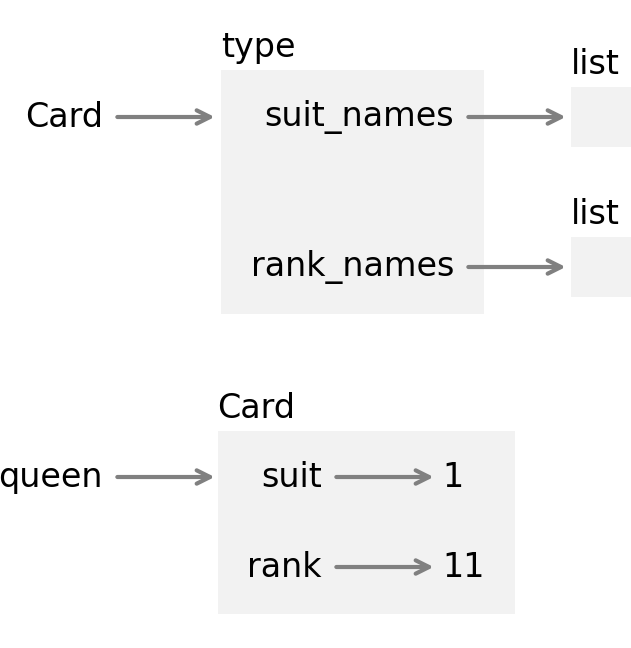
Every Card instance has its own suit and rank attributes, but there is only one Card class object, and only one copy of the class variables suit_names and rank_names.
Comparing Cards
Suppose we create a second Card object with the same suit and rank:
queen2=Card(1,12)(queen2)
Queen of Diamonds
If we use the == operator to compare them, it checks whether queen and queen2 refer to the same object:
queen==queen2
False
They don’t, so it returns False. We can change this behavior by defining a special method called __eq__:
%%add_method_toCarddef__eq__(self,other):returnself.suit==other.suitandself.rank==other.rank
"Class 'Card' not found."
__eq__ takes two Card objects as parameters and returns True if they have the same suit and rank, even if they are not the same object. In other words, it checks whether they are equivalent, even if they are not identical.
When we use the == operator with Card objects, Python calls the __eq__ method:
queen==queen2
True
As a second test, let’s create a card with the same suit and a different rank:
six=Card(1,6)(six)
6 of Diamonds
We can confirm that queen and six are not equivalent:
queen==six
False
If we use the != operator, Python invokes a special method called __ne__, if it exists. Otherwise, it invokes__eq__ and inverts the result—so if __eq__ returns True, the result of the != operator is False:
queen!=queen2
False
queen!=six
True
Now suppose we want to compare two cards to see which is bigger. If we use one of the relational operators, we get a TypeError:
queen<queen2
TypeError: '<' not supported between instances of 'Card' and 'Card'
To change the behavior of the < operator, we can define a special method called __lt__, which is short for “less than.” For the sake of this example, let’s assume that suit is more important than rank—so all Spades outrank all Hearts, which outrank all Diamonds, and so on. If two cards have the same suit, the one with the higher rank wins.
To implement this logic, we’ll use the following method, which returns a tuple containing a card’s suit and rank, in that order:
%%add_method_toCarddefto_tuple(self):return(self.suit,self.rank)
We can use this method to write __lt__:
%%add_method_toCarddef__lt__(self,other):returnself.to_tuple()<other.to_tuple()
Tuple comparison compares the first elements from each tuple, which represent the suits. If they are the same, it compares the second elements, which represent the ranks.
Now if we use the < operator, it invokes the __lt__ operator:
six<queen
True
If we use the > operator, it invokes a special method called __gt__, if it exists. Otherwise it invokes __lt__ with the arguments in the opposite order:
queen<queen2
False
queen>queen2
False
Finally, if we use the <= operator, it invokes a special method called __le__:
%%add_method_toCarddef__le__(self,other):returnself.to_tuple()<=other.to_tuple()
So we can check whether one card is less than or equal to another:
queen<=queen2
True
queen<=six
False
If we use the >= operator, it uses __ge__ if it exists. Otherwise, it invokes __le__ with the arguments in the opposite order:
queen>=six
True
As we have defined them, these methods are complete in the sense that we can compare any two Card objects, and consistent in the sense that results from different operators don’t contradict each other. With these two properties, we can say that Card objects are totally ordered. And that means, as we’ll see soon, that they can be sorted.
Decks
Now that we have objects that represent cards, let’s define objects that represent decks. The following is a class definition for Deck with an __init__ method that takes a list of Card objects as a parameter and assigns it to an attribute called cards:
classDeck:def__init__(self,cards):self.cards=cards
To create a list that contains the 52 cards in a standard deck, we’ll use the following static method:
%%add_method_toDeckdefmake_cards():cards=[]forsuitinrange(4):forrankinrange(2,15):card=Card(suit,rank)cards.append(card)returncards
In make_cards, the outer loop enumerates the suits from 0 to 3. The inner loop enumerates the ranks from 2 to 14—where 14 represents an Ace that outranks a King. Each iteration creates a new Card with the current suit and rank, and appends it to cards. Here’s how we make a list of cards and a Deck object that contains it:
cards=Deck.make_cards()deck=Deck(cards)len(deck.cards)
52
It contains 52 cards, as intended.
Printing the Deck
Here is a __str__ method for Deck:
%%add_method_toDeckdef__str__(self):res=[]forcardinself.cards:res.append(str(card))return'\n'.join(res)
This method demonstrates an efficient way to accumulate a large string—building a list of strings and then using the string method join.
We’ll test this method with a deck that only contains two cards:
small_deck=Deck([queen,six])
If we call str, it invokes __str__:
str(small_deck)
'Queen of Diamonds\n6 of Diamonds'
When Jupyter displays a string, it shows the “representational” form of the string, which represents a newline with the sequence \n.
However, if we print the result, Jupyter shows the “printable” form of the string, which prints the newline as whitespace:
(small_deck)
Queen of Diamonds
6 of Diamonds
So the cards appear on separate lines.
Add, Remove, Shuffle, and Sort
To deal cards, we would like a method that removes a card from the deck and returns it. The list method pop provides a convenient way to do that:
%%add_method_toDeckdeftake_card(self):returnself.cards.pop()
Here’s how we use it:
card=deck.take_card()(card)
Ace of Spades
We can confirm that there are 51 cards left in the deck:
len(deck.cards)
51
To add a card, we can use the list method append:
%%add_method_toDeckdefput_card(self,card):self.cards.append(card)
As an example, we can put back the card we just popped:
deck.put_card(card)len(deck.cards)
52
To shuffle the deck, we can use the shuffle function from the random module:
importrandom
%%add_method_toDeckdefshuffle(self):random.shuffle(self.cards)
If we shuffle the deck and print the first few cards, we can see that they are in no apparent order:
deck.shuffle()forcardindeck.cards[:4]:(card)
2 of Diamonds
4 of Hearts
5 of Clubs
8 of Diamonds
To sort the cards, we can use the list method sort, which sorts the elements “in place”—that is, it modifies the list rather than creating a new list:
%%add_method_toDeckdefsort(self):self.cards.sort()
When we invoke sort, it uses the __lt__ method to compare cards:
deck.sort()
If we print the first few cards, we can confirm that they are in increasing order:
forcardindeck.cards[:4]:(card)
2 of Clubs
3 of Clubs
4 of Clubs
5 of Clubs
In this example, Deck.sort doesn’t do anything other than invoke list.sort. Passing along responsibility like this is called delegation.
Parents and Children
Inheritance is the ability to define a new class that is a modified version of an existing class. As an example, let’s say we want a class to represent a “hand,” that is, the cards held by one player:
-
A hand is similar to a deck—both are made up of a collection of cards, and both require operations like adding and removing cards.
-
A hand is also different from a deck—there are operations we want for hands that don’t make sense for a deck. For example, in poker we might compare two hands to see which one wins. In bridge, we might compute a score for a hand in order to make a bid.
This relationship between classes—where one is a specialized version of another—lends itself to inheritance.
To define a new class that is based on an existing class, we put the name of the existing class in parentheses:
classHand(Deck):"""Represents a hand of playing cards."""
This definition indicates that Hand inherits from Deck, which means that Hand objects can access methods defined in Deck, like take_card and put_card.
Hand also inherits __init__ from Deck, but if we define __init__ in the Hand class, it overrides the one in the Deck class:
%%add_method_toHanddef__init__(self,label=''):self.label=labelself.cards=[]
This version of __init__ takes an optional string as a parameter, and always starts with an empty list of cards. When we create a Hand, Python invokes this method, not the one in Deck—which we can confirm by checking that the result has a label attribute:
hand=Hand('player 1')hand.label
'player 1'
To deal a card, we can use take_card to remove a card from a Deck, and put_card to add the card to a Hand:
deck=Deck(cards)card=deck.take_card()hand.put_card(card)(hand)
Ace of Spades
Let’s encapsulate this code in a Deck method called move_cards:
%%add_method_toDeckdefmove_cards(self,other,num):foriinrange(num):card=self.take_card()other.put_card(card)
This method is polymorphic—that is, it works with more than one type: self and other can be either a Hand or a Deck. So we can use this method to deal a card from Deck to a Hand, from one Hand to another, or from a Hand back to a Deck.
When a new class inherits from an existing one, the existing one is called the parent and the new class is called the child. In general:
-
Instances of the child class should have all of the attributes of the parent class, but they can have additional attributes.
-
The child class should have all of the methods of the parent class, but it can have additional methods.
-
If a child class overrides a method from the parent class, the new method should take the same parameters and return a compatible result.
This set of rules is called the “Liskov substitution principle” after computer scientist Barbara Liskov.
If you follow these rules, any function or method designed to work with an instance of a parent class, like a Deck, will also work with instances of a child class, like Hand. If you violate these rules, your code will collapse like a house of cards (sorry).
Specialization
Let’s make a class called BridgeHand that represents a hand in bridge—a widely played card game. We’ll inherit from Hand and add a new method called high_card_point_count that evaluates a hand using a “high card point” method, which adds up points for the high cards in the hand.
Here’s a class definition that contains as a class variable a dictionary that maps from card names to their point values:
classBridgeHand(Hand):"""Represents a bridge hand."""hcp_dict={'Ace':4,'King':3,'Queen':2,'Jack':1,}
Given the rank of a card, like 12, we can use Card.rank_names to get the string representation of the rank, and then use hcp_dict to get its score:
rank=12rank_name=Card.rank_names[rank]score=BridgeHand.hcp_dict.get(rank_name,0)rank_name,score
('Queen', 2)
The following method loops through the cards in a BridgeHand and adds up their scores:
%%add_method_toBridgeHanddefhigh_card_point_count(self):count=0forcardinself.cards:rank_name=Card.rank_names[card.rank]count+=BridgeHand.hcp_dict.get(rank_name,0)returncount
To test it, we’ll deal a hand with five cards—a bridge hand usually has thirteen, but it’s easier to test code with small examples:
hand=BridgeHand('player 2')deck.shuffle()deck.move_cards(hand,5)(hand)
4 of Diamonds
King of Hearts
10 of Hearts
10 of Clubs
Queen of Diamonds
And here is the total score for the King and Queen:
hand.high_card_point_count()
5
BridgeHand inherits the variables and methods of Hand and adds a class variable and a method that are specific to bridge. This way of using inheritance is called specialization because it defines a new class that is specialized for a particular use, like playing bridge.
Debugging
Inheritance is a useful feature. Some programs that would be repetitive without inheritance can be written more concisely with it. Also, inheritance can facilitate code reuse, since you can customize the behavior of a parent class without having to modify it. In some cases, the inheritance structure reflects the natural structure of the problem, which makes the design easier to understand.
On the other hand, inheritance can make programs difficult to read. When a method is invoked, it is sometimes not clear where to find its definition—the relevant code may be spread across several modules.
Any time you are unsure about the flow of execution through your program, the simplest solution is to add print statements at the beginning of the relevant methods. If Deck.shuffle prints a message that says something like Running Deck.shuffle, then as the program runs it traces the flow of execution.
As an alternative, you could use the following function, which takes an object and a method name (as a string) and returns the class that provides the definition of the method:
deffind_defining_class(obj,method_name):""""""fortypintype(obj).mro():ifmethod_nameinvars(typ):returntypreturnf'Method{method_name}not found.'
find_defining_class uses the mro method to get the list of class objects (types) that will be searched for methods. “MRO” stands for “method resolution order,” which is the sequence of classes Python searches to “resolve” a method name—that is, to find the function object the name refers to.
As an example, let’s instantiate a BridgeHand and then find the defining class of shuffle:
hand=BridgeHand('player 3')find_defining_class(hand,'shuffle')
__main__.Deck
The shuffle method for the BridgeHand object is the one in Deck.
Glossary
inheritance: The ability to define a new class that is a modified version of a previously defined class.
encode: To represent one set of values using another set of values by constructing a mapping between them.
class variable: A variable defined inside a class definition, but not inside any method.
totally ordered: A set of objects is totally ordered if we can compare any two elements and the results are consistent.
delegation: When one method passes responsibility to another method to do most or all of the work.
parent class: A class that is inherited from.
child class: A class that inherits from another class.
specialization: A way of using inheritance to create a new class that is a specialized version of an existing class.
Exercises
Ask a Virtual Assistant
When it goes well, object-oriented programming can make programs more readable, testable, and reusable. But it can also make programs complicated and hard to maintain. As a result, OOP is a topic of controversy—some people love it, and some people don’t.
To learn more about the topic, ask a virtual assistant:
-
“What are some pros and cons of object-oriented programming?”
-
“What does it mean when people say ‘favor composition over inheritance’?”
-
“What is the Liskov substitution principle?”
-
“Is Python an object-oriented language?”
-
“What are the requirements for a set to be totally ordered?”
And as always, consider using a virtual assistant to help with the following exercises.
Exercise
In contract bridge, a “trick” is a round of play in which each of four players plays one card. To represent those cards, we’ll define a class that inherits from Deck:
classTrick(Deck):"""Represents a trick in contract bridge."""
As an example, consider this trick, where the first player leads with the 3 of Diamonds, which means that Diamonds are the “led suit.” The second and third players “follow suit,” which means they play a card with the led suit. The fourth player plays a card of a different suit, which means they cannot win the trick. So the winner of this trick is the third player, because they played the highest card in the led suit:
cards=[Card(1,3),Card(1,10),Card(1,12),Card(2,13)]trick=Trick(cards)(trick)
3 of Diamonds
10 of Diamonds
Queen of Diamonds
King of Hearts
Write a Trick method called find_winner that loops through the cards in the Trick and returns the index of the card that wins. In the previous example, the index of the winning card is 2.
Exercise
The next few exercises ask to you write functions that classify poker hands. If you are not familiar with poker, I’ll explain what you need to know. We’ll use the following class to represent poker hands:
classPokerHand(Hand):"""Represents a poker hand."""defget_suit_counts(self):counter={}forcardinself.cards:key=card.suitcounter[key]=counter.get(key,0)+1returncounterdefget_rank_counts(self):counter={}forcardinself.cards:key=card.rankcounter[key]=counter.get(key,0)+1returncounter
PokerHand provides two methods that will help with the exercises:
get_suit_counts-
Loops through the cards in the
PokerHand, counts the number of cards in each suit, and returns a dictionary that maps from each suit code to the number of times it appears. get_rank_counts-
Does the same thing with the ranks of the cards, returning a dictionary that maps from each rank code to the number of times it appears.
All of the exercises that follow can be done using only the Python features we have learned so far, but some of them are more difficult than most of the previous exercises. I encourage you to ask a virtual assistant for help.
For problems like this, it often works well to ask for general advice about strategies and algorithms. Then you can either write the code yourself or ask for code. If you ask for code, you might want to provide the relevant class definitions as part of the prompt.
As a first exercise, we’ll write a method called has_flush that checks whether a hand has a “flush”—that is, whether it contains at least five cards of the same suit.
In most varieties of poker, a hand contains either five or seven cards, but there are some exotic variations where a hand contains other numbers of cards. But regardless of how many cards there are in a hand, the only ones that count are the five that make the best hand.
Exercise
Write a method called has_straight that checks whether a hand contains a straight, which is a set of five cards with consecutive ranks. For example, if a hand contains ranks 5, 6, 7, 8, and 9, it contains a straight.
An Ace can come before a 2 or after a King, so Ace, 2, 3, 4, 5 is a straight and so is 10, Jack, Queen, King, Ace. But a straight cannot “wrap around,” so King, Ace, 2, 3, 4 is not a straight.
Exercise
A hand has a straight flush if it contains a set of five cards that are both a straight and a flush—that is, five cards of the same suit with consecutive ranks. Write a PokerHand method that checks whether a hand has a straight flush.
Exercise
A poker hand has a pair if it contains two or more cards with the same rank. Write a PokerHand method that checks whether a hand contains a pair.
You can use the following outline to get started.
To test your method, here’s a hand that has a pair:
pair=deepcopy(bad_hand)pair.put_card(Card(1,2))(pair)
2 of Clubs
3 of Clubs
4 of Hearts
5 of Spades
7 of Clubs
2 of Diamonds
pair.has_pair()# should return True
True
bad_hand.has_pair()# should return False
False
good_hand.has_pair()# should return False
False
Exercise
A hand has a full house if it contains three cards of one rank and two cards of another rank. Write a PokerHand method that checks whether a hand has a full house.
Exercise
This exercise is a cautionary tale about a common error that can be difficult to debug. Consider the following class definition:
classKangaroo:"""A Kangaroo is a marsupial."""def__init__(self,name,contents=[]):"""Initialize the pouch contents.name: stringcontents: initial pouch contents."""self.name=nameself.contents=contentsdef__str__(self):"""Return a string representation of this Kangaroo."""t=[self.name+' has pouch contents:']forobjinself.contents:s=' '+object.__str__(obj)t.append(s)return'\n'.join(t)defput_in_pouch(self,item):"""Adds a new item to the pouch contents.item: object to be added"""self.contents.append(item)
__init__ takes two parameters: name is required, but contents is optional—if it’s not provided, the default value is an empty list. __str__ returns a string representation of the object that includes the name and the contents of the pouch. put_in_pouch takes any object and appends it to contents.
Now let’s see how this class works. We’ll create two Kangaroo objects with the names Kanga and Roo:
kanga=Kangaroo('Kanga')roo=Kangaroo('Roo')
To Kanga’s pouch we’ll add two strings and Roo:
kanga.put_in_pouch('wallet')kanga.put_in_pouch('car keys')kanga.put_in_pouch(roo)
If we print kanga, it seems like everything worked:
(kanga)
Kanga has pouch contents:
    'wallet'
    'car keys'
    <__main__.Kangaroo object at 0x7f1f4f1a1330>
But what happens if we print roo?
(roo)
Roo has pouch contents:
    'wallet'
    'car keys'
    <__main__.Kangaroo object at 0x7f1f4f1a1330>
Roo’s pouch contains the same contents as Kanga’s, including a reference to roo!
See if you can figure out what went wrong. Then ask a virtual assistant, “What’s wrong with the following program?” and paste in the definition of Kangaroo.