Chapter 8. Strings and Regular Expressions
Strings are not like integers, floats, and booleans. A string is a sequence, which means it contains multiple values in a particular order. In this chapter we’ll see how to access the values that make up a string, and we’ll use functions that process strings.
We’ll also use regular expressions, which are a powerful tool for finding patterns in a string and performing operations like search and replace.
As an exercise, you’ll have a chance to apply these tools to a word game called Wordle.
A String Is a Sequence
A string is a sequence of characters. A character can be a letter (in almost any alphabet), a digit, a punctuation mark, or whitespace.
You can select a character from a string with the bracket operator. This example statement selects character number 1 from fruit and assigns it to letter:
fruit='banana'letter=fruit[1]
The expression in brackets is an index, so called because it indicates which character in the sequence to select. But the result might not be what you expect:
letter
'a'
The letter with index 1 is actually the second letter of the string. An index is an offset from the beginning of the string, so the offset of the first letter is 0:
fruit[0]
'b'
You can think of 'b' as the 0th letter of 'banana'—pronounced “zero-eth.”
The index in brackets can be a variable:
i=1fruit[i]
'a'
Or an expression that contains variables and operators:
fruit[i+1]
'n'
But the value of the index has to be an integer—otherwise you get a TypeError:
fruit[1.5]
TypeError: string indices must be integers
As we saw in Chapter 1, we can use the built-in function len to get the length of a string:
n=len(fruit)n
6
To get the last letter of a string, you might be tempted to write this:
fruit[n]
IndexError: string index out of range
But that causes an IndexError because there is no letter in 'banana' with the index 6. Because we started counting at 0, the six letters are numbered 0 to 5. To get the last character, you have to subtract 1 from n:
fruit[n-1]
'a'
But there’s an easier way. To get the last letter in a string, you can use a negative index, which counts backward from the end:
fruit[-1]
'a'
The index -1 selects the last letter, -2 selects the second to last, and so on.
String Slices
A segment of a string is called a slice. Selecting a slice is similar to selecting a character:
fruit='banana'fruit[0:3]
'ban'
The operator [n:m] returns the part of the string from the nth character to the mth character, including the first but excluding the second. This behavior is counterintuitive, but it might help to imagine the indices pointing between the characters, as in this figure:
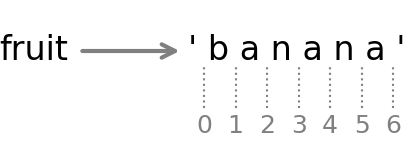
For example, the slice [3:6] selects the letters ana, which means that 6 is legal as part of a slice, but not legal as an index.
If you omit the first index, the slice starts at the beginning of the string:
fruit[:3]
'ban'
If you omit the second index, the slice goes to the end of the string:
fruit[3:]
'ana'
If the first index is greater than or equal to the second, the result is an empty string, represented by two quotation marks:
fruit[3:3]
''
An empty string contains no characters and has a length of 0.
Continuing this example, what do you think fruit[:] means? Try it and see.
Strings Are Immutable
It is tempting to use the [] operator on the left side of an assignment, with the intention of changing a character in a string, like this:
greeting='Hello, world!'greeting[0]='J'
TypeError: 'str' object does not support item assignment
The result is a TypeError. In the error message, the object is the string and the item is the character we tried to assign. For now, an object is the same thing as a value, but we will refine that definition later.
The reason for this error is that strings are immutable, which means you can’t change an existing string. The best you can do is create a new string that is a variation of the original:
new_greeting='J'+greeting[1:]new_greeting
'Jello, world!'
This example concatenates a new first letter onto a slice of greeting. It has no effect on the original string:
greeting
'Hello, world!'
String Comparison
The relational operators work on strings. To see if two strings are equal, we can use the == operator:
word='banana'ifword=='banana':('All right, banana.')
All right, banana.
Other relational operations are useful for putting words in alphabetical order:
defcompare_word(word):ifword<'banana':(word,'comes before banana.')elifword>'banana':(word,'comes after banana.')else:('All right, banana.')
compare_word('apple')
apple comes before banana.
Python does not handle uppercase and lowercase letters the same way people do. All the uppercase letters come before all the lowercase letters, so:
compare_word('Pineapple')
Pineapple comes before banana.
To solve this problem, we can convert strings to a standard format, such as all lowercase, before performing the comparison. Keep that in mind if you have to defend yourself against a man armed with a pineapple.
String Methods
Strings provide methods that perform a variety of useful operations. A method is similar to a function—it takes arguments and returns a value—but the syntax is different. For example, the method upper takes a string and returns a new string with all uppercase letters.
Instead of the function syntax upper(word), it uses the method syntax word.upper():
word='banana'new_word=word.upper()new_word
'BANANA'
This use of the dot operator specifies the name of the method, upper, and the name of the string to apply the method to, word. The empty parentheses indicate that this method takes no arguments.
A method call is called an invocation; in this case, we would say that we are invoking upper on word.
Writing Files
String operators and methods are useful for reading and writing text files. As an example, we’ll work with the text of Dracula, a novel by Bram Stoker that is available from Project Gutenberg. I’ve downloaded the book in a plain-text file called pg345.txt, which we can open for reading like this:
reader=open('pg345.txt')
In addition to the text of the book, this file contains a section at the beginning with information about the book and a section at the end with information about the license. Before we process the text, we can remove this extra material by finding the special lines at the beginning and end that begin with '***'.
The following function takes a line and checks whether it is one of the special lines. It uses the startswith method, which checks whether a string starts with a given sequence of characters:
defis_special_line(line):returnline.startswith('*** ')
We can use this function to loop through the lines in the file and print only the special lines:
forlineinreader:ifis_special_line(line):(line.strip())
*** START OF THE PROJECT GUTENBERG EBOOK DRACULA ***
*** END OF THE PROJECT GUTENBERG EBOOK DRACULA ***
Now let’s create a new file, called pg345_cleaned.txt, that contains only the text of the book. To loop through the book again, we have to open it again for reading. And, to write a new file, we can open it for writing:
reader=open('pg345.txt')writer=open('pg345_cleaned.txt','w')
open takes an optional parameter that specifies the “mode”—in this example, 'w' indicates that we’re opening the file for writing. If the file doesn’t exist, it will be created; if it already exists, the contents will be replaced.
As a first step, we’ll loop through the file until we find the first special line:
forlineinreader:ifis_special_line(line):break
The break statement “breaks” out of the loop—that is, it causes the loop to end immediately, before we get to the end of the file.
When the loop exits, line contains the special line that made the conditional true:
line
'*** START OF THE PROJECT GUTENBERG EBOOK DRACULA ***\n'
Because reader keeps track of where it is in the file, we can use a second loop to pick up where we left off.
The following loop reads the rest of the file, one line at a time. When it finds the special line that indicates the end of the text, it breaks out of the loop. Otherwise, it writes the line to the output file:
forlineinreader:ifis_special_line(line):breakwriter.write(line)
When this loop exits, line contains the second special line:
line
'*** END OF THE PROJECT GUTENBERG EBOOK DRACULA ***\n'
At this point reader and writer are still open, which means we could keep reading lines from reader or writing lines to writer. To indicate that we’re done, we can close both files by invoking the close method:
reader.close()writer.close()
To check whether this process was successful, we can read the first few lines from the new file we just created:
forlineinopen('pg345_cleaned.txt'):line=line.strip()iflen(line)>0:(line)ifline.endswith('Stoker'):break
DRACULA
_by_
Bram Stoker
The endswith method checks whether a string ends with a given sequence of characters.
Find and Replace
In the Icelandic translation of Dracula from 1901, the name of one of the characters was changed from “Jonathan” to “Thomas.” To make this change in the English version, we can loop through the book, use the replace method to replace one name with another, and write the result to a new file.
We’ll start by counting the lines in the cleaned version of the file:
total=0forlineinopen('pg345_cleaned.txt'):total+=1total
15499
To see whether a line contains “Jonathan,” we can use the in operator, which checks whether this sequence of characters appears anywhere in the line:
total=0forlineinopen('pg345_cleaned.txt'):if'Jonathan'inline:total+=1total
199
There are 199 lines that contain the name, but that’s not quite the total number of times it appears, because it can appear more than once in a line. To get the total, we can use the count method, which returns the number of times a sequence appears in a string:
total=0forlineinopen('pg345_cleaned.txt'):total+=line.count('Jonathan')total
200
Now we can replace 'Jonathan' with 'Thomas' like this:
writer=open('pg345_replaced.txt','w')forlineinopen('pg345_cleaned.txt'):line=line.replace('Jonathan','Thomas')writer.write(line)
The result is a new file called pg345_replaced.txt that contains a version of Dracula where Jonathan Harker is called Thomas.
Regular Expressions
If we know exactly what sequence of characters we’re looking for, we can use the in operator to find it and the replace method to replace it. But there is another tool, called a regular expression, that can also perform these operations—and a lot more.
To demonstrate, I’ll start with a simple example and we’ll work our way up. Suppose, again, that we want to find all lines that contain a particular word. For a change, let’s look for references to the titular character of the book, Count Dracula. Here’s a line that mentions him:
text="I am Dracula; and I bid you welcome, Mr. Harker, to my house."
And here’s the pattern we’ll use to search:
pattern='Dracula'
A module called re provides functions related to regular expressions. We can import it like this and use the search function to check whether the pattern appears in the text:
importreresult=re.search(pattern,text)result
<re.Match object; span=(5, 12), match='Dracula'>
If the pattern appears in the text, search returns a Match object that contains the results of the search. Among other information, it has a variable named string that contains the text that was searched:
result.string
'I am Dracula; and I bid you welcome, Mr. Harker, to my house.'
It also provides a function called group that returns the part of the text that matched the pattern:
result.group()
'Dracula'
And it provides a function called span that returns the index in the text where the pattern starts and ends:
result.span()
(5, 12)
If the pattern doesn’t appear in the text, the return value from search is None:
result=re.search('Count',text)(result)
None
So we can check whether the search was successful by checking whether the result is None:
result==None
True
Putting all that together, here’s a function that loops through the lines in the book until it finds one that matches the given pattern, and returns the Match object:
deffind_first(pattern):forlineinopen('pg345_cleaned.txt'):result=re.search(pattern,line)ifresult!=None:returnresult
We can use it to find the first mention of a character:
result=find_first('Harker')result.string
'CHAPTER I. Jonathan Harker’s Journal\n'
For this example, we didn’t have to use regular expressions—we could have done the same thing more easily with the in operator. But regular expressions can do things the in operator cannot.
For example, if the pattern includes the vertical bar character, '|', it can match either the sequence on the left or the sequence on the right. Suppose we want to find the first mention of Mina Murray in the book, but we are not sure whether she is referred to by first name or last. We can use the following pattern, which matches either name:
pattern=r'Mina|Murray'result=find_first(pattern)result.string
'CHAPTER V. Letters—Lucy and Mina\n'
We can use a pattern like this to see how many times a character is mentioned by either name. Here’s a function that loops through the book and counts the number of lines that match the given pattern:
defcount_matches(pattern):count=0forlineinopen('pg345_cleaned.txt'):result=re.search(pattern,line)ifresult!=None:count+=1returncount
Now let’s see how many times Mina is mentioned:
count_matches('Mina|Murray')
229
The special character '^' matches the beginning of a string, so we can find a line that starts with a given pattern:
result=find_first('^Dracula')result.string
'Dracula, jumping to his feet, said:--\n'
And the special character '$' matches the end of a string, so we can find a line that ends with a given pattern (ignoring the newline at the end):
result=find_first('Harker$')result.string
"by five o'clock, we must start off; for it won't do to leave Mrs. Harker\n"
String Substitution
Bram Stoker was born in Ireland, and when Dracula was published in 1897, he was living in England. So we would expect him to use the British spelling of words like “centre” and “colour.” To check, we can use the following pattern, which matches either “centre” or the American spelling “center.”
pattern='cent(er|re)'
In this pattern, the parentheses enclose the part of the pattern the vertical bar applies to. So this pattern matches a sequence that starts with 'cent' and ends with either 'er' or 're':
result=find_first(pattern)result.string
'horseshoe of the Carpathians, as if it were the centre of some sort of\n'
As expected, he used the British spelling.
We can also check whether he used the British spelling of “colour.” The following pattern uses the special character '?', which means that the previous character is optional:
pattern='colou?r'
This pattern matches either “colour” with the 'u' or “color” without it:
result=find_first(pattern)line=result.stringline
'undergarment with long double apron, front, and back, of coloured stuff\n'
Again, as expected, he used the British spelling.
Now suppose we want to produce an edition of the book with American spellings. We can use the sub function in the re module, which does string substitution:
re.sub(pattern,'color',line)
'undergarment with long double apron, front, and back, of colored stuff\n'
The first argument is the pattern we want to find and replace, the second is what we want to replace it with, and the third is the string we want to search. In the result, you can see that “colour” has been replaced with “color.”
Debugging
When you are reading and writing files, debugging can be tricky. If you are working in a Jupyter notebook, you can use shell commands to help. For example, to display the first few lines of a file, you can use the command !head, like this:
!headpg345_cleaned.txt
The initial exclamation point, !, indicates that this is a shell command, which is not part of Python. To display the last few lines, you can use !tail:
!tailpg345_cleaned.txt
When you are working with large files, debugging can be difficult because there might be too much output to check by hand. A good debugging strategy is to start with just part of the file, get the program working, and then run it with the whole file.
To make a small file that contains part of a larger file, we can use !head again with the redirect operator, >, which indicates that the results should be written to a file rather than displayed:
!headpg345_cleaned.txt>pg345_cleaned_10_lines.txt
By default, !head reads the first 10 lines, but it takes an optional argument that indicates the number of lines to read:
!head-100pg345_cleaned.txt>pg345_cleaned_100_lines.txt
This shell command reads the first 100 lines from pg345_cleaned.txt and writes them to a file called pg345_cleaned_100_lines.txt.
Note that the shell commands !head and !tail are not available on all operating systems. If they don’t work for you, we can write similar functions in Python. See the first exercise at the end of this chapter for suggestions.
Glossary
sequence: An ordered collection of values where each value is identified by an integer index.
character: An element of a string, including letters, numbers, and symbols.
index: An integer value used to select an item in a sequence, such as a character in a string. In Python, indices start from 0.
slice: A part of a string specified by a range of indices.
empty string: A string that contains no characters and has length 0.
object: Something a variable can refer to. An object has a type and a value.
immutable: If the elements of an object cannot be changed, the object is immutable.
invocation: An expression—or part of an expression—that calls a method.
regular expression: A sequence of characters that defines a search pattern.
pattern: A rule that specifies the requirements a string has to meet to constitute a match.
string substitution: Replacement of a string, or part of a string, with another string.
shell command: A statement in a shell language, which is a language used to interact with an operating system.
raw string: A Python string that is preceded by the letter r, which indicates that backslashes that appear in the string should not be considered part of a special sequence.
Exercises
Ask a Virtual Assistant
In this chapter, we only scratched the surface of what regular expressions can do. To get an idea of what’s possible, ask a virtual assistant, “What are the most common special characters used in Python regular expressions?”
You can also ask for a pattern that matches particular kinds of strings. For example, try asking:
-
“Write a Python regular expression that matches a 10-digit phone number with hyphens.”
-
“Write a Python regular expression that matches a street address with a number and a street name, followed by
STorAVE.” -
“Write a Python regular expression that matches a full name with any common title like
MrorMrs, followed by any number of names beginning with capital letters, possibly with hyphens between some names.”
And if you want to see something more complicated, try asking for a regular expression that matches any legal URL.
A regular expression often has the letter r before the quotation mark, which indicates that it is a raw string. For more information, ask a virtual assistant, “What is a raw string in Python?”
Exercise
See if you can write a function that does the same thing as the shell command !head. It should take as arguments the name of a file to read, the number of lines to read, and the name of the file to write the lines into. If the third parameter is None, it should display the lines rather than write them to a file.
Consider asking a virtual assistant for help, but if you do, tell it not to use a with statement or a try statement.
Exercise
“Wordle” is an online word game where the objective is to guess a five-letter word in six or fewer attempts. Each attempt has to be recognized as a word, not including proper nouns. After each attempt, you get information about which of the letters you guessed appear in the target word, and which ones are in the correct position.
For example, suppose the target word is MOWER and you guess TRIED. You would learn that E is in the word and in the correct position, R is in the word but not in the correct position, and T, I, and D are not in the word.
As a different example, suppose you have guessed the words SPADE and CLERK, and you’ve learned that E is in the word, but not in either of those positions, and none of the other letters appear in the word.
Of the words in the word list, how many could be the target word? Write a function called check_word that takes a five-letter word and checks whether it could be the target word.
You can use any of the functions from the previous chapter, like uses_any.
Exercise
Continuing the previous exercise, suppose you guess the word TOTEM and learn that the E is still not in the right place, but the M is. How many words are left?
Exercise
The Count of Monte Cristo is a novel by Alexandre Dumas that is considered a classic. Nevertheless, in the introduction of an English translation of the book, the writer Umberto Eco confesses that he found the book to be “one of the most badly written novels of all time.”
In particular, he says it is “shameless in its repetition of the same adjective,” and mentions in particular the number of times “its characters either shudder or turn pale.”
To see whether his objection is valid, let’s count the number of times the word pale appears in any form, including pale, pales, paled, and paleness, as well as the related word pallor. Use a single regular expression that matches all of these words and no others.